

Ok, so this looks like a major step in the right direction with the remote web workplace enhancements. It has a new Views filter that rather quickly renders picture thumbnails.
The Good
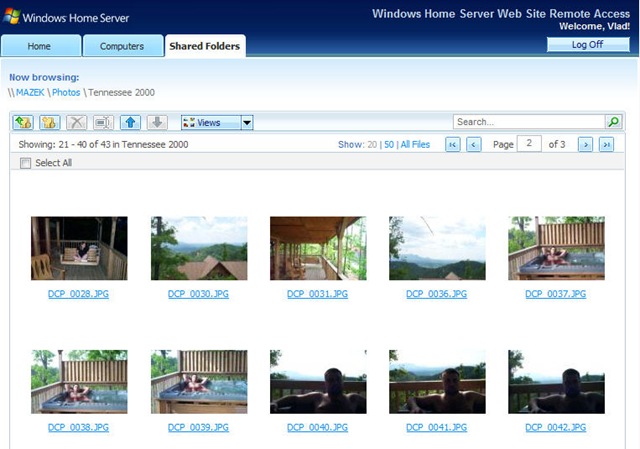
Yes, something for the ladies there.
One interesting (or annoying, depending on how you work) part is that only filenames are clickable, clicking on the icons themselves does not open them. However, clicking on them does select them, so conceivably with the large amount of images you won’t have to strain your fingers to select a bunch of files on the page.
There is also a built in Search functionality, which actually seems to work rather well.

(btw, whoever owns this code, you should validate your inputs. Hitting Search on an empty search input field still pushes you forward to the results page even though you didn’t search for anything, making me wonder what else isn’t being validated)
I’ll give it an A on the picture management side, could have used a streaming screen saver or a slideshow function.
The Bad
The Video side of the home isn’t quite as well put together. There are no video previews or image snapshots. There also seems to be no option for the ability to stream files from the server, it’s very much a download and play type of an affair. Downloading multiple files gives me an option to download them as a self extracting executable or a compressed zip file, which doesn’t really do much in the way of media usability. No ability to create a playlist, which I am sure won’t go far with my audience that spends half their day on freeones downloading 15 second previews of larger movies and would like them streamed down from the home server.
The Ugly
The remote desktop access is too whiny. Four prompts after hitting Connect to your Home Server link, ending in a long bunch of text and techie jargon that no regular home user would understand (in order to RDP to the server you must add it to your Internet Explorer trusted zone) or follow. Pass, back to logmein.com.
Not much new to report on the Home Server console. I think this is the biggest fail for WHS, given that the PP has been under development for as long as WHS has been on sale. The Addins section is Microsoft’s opportunity to create an “App Store” like experience for its users and a way to promote its developers. Yet there is seemingly no way to add or search for addins from this screen. There is the general “Jr. Server Admin” rookie link leading to a chm that no home user would ever explore but no link to the web site to obtain them. The Live Search (hey, it’s default on the box) doesn’t show a Microsoft addin download site in first two pages of search results (“whs add-ins”) and the chm also fails to list where to download them. It does however list the worlds most unfriendly TechNet style process for installing an addin, with two more steps than it would take you to recover from an alcohol addiction. This is a Home server, right?
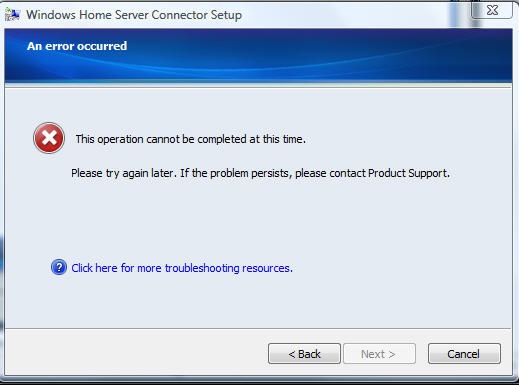
Finally, the client console software autoupdate still fails. It sends the user to download a Troubleshooting package or to call Product Support.
All in All
Microsoft’s big problem with this solution is the apparent lack of fit and design – if it’s a server appliance it requires far too much server management experience (reading, downloading software, deploying it, reading chm files). It is not very user friendly, it doesn’t seem to update properly, it requires far too much effort to discover and install add-ins to extend it’s functionality. If it’s a home NAS solution it hides far too much of its power. If it’s just a Microsoft mee-too for the consumer NAS market then it really fails in usability and user friendliness when compared to the solutions 1/4 its cost.
If you paid $500 for 500GB and the above features, would you be wowed? Consider that for half the cost you could have this. Given the amount of time PP spent in development I’m not sure what level of hope there can be in a v2 of this.
 For the less coherent, more grammatically correct realtime insight, follow me on Twitter at
Pingback: Kicking and Screaming I am Bloggin » Blog Archive » Long Awaited WHS Bug Fix Arrives