

Believe it or not, this question comes up more often than anything else in the ITPRO circles – “I need to add more hard drives to my PC but I don’t have any more 3.5” slots. This happens to be true for most people that bought a desktop PC from Dell, HP, Sony, etc because those manufacturers use a 3.5” internal bracket to suspend the drives from the 5.25” cages. If you bought an OEM case, such as ones from Thermaltake, Antec or Cooler Master you would have six or more internal 3.5” slots.
Let’s face it, the storage demand over even the past two years has gone through the roof. If you thought you needed another hard drive for your MP3s, imagine what happens when you start doing videos. You’re likely running out of room in your case and are resorting to the external USB hard drives all plugged into that $4 Walmart power strip. Now while there are certainly faster ways to light your house on fire, this solution certainly brings that sense of surprise when the fire department tells you that the third USB hard drive you jam-fitted into the power strip at an angle is the one that sparked the place down to foundation.
Could be worse though. Let’s suppose you bought a Media PC case that was designed by an Asian. There is nothing worse than opening a Made in Taiwan case, looking at the mess, and not being able to beat the dumb#@%* that designed it half to death. There are times I look at these cases and wonder if those bastards were just hoping to extend their little spec of dirt in the middle of Pacific with all the returned cases because their design made them useless. For example, the last Media PC case I bought had a 3.5” slot where 2” of it were blocked off by the case fan. Brilliant! How the #@%% am I supposed to plug in the SATA data and power cables into it?
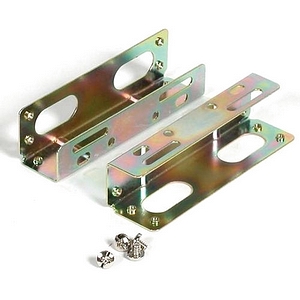 Now that the brief moment of rage is gone, let me offer you a solution that OEM’s have been using for over a decade. The solution is called a 3.5 to 5.25 hard drive mounting bracket. These metal brackets mount to the side of your 3.5” drive and make it fit into the 5.25 slot, of which every midtower case seems to have at least 2–3 spare ones. These brackets cost just a buck or two. There are also 3.5” hard drive cooler kits, Internal cooling cages, Internal RAID expansion kits, hot-swap SATA adapters and more. All are great solutions to the climbing demand for storage and major PC manufacturers inability to provide consumers with reasonable way to expand internal storage. So there you go, I hope I saved your house from a USB drive started fire
Happy Easter!
2 Responses to OEM Tricks: Help, I’ve run out of 3.5″ slots in my case!