Data Protection Manager 2006 Released (DPM)

Uncategorized
Comments Off on Data Protection Manager 2006 Released (DPM)


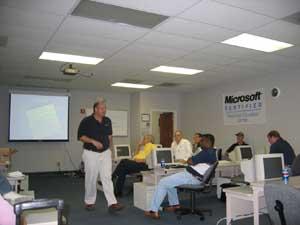
Microsoft has released the Data Protection Manager 2006 server today. For my local folks, this is what Rene Alamo demoed for us during the last partner technight event in Orlando. For those of you not familiar with the product here is the web site so please get to learning.

To help push you along here is my dumbed down opinion of what DPM 2006 is. Think of the DPM server as external Volume Shadow Copy for file servers running on a remote server. The same way you have your local server taking snapshots of your documents on a predefined schedule and having the ability to restore documents on demand, the DPM allows you to take snapshots of all the servers shares and store them on a remote server for purposes of disaster recovery. This is something that would sit in the data center and take periodic snaps just to keep your data redundant. The killer feature, in my humble opinion, is that it takes file-based deltas which allow it to only pass changes accross the pipe, not the entire file. So if you modified a 5 meg PowerPoint slide deck it would not attempt to upload 5 megs but just the change. Multiply that type of an effort over 5-20 users and you’ll kill a DSL in a snap. In larger environments even the T3 connection would get floored. Thats what DPM has been designed to solve – offsite backups that happen frequently, automatically and allow for user self service.

What would you be willing to pay for a product like that (Chef Vlad takes out a new tomato and cleans his knife)… The retail price is $995 for a DPM server and 3 DPML (Data Protection Management Licenses) which cover 3 file servers. Additional 3 packs are $559. But call in the next 15 minutes and.. Well, you get the idea – there is a discount with Volume Licensing and all the other stuff that goes on with Microsoft licensing. If thats not in the budget, start playing with it. There is a free 120 day trial ISO available. If you’re not absolutely thrilled it won’t cost you a dime.

No Visual Studio 2005 in MAPS

Uncategorized
Comments Off on No Visual Studio 2005 in MAPS

Note: Notice of Correction for September 19 Newsletter
On September 19, the Microsoft Partner Program newsletters incorrectly stated that Visual Studio 2005 Standard was included in the Microsoft Action Pack. Please note that Virtual Server 2005 Standard Edition will be offered in the October Action Pack quarterly update shipment. We apologize for any confusion or inconvenience that this may have caused.

They confused the VS2005 acronym: What you will actually be getting is the Microsoft Virtual Server 2005. If you still need Visual Studio 2005 but can’t break the piggy bank for it, there is a MAPS version for developers called: Microsoft Empower for ISVs. Its a slimmed down MSDN and MAPS subscription with basic productivity, servers and 5 CALs of Office/Windows for developers. You must be a partner to get this and there are other restrictions.

You know you’re having a good day

Uncategorized
9 Comments

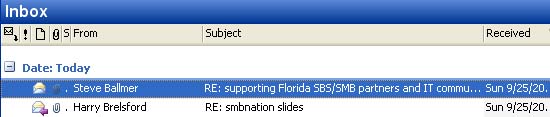
When you wake up to a mailbox like this:

In case you’re wondering, I sent back feedback regarding community events in Florida and how we have been supported strictly by the people going above and beyond their job description.

P.S. Light blog today because Blogger image functionality seems to be broken today. I looked at the free Movable Type license yesterday with my neighbor as she seems to love it but I just don’t know… It took a long time to get off perl, the ugliest programming language syntax ever, and going back to debugging and maintaining yet another codebase.. bleh.

SBA 2006 For Resale Promotion

Uncategorized
3 Comments


Care of our buddy Brian Kruse from Boca Raton comes a “for-resale” promotion on Small Business Accounting 2006: For-Resale Software Incentive. Basically, if you’re a Small Business Specialist you get a free copy of SBA 2006 that you can resell.

Not a big deal ($150 or so) but this is just another example of Microsoft’s commitment to Small Business Specialist program. Way to go guys!

Remember JJ’s post about SBA 2006 SP1: Download it today and put your BCM database on that SBS Server.

What would you like to know?

Uncategorized
9 Comments


So the other day I wrote about setting default domain for OWA and I literally got as much feedback on it as I did for the bigger how-to SBS articles I wrote before. Which got me thinking… Exchange (and to a lesser degree IIS & Mobility) are my bag baby so are there any things that you would like to learn how to do? The reason I ask this was because the feedback came from some of the people that I work with closely (you know who you are) so if I can give you something that applies to you (oh my god, not another KB article) please post the question…

Orlando IT Pro: SBA/BCM databases on the SBS server: You heard it first

Uncategorized
1 Comment


JJ Antequino hung out with us again at the OrlandoSBS meeting and just as he was about to leave during Blain’s presentation he dropped a huge bombshell about SBA: SP1 for SBA and BCM is out guys. I think half the room fainted at the suggestion that you can now store a BCM database on the SBS server. Here are some details and of course the download:

– We can now import Outlook Contacts into Business Contact Manager
– New Manual Payroll Check Tool – including the much anticipated Excel tool!
– Memorized Documents
– More flexible Cash Basis reporting
– Support for importing QB2005 data files:
* For importing master records only QuickBooks 2002 through 2005: Basic, Pro, Premier, Enterprise, and Accountant
* For importing all data QuickBooks 2004 and 2005: Pro, Premier, Enterprise, and Accountant
– New Accountants Import Wizard – allows a accountants database to be imported into the current database!
– New Reporting tool for jobs and time and materials
* Ability to report on job estimates versus actual
* Ability to report jobs progress; invoices versus quotes
– Import Bank File dialog box – You can use the Import Bank File dialog box to import bank transactions into Microsoft Office Small Business Accounting:
* If the financial institution that you do business with is not listed in the Select a Financial Institution for Online Services page in the Online Banking Setup Wizard.
* If you have accounts that you have not set up for online banking.
* Imported bank files must be in the .ofx file format.


So much for just getting started though. This is JJ’s second blong entry and he’s killed virtually 90% of the headaches posted in public newsgroups about BCM & SBA. JJ has been one of the biggest supporters of our Orlando IT Pro group and I just wrote a killer review of what he and the Microsoft team have done for us in Orlando. I’m on this global SBS Group Leads list and we have the best Microsoft backed group on the planet, bar none. JJ has brought us stuff from the WWPC in the past, driven 100’s of miles to attend remote SBS group meetings, helped partners at TS2 events he was not even presenting at. He is the TS2 guy as far as far as Florida is concerned. That is also the team that works with partners and actually takes feedback and makes things happen with it. Why do you think Action Pack will now include Visual Studio 2005, Virtual Server 2005 and Windows XP 64bit edition? TS2. These guys listen, they do stuff. Now do you see why I’ve been inviting you out to these shows for years?

Speaking of backing us, Blain Barton came over and held an excellent presentation on SQL Server 2005 for us at this months meeting. You can’t buy presentations like this folks. Blain went from defining the database and covered everything from Access up to SQL Server 2005 mirroring and SAC in 60 minutes. Blain usually presents Technet Seminars to enterprise/midmarket folks and I think everyone that attended would agree that I did not lie when I said that you will not find this caliber of a presentation for SBS/SQL anywhere. The versatility is key — I could have put together an overview of SQL 2005. But Blain was able to entertain people brand new to SBS and even field questions from the guy in the back of the room that spent the meeting in SQL 2005 and VS2005. Some things you just can’t fake.

So…. Time to move to Florida folks 🙂

SharePoint v3 Top Ten Features: Start drooling

Uncategorized
1 Comment

This is the top 10 list of features in SharePoint v3 according to Lawrence Liu:

1. A “Global” Template that is applied/provisioned before any other template, and a Feature Framework that provides modularity for “additive” templates
2. OOB document review/approval workflow with support for digital signatures
3. Integration with Outlook — read/write access to SharePoint datetypes: calendar, tasks, contacts, discussions, and documents
4. All SharePoint Lists provide RSS feeds!
5. SharePoint Lists (e.g. Discussion Boards, Calendars, Document Libraries, Announcements) can accept incoming e-mail
a. Discussion Boards maintain e-mail threading and full HTML messages
b. Calendars process incoming iCals
c. Document Libraries map attachments to documents
6. File level security (i.e. access control) in Document Libraries
7. List item versioning that shows metadata changes
8. Complete control of site branding — apply custom master pages and page layout, define custom site navigation
9. Support for multi-lingual sites!
10. Policy based document archiving and records management with compliance reporting.

There is also a top 10 by Arpan Shah which outlines the following:

– Security/Auth “stuff” from supporting the ASP.NET 2.0 authentication provider model and security trimming to single item security. 🙂
– Built on top of Whidbey – support for ASP.NET 2.0 web parts, nav/auth provider models, master pages :-), and more
– SPS/CMS integrated architecture from end-user to development and deployment
– RSS, Wikki and Blogging support.. the RSS support is especially great w/ the new version of Outlook… or any RSS reader really
– Content types – very cool and super useful.. define a content type that includes metadata and actions
– Recycle bin – IT orgs will love that
– Lists – things like eventing support, scalability
– Search investments – relevancy and User Experience are fantastic
– ECM investments – from content creation, sharing, searching, publishing to retaining
– Workflow based on Windows Workflow Foundation

Considering we have no access to this stuff, and probably won’t for quite some time these lists are quite impressive! If they keep even half of this we’ll be really well off.


Blogging as a form of therapy?

Uncategorized
Comments Off on Blogging as a form of therapy?


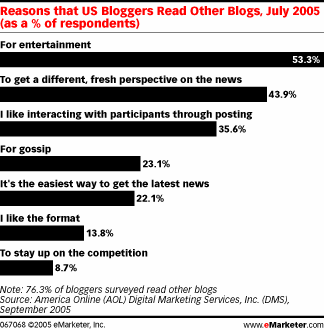
Yes, this is a tech blog but I saw this story and it seems pretty interesting (anotherwords, take a moment to read it). Apparently, half of the bloggers blog as a form of therapy and keep in touch with family. But half of the people reading blogs do so as a form of entertainment. Out of everyone polled by AOL, only 16% were seriously interested in journalism. I guess that puts to rest all the arguments about citizen journalists taking over the “professional” journalists jobs. I would beg to differ with that statement in the single area – Information Technology. The only reason you would ever subscribe to PC World, PC Magazine and such would be to read op-ed. Thats all those magazines have — just some dorks opinion (Dvorak, etc) and more often than not, not a very valuable opinion at that. Today you can get these opinions in real-time, not just from the hobbyists but from people that actually implement these solutions (me) people that design these solutions (Microsoft) and then everyone else involved in the actual product, delivery and support. So whose opinion on IT is more valuable? That of the people actually developing, providing and supporting IT or some burned out journalist that could not make it as an IT professional? Not a flame starter, I just don’t think PC Magazine and company can continue to exist as an advertising pamphlet while not really providing much else.


So if you haven’t already… start a blog. I’ve been blogging with my buddy Pablo since the late 90’s before the “blog” really existed. You can take the trip down memory lane via WayBack machine to see the original Vlad blogs from way back when. Even my dog has a blog. Point being, if you have anything interesting or insightful to share with the world, please do. You would be shocked how many people will read what you have to say, especially if you are helpful. And you will definately meet interesting people, some half way accross the world. You can be world famous!!!!

Can’t get into OWA

Uncategorized
3 Comments


This same subject has appeared enough times that it frankly puzzles me why I have not written an article on it yet. So here is a quickie:

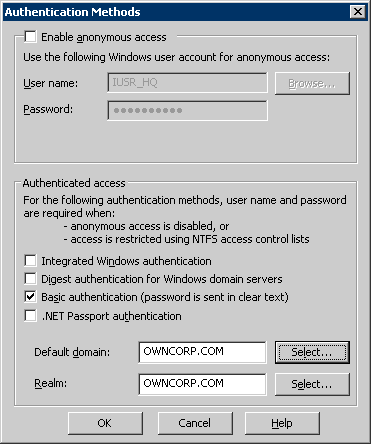
If you applied patch 888619 you may find it difficult to log into your Outlook Web Access. However, you remembered the good old NTLM troubleshooting days and got in via DOMAIN\login just fine. The above breaks only SBS without SP1 (and if thats you… SMACK.. patch you fools) but here is how you set the default domain in OWA so you can login without putting in your domain every time:

Start > Administrative Tools > Internet Information Server (IIS) Manager
Expand your server > Web Sites > Default Web Site and select properties for the Exchange folder.
Directory Security (tab) and click on Edit under the Authentication and Access Control.

Something like the icon on the right shows up. Select the default domain, select the default realm (both will be your domain name) hit OK, Apply and you’re done. No more OWNCORP\vlad, just Vlad.

MPAN Approach Presentation

Uncategorized
Comments Off on MPAN Approach Presentation


Care of Eric Ligman and Microsoft Small Business Community:
For anyone who missed yesterday’s Small Business Specialist Community Talk Series where we had Bob Lewis as a guest speaker to discuss MPAN and the opportunity to work with them as Small Business Specialists, the link to view the recorded session is now posted. Simply go to our site, http://www.mssmallbiz.com, click on the “Our webcasts” link in the upper center part of the page, and click the “View Replay” link next to yesterday’s session.