IE7: Defining your priorities

Uncategorized
3 Comments


Now this is one of the things that make us IT Professionals want to laugh and cry at the same time. I personally spent at least a few minutes laughing to the point of shedding a tear and I hope this is just a joke (it’s not btw). From the IE blog:

Hopefully, by now you’ve seen from our posts that there are a lot of new features and work going into IE 7. As part of this update, we’re refreshing our icon and logotype. We considered more radical departures from our current logo, but blue e with the ring is very recognizable and familiar to users, so we elected instead to make more subtle changes.

As you can see, the new e has more modern look, and the edges are a bit darker so the icon stands out better against different backgrounds. We liked the gold ring too since it brings in new energy and helps the icon pop a bit more than the old one.

This icon and text treatment will be used on the versions of IE 7 for Windows XPSP2, Server 2003 SP1, and x64 versions. We’ll have a slightly different look for the Windows Vista version, one that’s more consistent with the icons there. We’re not quite ready with that one yet, but we’ll share it here once we do.

We’re happy with how this turned out; I hope you like the new look too.

As an IT Professional, how refreshing do you find it that the IE7 team is spending resources to touch up their logo? Does the gold ring take away the fact that you’re facing downtime and monthly reboots due to the security exploits in IE? Seriously guys, if you’ve found someone with the time to play with the logo in the midst of all the security issues you need to clear up that departments headcount and move them into R&D.

Solution Accelerators, Hacking and SBSC in the UK

Uncategorized
5 Comments

Its a busy Friday, lots of things to talk about. SBSC is coming to the UK, hackers are already exploiting holes reported in August’s security bulletins released on Tuesday and there is now a solution accelerator for really large deployments. Even if you’ll never deploy XP to 15,000 desktops these documents are very interesting so give them a few minutes.

Hacking
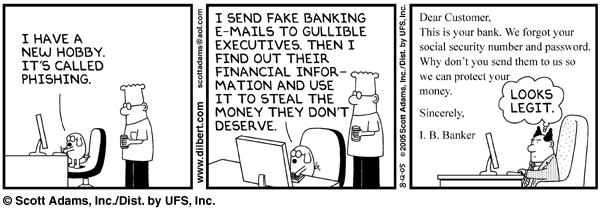
If you have not patched your systems on Tuesday, the Microsoft Internet Explorer holes are already being attacked. This is why it is important to have a good patching system in place or at least turn on Automatic Updates so that your clients and computers can stay up to date without your explicit action. In the world of 0-day security exploits, the fact that it took three days to produce a public exploit is somewhat shocking, but a blessing in disguise. Patch your systems immediately. Believe it or not, people compromise security for fun as our friend Dogbert points out:

Solution Accelerator for Business Desktop Deployment Enterprise Edition
Steven Bink is reporting the release of: The Solution Accelerator for Business Desktop Deployment (BDD) follows the best practices of a multinational bank with more than 15,000 employees on five continents using multiple data centers. This solution shows how both Zero Touch and Lite Touch deployments are performed in that organization. Zero Touch contains two components:
* Zero Touch Install (ZTI). The ZTI component makes extensive use of the Microsoft Systems Management Server (SMS) 2003 Operating System Deployment (OSD) Feature Pack to allow customers in large and geographically dispersed organizations to perform new machine setup and machine replacement for users to be migrated to a new machine, without having to touch the target box.
* Zero Touch Provisioning (ZTP). The ZTP component allows businesses to move to a managed, self-service provisioning portal that allows delegates to perform common provisioning tasks, such as password resets, e-mail provisioning, and elective application installation. ZTP requires the use of SMS 2003. The Enterprise Edition provides complete guidance for ZTP using Microsoft BizTalk® Server 2004. ZTP provides a base to reliably provision enterprise or hosted commercial services and applications, resulting in reduced administrator intervention during the provisioning phase.

Download it here.

SBSC in the UK
Microsoft Small Business Specialist program that launched in USA at WWPC has been a great success so far and now our UK friends are getting it too. Their program is set to launch on Monday, August 15, 2005 and this site has more information on it: www.sbsbpi.co.uk. This seems to be very similar to US’s Small Business Community Channel so if you’re in the UK and smallbiz its a good time to check these sites out.

More info from Susanne Dansey about SBSBPI web site:
The purpose of the site is to allow proactive Microsoft SBS resellers in the UK to keep in contact when they can’t otherwise meet up and chat. A special section has been dedicated to qualified Small Business Partners to share information and to catch up with the latest developments generated by the pilot reseller team and by Microsoft. The rest of the forum is available as a touch point for everyone.

Dog days of summer

Uncategorized
1 Comment

It has been a little slow over the past few days, not a whole lot of exciting stuff going on. Microsoft won $7 from optinrealbig.com scum. Looks like the new version of GPL will be out soon. Neowin, usually a well respected Microsoft watchdog, managed to turn a grain of salt into a mountain by predicting the end of free Microsoft Antispyware on one line from a OneCare chat. On the more positive note, Tampa Bay SBS UG meeting last night was excellent, Chad Gross delivered a presentation on SharePoint and integrating Infopath into it to create “poor man’s crm”.

As for what you should spend this weeks allowance on?

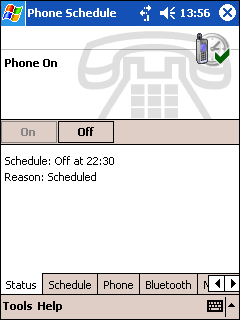
Schedule the phone on your Windows Mobile device to turn on and off!

Benefits include:
* Save the battery on your device by turning off your phone and Bluetooth at night.
* Save money by preventing your device connecting to the Internet at unwanted times (for example: sending and receiving email).
* Stop unwanted calls in the middle of the night or during meetings.

With its rich, intuitive interface Phone Schedule allows you to select from a number of options, including:
* Turn your phone on and off at a scheduled time for each day of the week.
* Turn your phone off during Pocket Outlook calendar appointments, depending on the type of meeting (Free, Tentative, Busy or Out-of-Office). New in version 2.0!
* Turn your phone off for a specified length of time or until a certain time is reached.
* Include Bluetooth in your schedule.
* Optional audio notifications when phone is turned on and off.
* Automatically PIN unlock your phone when it turns on.
* Program works behind the Windows Mobile password/PIN logon.
* One setting for all days allows for single-click configuration for an entire week.
* Program waits for connected voice calls to be completed before turning the phone off. New in version 2.0!
* Option to automatically blank the screen during an incoming or outgoing phone call. New in version 2.0!
* Easy to use interface.
* Includes built-in HTML help. New in version 2.0!

You can buy it here, $13.

August Security Bulletins

Uncategorized
Comments Off on August Security Bulletins

Its that time of the month folks, Microsoft Patchday. Review security alerts below and get to patching. Please test these patches first and if you encounter any issues make sure to attend the Technet webcast tomorrow when you can ask questions and get some help.

On the side note, Juniper routers (and IDS) seem to already protect against the exploits listed below. “Juniper Networks Protects Customers Against New Microsoft Windows Vulnerabilities Disclosed Today.” Way to go Juniper!

Bulletin Summary:

http://www.microsoft.com/technet/security/Bulletin/ms05-Aug.mspx

Critical Bulletins:

Cumulative Security Update for Internet Explorer (896727)
http://www.microsoft.com/technet/security/Bulletin/ms05-038.mspx

Vulnerability in Plug and Play Could Allow Remote Code Execution and Elevation of Privilege (899588)
http://www.microsoft.com/technet/security/Bulletin/ms05-039.mspx

Vulnerability in Print Spooler Service Could Allow Remote Code Execution (896423)
http://www.microsoft.com/technet/security/Bulletin/ms05-043.mspx

Important Bulletins:

Vulnerability in Telephony Service Could Allow Remote Code Execution (893756)
http://www.microsoft.com/technet/security/Bulletin/ms05-040.mspx

Moderate Bulletins:

Vulnerability in Remote Desktop Protocol Could Allow Denial of Service (899591)
http://www.microsoft.com/technet/security/Bulletin/ms05-041.mspx

Vulnerabilities in Kerberos Could Allow Denial of Service, Information Disclosure, and Spoofing (899587)
http://www.microsoft.com/technet/security/Bulletin/ms05-042.mspx

Re-Released Bulletins:

Vulnerabilities in Microsoft Word May Lead to Remote Code Execution (890169)
http://www.microsoft.com/technet/security/Bulletin/ms05-023.mspx

Vulnerability in Microsoft Agent Could Allow Spoofing (890046)
(890169)
http://www.microsoft.com/technet/security/Bulletin/ms05-032.mspx

This represents our regularly scheduled monthly bulletin release (second Tuesday of each month). Please note that Microsoft may release bulletins out side of this schedule if we determine the need to do so.

If you have any questions regarding the patch or its implementation after reading the above listed bulletin you should contact Product Support Services in the United States at 1-866-PCSafety (1-866-727-2338). International customers should contact their local subsidiary.

Update:
By the way, the IE patch (896727) cannot be installed because the digital certificate of the path is invalid. Just a heads up for anybody that encounters “file is corrupt” errors while installing that patch.

Outlook 2003 Calendar Views

Uncategorized
3 Comments

Today has been a good day for Outlook users. Another incredibly useful tool for those of us that live inside of Outlook.

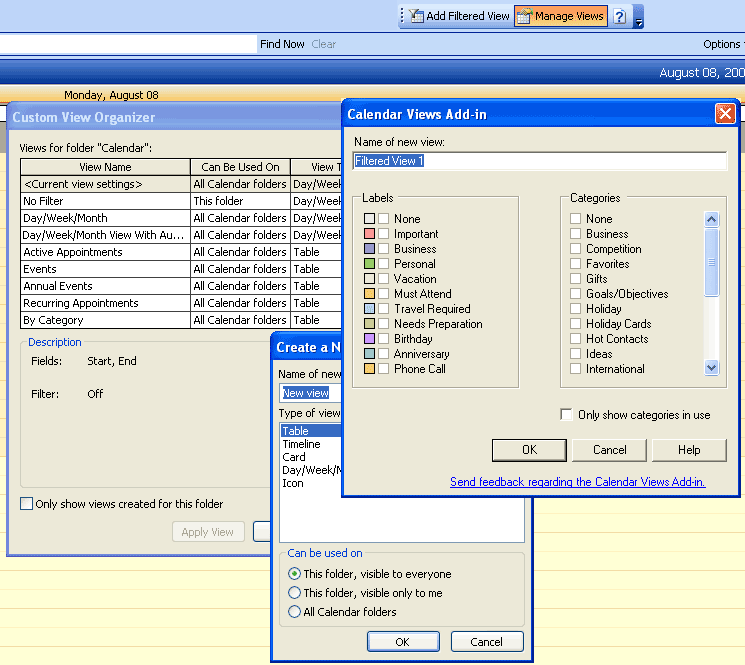
The Microsoft Office Outlook 2003 Calendar Views Add-in makes it easy for you to view your Outlook Calendar appointments through a filter that is based on Outlook labels and categories. For example, you can create a view that shows you only the appointments on your calendar that are labeled Must Attend, or are categorized as Important.

You add filters by using the Calendar Views toolbar, which opens in your Outlook Calendar after you install the add-in.

Note: This add-in is for Microsoft Office Outlook 2003 only.

Ok, I really dig this tool. I’ve taken a little screenshot of the toolbar which seems very clean yet very functional which leads me to believe that Microsoft must have outsourced the development of this addin. The screenshot also shows the view design screens which, as you can tell, are very powerful.

Whats missing from the screenshot (because I don’t want you to see all my appointments) is the bar underneath the actual calendar (and above Open a Shared Calendar..) where you can access all the views with just a single click. Default view is “No view” but you can apply Active Appointments, Events, Annual Events, recurring appointments, as well as the ones you define on your own. Worth the bandwidth!

You can download it here.

SmartPhone Call Assistant

Uncategorized
1 Comment

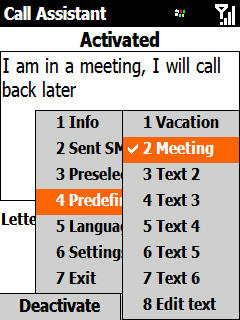
Think of Call Assistant as your Out-of-Office autoresponder for your cell phone. How often do you find yourself stuck in an all day meeting where you can’t play with your cell phone? Well, Call Assistant is just what you need in those situations, and its finally released. Here is a look:

Why should you use it?

With a few clicks you can setup your SmartPhone to send back an SMS to the caller informing them of your (un)availability. Instead of waiting for a callback from your voicemail (which may not happen for another day or so) they will immediately get an SMS message from you with the text you selected.

Features

* Send automatically a SMS to Caller
* Use one of up to 7 predefined texts
* Define a Preselection-range, so Call Assistant is only sending SMS to Mobile Networks
* Allow only one SMS per unique Caller or for every call the caller makes
* Get a report of the SMS sent by the application and immediatly call back from there with one click
* German and English language support
* Supports all Smartphone 2003-Devices incl. the new devices with 240×320-Screens!

And its free. Download it here.

Download the Live Meeting Add-in Pack

Uncategorized
Comments Off on Download the Live Meeting Add-in Pack


Eileen Brown is reporting that the LiveMeeting add-in pack is online. The ability to start a session from an IM is a great new feature I will abuse immediately. The Live Meeting Add-In Pack consists of three distinct add-ins: the Live Meeting Add-in for Outlook, the Office Collaboration Add-in, and the Live Meeting add-in for Instant Messaging, each which offer unique features.

Live Meeting Add-in for Outlook
With the Live Meeting Add-in for Outlook, you can:
* Schedule a Live Meeting from Outlook
* Identify individual meeting participants as attendees or presenters
* Send separate invitations for attendees and for presenters
* Specify default meeting options and override those defaults for specific meetings

Live Meeting Add-in for Office Collaboration
* With the Office Collaboration Add-in, you can start a Meet Now meeting directly from Word, Excel, PowerPoint, Visio, or Project. The document appears in an application sharing session.

Live Meeting Add-in for Instant Messaging
* If the recipient also has the Live Meeting Add-in Pack installed, you can start a Live Meeting from Windows Messenger or from MSN Messenger.

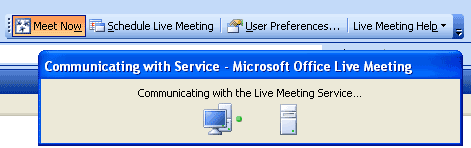
Update: Here is a look at it:

Download it here. If you’re one of the folks that needed any kind of support from me lately, you know how much I love this service. It is worth every penny! (well, 37,500 pennies / month / 5 users to be exact, but still worth it nonetheless)

WMI Code Creator Tool

Uncategorized
Comments Off on WMI Code Creator Tool

The WMI Code Creator tool generates code that uses WMI to obtain management information or perform management tasks. You can use the tool to learn how to manage computers using WMI scripting and WMI .NET. The tool generates code that runs on the local computer, a remote computer, or a group of remote computers based on your selection from the Target Computer menu on the tool. You can also execute the generated code directly from the tool.

The tool is meant to help IT Professionals quickly create management scripts and to help developers learn WMI scripting and WMI .NET. The tool helps take the complexity out of writing code that uses WMI and helps developers and IT Professionals understand how powerful and useful WMI can be for managing computers.

Using the tool, you can query for management information such as the name and version of an operating system, how much free disk space is on a hard drive, or the state of a service. You can also use the tool to execute a method from a WMI class to perform a management task. For example, you can create code that executes the Create method of the Win32_Process class to create a new process such as Notepad or another executable. The tool also allows you to generate code to receive event notifications using WMI. For example, you can select to receive an event every time a process is started or stopped, or when a computer shuts down.

The tool also allows you to browse through the available WMI namespaces and classes on the local computer to find their descriptions, properties, methods, and qualifiers.

The code that creates the tool is also included in the download. The tool was created using WMI .NET, and the code for the tool can help developers understand how WMI .NET is used to create applications and manage information. Be sure to read the end-user license agreement that is included in the download.

Click here to download.

Say goodbye to your privacy, again

Uncategorized
2 Comments


Privacy is like a girlfriend that you’re helplessly in love with. She comes back every so often, just to give you a false hope and break your heart all over again. This time around it is not a case of some insignificant ID code that will remotely ever track what you’re doing like the RFID or Pentium 4 serial id. Nope, much worse.

The following legislation, CALEA, requires manufacturers and Internet Service Providers to allow for easy tapping by the law enforcement. FCC has concluded that the arguments of VoIP replacing common POTS are strong enough to warrant easy tapping by your government — into your ISP, into your router, into your modem, perhaps directly into your own OS. So you were concerned about how many people would know if you looked at Jenna Jameson by tracking your P4 or RFID.. Now feds can simply RDP into your system and look at My Pictures or cache folders. Will they? Highly unlikely. So we should just ignore this, right? right?

NO. Deadline for full compliance is 18 months from the date of the order, signed on August 5th, 2005. This gives you exactly 18 months to dump your commercial router and replace your networking gear with something free and open that can detect remote intrusions into your own network. Not specifically because you don’t trust the federal government but because we live in the age of rapid deployment and broadband, so if the fed has the capability to see your every move so do the criminals and hackers. There is a very good reason why things like full disclosure and proof-of-concept explots exist: to force vendors into proactive security assesments and management. Without full disclosure, vendors tend to conspire to hide security problems, more often than not.

So, do you think you should trust such a vendor to power your network?

APC PowerChute 7.x Upgrades

Uncategorized
3 Comments


Fellow OrlandoSBS guy R. Scott Buchanan first called out this problem on our list on Monday, but it turns out a lot more people do not know about it:

In order for PowerChute Business Edition to remain functional, users must upgrade to any version of 7.x. Due to expiration of the Sun Java Runtime Environment certificate, versions 6.x of PowerChute Business Edition will cease to operate normally as of July 27, 2005. Failure to upgrade will result in PowerChute Business Edition no longer providing monitoring and graceful shutdown of your system.

To sum it up, if you need to reboot a system with PowerChute 6.x on it, the system may hang or sit at the “Applying computer settings…” prompt for about 20 minutes.

If you are still on Windows NT this ought to be the least of your worries, but you can apply PowerChute Business Edition 7.0.2 to resolve this issue on Windows NT.

Please download the latest version of PowerChute Business Edition 7.0.4 to resolve this problem on a newer edition of Windows.

If you’ve already rebooted and cannot seem to get back into Windows to install the new release, please boot into the safe mode and shut down, set to manual or disable APCPBEAgent and APCPBEServer services. Reset them to automatic after you’ve upgraded to 7.x.