WGA Swings, Misses

Uncategorized
Comments Off on WGA Swings, Misses

Last week Microsoft “Windows Genuine Advantage” was enforced on Windows Update sites and I posted a story about it. Since that post 13% of my traffic was to that story, roughly 20GB of traffic went to the people who showed up looking for the crack. Sad thing is, I never mentioned how you crack WPA, just that it was cracked in less than 24 hours.

Microsoft, shamed by the quick defeat of WGA, proceeded to patch the hole and issue a new mechanism for validating Windows. This step, too, was defeated in less than 24 hours AND it is much easier to do than the original workaround.

The initial WGA process was bypassed by selecting to do an alternate validation process (ie, reject the ActiveX component and download GenuineCheck.exe). Running that binary on an authentic copy of Windows would generate a validation code that you could paste back into the WGA check and validate your copy. Brilliant!

So Microsoft went back to the table and patched the hole. All the crooks that tried to validate the their pirated copy now would get an error. Not 24 hours later, someone found out that running GenuineCheck.exe in a Windows 2000 compatibility mode generates valid keys for Windows XP. In this new scenario you don’t even need a “genuine” copy of Windows to run the GenuineCheck.exe, it can be done on any pirated copy.

Microsoft Missing The Point
Now in my humble opinion, this is another slap in the face and bad showing of Microsoft’s ignorant attitude towards customers. You have to understand your customer. Here is what I mean:

If I purchased Windows XP (OEM, Volume, Business, FPP) and I had to go through constant barrage of activating, validating, checking and proving that I actually purchased the product… I would be extremely upset. I gave you $200 for this piece of software and you continuously ask me to prove that I am not a crook. Guess how anxious I am going to buy Windows Vista when it comes out? Not at all.

On the other hand, you’ve got the crooks, pirates, fraudulent Microsoft Partners, OEM’s and other unaffiliated.. well, criminals for the lack of a better word that will bypass every authentication/validation method you come up with. They have knowingly stolen a copy of Windows and they have no intention of ever purchasing Windows. If you deactivate their copy, they will reinstall and know not to update it. Think you can find a better way to lock down the OS? You can’t. Look at Xbox. I remember back in 1994 when a copy of Autocad came out requiring Sentinel (serial device that included the key) to be plugged in or the system would not work. Cracked.

My point is, Microsoft should be PROSECUTING criminals, and believe me, they know who they are. I know who they are: I get an email from Vanessa J. Smith almost five times a day telling me about affordable office software. You mean Microsoft lawyers can’t find her? Let me help. If you have never received that email, you do not own an email account. I am on a number of mailing lists that Microsoft employees usually post on — and Yahoo tags the advertising right underneath their signature: Get cheap Windows, OEM SBS 2003, Affordable Office. But no, Microsoft needs YOUR help in figuring out who is a criminal. ;(

Instead, Microsoft wastes time and money to eliminate the low percentage of people that have no intention of going legit.. at the cost of the genuine users of Windows who purchased their copy and have to constantly prove that they are not crooks. So whats going on here? Criminals are allowed to run around and sell XP for $50 but legitimate users of Windows are forced to activate, validate, authenticate…

This is not a good way to build loyalty for your software.

Links and news from other sources

Uncategorized
1 Comment

Took a few days off to finalize some internal cleanup and do a technical seminar in South Florida, so here are a few things that showed up on my radar:

Eric Ligman’s Webcasts
Eric is the Microsoft smallbiz guy (or at least thats how I think of him) and he reports there are a few webcasts put together specifically for the SMB Partners:
Create More Leads, Close More Sales, & Make More Money In Small Business with Microsoft on August 11th
Effective Direct Mail and E-mail Marketing to Small Businesses on August 30th

Susan Bradley News
Microsoft released a bunch of SharePoint templates this week, 30 total. You can download them here.

Microsoft Innovation
Actually a part of the MSN Sandbox where Microsoft tests new software in much the same way Google does. It is interesting how these two “innovators” are copying each other over and over. Check these two out:

http://www.start.com/myw3b/

http://www.google.com/ig

Even though start.com supports OPML, it loses this round to Google: simplicity is crucial. Microsoft has grown on features for decades, while “easier to use” competitors have been pushed to far, far, far, far distant second and barely hang on as walkman makers. The landscape is changing, people want instantaneous access to information. Will someone go over to MSN and slap this into them?

Patchin’ their way.. the only way they know how..

Uncategorized
2 Comments


.. that’s just a little bit more than the SLA will allow. Reboot time, YEEHAW!

Remember that every second Tuesday of the month is the official Microsoft patch-day. There are 6 updates (some critical) so plan/announce the maintenance window because you will be rebooting.

Also remember that there is a “day after” TechNet webcast that explains what was fixed and gives you the opportunity to ask questions or bring up any problems you encounter. Remember the VladBestPractices: block WAN access to ports or non-critical applications/services that are exposed by the patches the second they become available. Test these patches in a virtual (or better yet, spare live server with identical hardware) environment. If nothing blows up, patch the live systems after the backup cycle completes. If something does blow up, watch the webcast. If that doesn’t help, there is always free partner business-down line.

On 9 August 2005 Microsoft is planning to release:

Security Updates
– 6 Microsoft Security Bulletins affecting Microsoft Windows. The highest Maximum Severity rating for these is Critical. These updates will require a restart. These updates will be detectable using the Microsoft Baseline Security Analyzer (MBSA).

Microsoft Windows Malicious Software Removal Tool

– Microsoft will release an updated version of the Microsoft Windows Malicious Software Removal Tool on Windows Update, Microsoft Update, Windows Server Update Services and the Download Center. Note that this tool will NOT be distributed using Software Update Services (SUS).

Non-security High Priority updates on MU, WU, WSUS and SUS

– Microsoft will release one NON-SECURITY High-Priority Update for Microsoft Windows on Windows Update (WU), Microsoft Update (MU), Software Update Services (SUS), and Windows Server Update Services (WSUS).

TechNet Webcast: Information about Microsoft’s August Security Bulletins (Level 100)
– Wednesday, August 10, 2005 11:00 AM (GMT-08:00) Pacific Time (US & Canada)

Wednesday Webcasts

Uncategorized
15 Comments


So I’ve skipped one live event in close to two years and the bad feedback pours in from South Florida. Apparently more than a few of you found the TS2 content for August/September quite weak which in its own is almost a great testiment to how powerful the Florida ITPRO groups are becoming. At TS2 you only saw the tip of the iceberg, while we dove in depth at the group meetings the week these announcements were made. Regardless, bad feedback is bad feedback. If you felt your time was wasted, I am truely sorry but I do have good news: There are some great webcasts happening this afternoon that you should consider attending.

Security Risk Management (Level 300)
Next Generation Comand Line Scripting with Monad (Level 300)
Small Business Webcast: Remote Technologies in Small Business Server 2003 (Level 100)
Small Business Webcast: Small Business Accounting 2006: New Product Demonstration (Level 100)
Active Directory Remote Administration (Part 1 of 2) (Level 200)

So thats what you can get for free, from the comfort of your home, office or cubicle. If you’re more on the development side and don’t want to piece all the info together, Microsoft announced a live two-day workshop on Microsoft SQL 2005. Its on October 6-7 in Tampa, the fee is $175.00.

Windows XP SP3

Uncategorized
2 Comments

Yes, again.

I’ve got some bad news for those of you still with the sour taste in your mouth from XP Service Pack 2…. Service Pack 3 for Windows XP is coming and you need to get ready. If you don’t want to be caught off-guard by an unannounced release (simultaneously posted for auto-rollout on Windows Update) again, you might want to start doing research and testing now.

Ethan Allen has a ton of information on the pre-SP3/post-SP2 patches released by Microsoft as well as links to a number of beta invitation ids. According to his site, the SP3 release will include Media Center update (Emerald), Windows Media Player 10 or 11 and… Internet Explorer 7.0.

It is absolutely critical for you to get on the front of testing this release because it might break more things than you can imagine. If you manage your clients web applications, or if they depend on web applications a lot, IE7 has been warning web developers to update their code for the new UserAgent string. If you don’t know what that means its time to start reading.

Weekend Partner Events

Uncategorized
Comments Off on Weekend Partner Events

With all the hype over Windows Vista, SQL Server 2005, SBA 2006, Diamond (next version of MCE) and all the other software we will not see for the foreseeable future it is easy to forget the problems true IT professionals are having in the field. I attempted to take the weekend off but had my usual slate of partner support calls and here are a few remarks:

70-282 Study Guide & Measure-Up Exam – Apparently both need a lot of corrections with the Measure-Up sample exam being completely worthless. Scott from Port Charlotte shared some questions with me that sounded like they belonged on an A+ exam. They explained every acronym inline. If you need to have PCI and DSL explained to you that 70-282 certification is going to be mighty expensive!

Never ever “reinstall” the server – Partner from Orlando called with a failed SP1 installation that he tried to remedy by reinstalling SBS 2003. This is NOT how you fix problems, especially when you are a Microsoft Partner. System down support for Service Pack issues is completely free, and even if its not, server is not a workstation. You do not wipe and recreate the central security and access control point of your network.

Joining Media Center Edition (MCE) to the domain – Apparently it is possible. If you can live without the MCE Extenders but can not live without centralized security and policy management, your boss’s shiny MCE can run within your Active Directory.

Hate vendors, but did you know you are one? – Had a candid chat with Susan Bradley on Friday about vendor-client relationship in the IT consulting world and she pointed out how many of your customers may see you as their vendor. You may not be selling a car, but your clients still double check your advice. It may be time to run a satisfaction survey and improve your practice.

Backing up your AD Domain Controllers – To wrap up the weekend, Brian from South Florida called at about 12:30 AM with another failed network/server issue. This did not happen to Brian, but partners often do not create frequent backups of secondary domain controllers in SMB networks. Remember that for Domain Controllers not only do you need to backup the System State but also the Active Directory database. And you need to do it often. If your backup exceeds the Active Directory age limit, you will not be allowed to restore the Active Directory. More details here.

So not a quiet weekend but a great list of items to brush up on and give an 18 point check to your disaster recovery procedure. Statistically, people learn to back up when they lose data. They ordinarily never learn how to properly restore the service, they are just content with anything coming back at all! With all the systems getting more dynamic and reliant on the remainder of the network, disaster and recovery are not a click-through process anymore. You need a plan!

Off to South Florida for a few partner events this week. If you’re in WPB or Miami come out on 8/2 and 8/4 (UA Movies & Boyton Beach 9, United Artist Movies @ The Falls 12) and learn something new about SBA 2006, Small Business Specialist, WSUS, SQL 2005 and any Vlad questions you may have. I’ll be there 8am – 5pm, look forward to seeing you. I will also be holding a hands-on Microsoft CRM 1.2 depolyment lab on Wednesday in Fort Lauderdale, if you are interested bring a notebook, pen & paper, plenty of caffeine and an extra tic-tac.

Vista First Look

Uncategorized
1 Comment

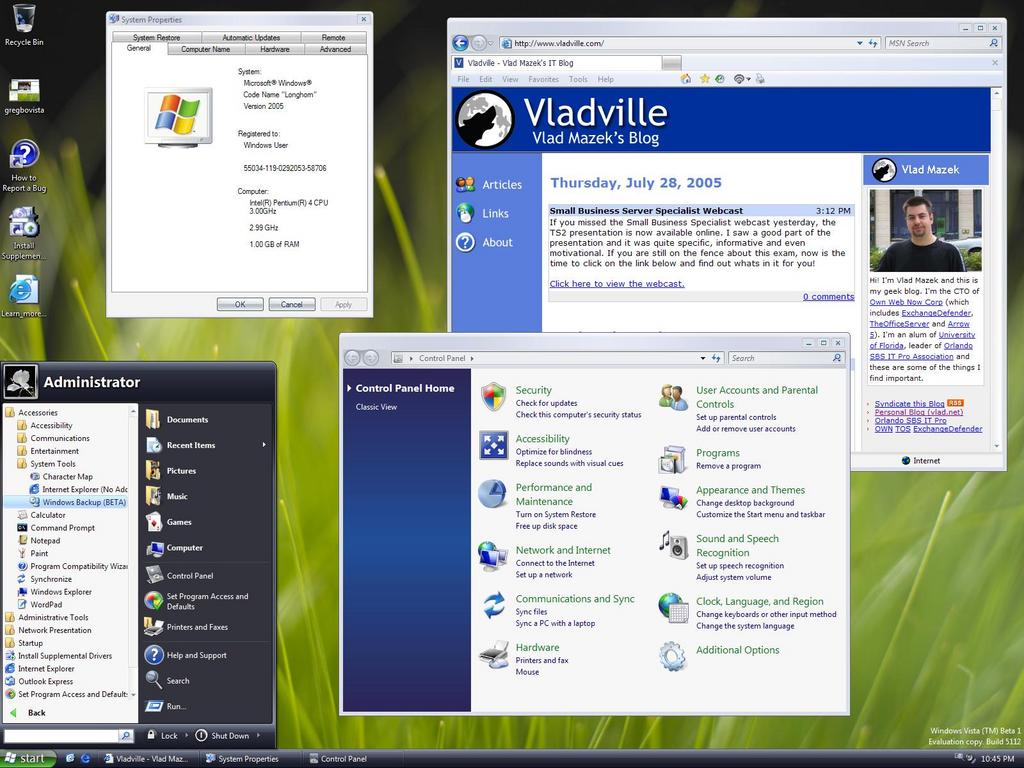
So here is my first impression of Longhorn along with a somewhat attractive screenshot:

Other interesting stuff? There seems to be a built-in, easy to use Windows Backup which is very good. IE 7 by default looks a lot less cluttered which in my opinion is a good thing.

On the bad end, Control Panel looks very cluttered, to the point that it takes a lot of reading to find anything. It is still filled with jargon so its not like its going to help deal ol’ grandma find what she is looking for.

Second, when you click on All Programs in the start bar the results are showed inline. This is not that good of an idea, I’ve looked a lot of non-IT Pro folks use their systems and unless something significant happens on the screen they miss it. Inlining this on the start menu will confuse a lot of folks.

Still playing with it, will keep you updated.

Small Business Server Specialist Webcast

Uncategorized
Comments Off on Small Business Server Specialist Webcast

If you missed the Small Business Specialist webcast yesterday, the TS2 presentation is now available online. I saw a good part of the presentation and it was quite specific, informative and even motivational. If you are still on the fence about this exam, now is the time to click on the link below and find out whats in it for you!

Click here to view the webcast.

Windows Vista Beta 1 Out

Uncategorized
3 Comments

Windows Vista (aka, Longhorn) has entered the beta stage. I am on a 2 hour wait till the 2.4 Gb DVD ISO image has completely downloaded to my system so I can being playing with it. It is only available to official beta testers and Microsoft Certified Partners with MSDN access. If you are not in that bunch enjoy this:

Check out other screenshots

Thursday Update: I have finished the installation on the demo system and inside the Virtual PC. It took roughly 12 hours for the VPC installation to happen on a 3 GHz system, but it looks extremely nice.

Microsoft Genuine Advantage Goes Live

Uncategorized
1 Comment

For about a year now Microsoft has been testing the Genuine Advantage program that checks if the license of your Windows system is valid or if it is a pirated copy. This system has been in place for some premium downloads on the Microsoft site and has been used simply to get the idea of which copies are pirated and crack down on companies distributing illegal software.

This system, Windows Geniune Advantage (WGA), is now integrated into the Windows Update site and you will not be allowed to download security patches for your operating system if it is not licensed properly. If you are using a stolen/pirated copy of Windows the system will prevent you from accessing the upgrades and give you two choices:

1. Fill out a piracy report, provide a proof of purchase / receipt, where or from whom you purchased the copy of Windows and you will get a free copy of Windows XP Home or Windows XP Professional.

2. If you only fill out the piracy report (and provide no information leading to how you acquired this illegal software) you will get a 50% discount on the copy of Microsoft Windows XP you are currently using.

“Microsoft has created a program that is fair to customers and reseller partners,” said Michael Cherry, lead analyst, Windows and Mobile, at Directions on Microsoft, an independent firm that provides analysis of Microsoft products and strategies. “While Microsoft is requiring customers to validate, they’re putting their best foot forward to help customers out, in terms of simplifying the process, creating software incentives and offering to help customers replace counterfeit software they acquired unwittingly.” The WGA validation process is designed to be quick and simple. On their first visit to the Microsoft Download Center, Windows Update or Microsoft Update, customers will be asked to participate in WGA. They will be prompted to download an ActiveX® control that checks the authenticity of their Windows software and, if Windows is validated, stores a special download key on the PC for future verification. The validation process does not collect any information that can be used by Microsoft to identify or contact the user.