Thanksgiving and return of The Ironman

IT Culture
Comments Off on Thanksgiving and return of The Ironman

Untitled document

It’s hard to put together long and coherent essays when you’re constantly running out of battery or being pestered by flight attendants to turn off your electronic equipment. I really have been a worldwide monkey over the last few months but tomorrow The Ironman strikes back. As you know I’ve promised myself that I would no longer do 50–70 hour shifts to compensate for Microsoft’s lack of QA and I must admit I have lived up to that. It has given me an opportunity to finally take some of Karl Palachuk and Roger Otterson’s advice on stepping back, reflecting and thinking more before I act. I have…

But tomorrow that changes, Katie goes out of town to spend Thanksgiving holiday with her family and I go into the full ironman mode for the next five days. So this weekend I am most thankful for what our customers have allowed us to build. Thank you for all your money!

Really, sincerely… thank you for your faith, for your patience and for your support over the years. I run a global business and we indeed never do sleep. Now back in the long long ago when I was an ISP in South Florida we could take servers offline for a few hours to do maintenance. As we grew into the national company the workday got longer as we worked coast to coast. Now OWN works for customers all over the world, for 24/7 operations for people that pay dearly to open this up. Not a moment passes by that I don’t lose sight of what an incredible leap of faith that is.

So this Thanksgiving, as usual, is an all out 24/7, 5 day marathon of IT upgrades and maintenance schedules. Everything we could not do during daylight hours in all the zones we are in happens during Thanksgiving. The load over the network took a cliff-dive over the past few hours and is likely to remain there until about Saturday night. We will be using this time to lock down on some gigantic holes in the software and put in the systems that have been under development for quite some time.

The magnitude of whats going on is spectacular to say the least. This month we did 0 project work, it has all been planning, projecting, building and growing for the next 12 months out. All aspects of the business, marketing, community engagement, partner relationships, technology, support, etc. We spent all month looking at feedback, prioritizing, planning, testing, piloting, etc. Now the fun part — integrating it all and hoping nobody notices the difference!

Again, my personal thanks to all of the people that allowed OWN to become what it is today and for the faith you put in us every day. I truelly appreciate it. On a very personal level…. I simply have the best job on earth, one that I’ve built myself. I oversee a global company and a global network that gives countless people and organizations the power to be better at what they do. When you’re down, we’re down, and we work very hard to keep things running. I always talk about the importance of being a professional and in USA there is an awesome commercial that goes a little bit like this:

Amateurs practice until they get it right.

Professionals practice until they can’t get it wrong.

This applies to IT as well.

But on the subject of being professional and thankful… Again, I cannot thank all of our customers and partners enough for this. I walked away from so many lucrative opportunities to run itsy bitsy networks just to spend 6 years in college getting an education to do more. And I did. I think one thing I am most proud and thankful for is for the living proof which Own Web Now has become – that you can scale small business customer service and care to service a worldwide network.

I’ve lost some sleep over that, true, but I’ll rest plenty when I die.

In the meantime, you can count on us to stay awake so you don’t have to.

-Vlad

Windows Server 2003 Service Pack 2 RC Available

Beta
1 Comment

Untitled document

Microsoft has made the long awaited Windows Server 2003 SP2 available as a release candidate (read: beta, broken, not for production) with some fairly interesting and worthwhile updates.

Click here for the SP2 site.

MMC3 is going to be a must for those that will be early adopters of Exchange 2007 but most of the improvements are going to be a hard sell initially. I can tell you from experience of thousands of Windows Server boxes we manage that they are rock solid and have performed remarkably well. Still nice to see Microsoft continue development on its flagship server product and adjust to the market needs. Niiiice.

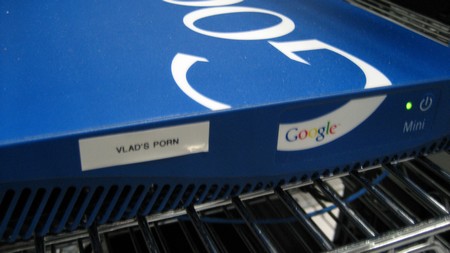
Vlad Mazek joins Google as VP of Network Load / Stress Test Operations

Vladville
Comments Off on Vlad Mazek joins Google as VP of Network Load / Stress Test Operations

Untitled document

Ok, not really but I just couldn’t resist taking this photo.

IMG_0687

Talk about stress testing. Though if I indeed pointed it to my collection I’m sure it would go up in smoke. As usual, if you find this offensive you’re in the wrong place.

P.S. Google Mini is Google’s smallbiz search appliance. It works on the Intranet (or public sites) to collect and index information without relying on Google.com’s main index. So if you’ve got something sensitive that needs to be searchable such as your corporate document database or porn collection, this is the toy you need to get. Nice paint job too. Not as flashy as the $24,000 yellow one for big environments but for SMB’s this ought to do the trick.

Experience of first dozen hours on Vista

Vista
Comments Off on Experience of first dozen hours on Vista

Untitled document

Spent the last day or so going through the process of Vista rollouts on our development systems and I thought I’d give you an honest take on the changes from RC2 to RTM that went live on MSDN and Connect last night.

The Good: Vista, Aero & Performance

  • Performance: Microsoft really optimized Vista, full Aero runs on entry level video cards. I have so far tested it on the laptop and the PC and with all features enabled the system performs admirably even with the integrated video cards.
  • Laptop: Dell Inspiron 6000 with ATI X300 with Vista Ultimate x32. System “Windows Experience Rating” rated at 1.7 with the graphics performance ranked at 2.4. The system performs very well but can get choppy with full screen video. 
  • Desktop: AMD Athlon x64 3200 with NVIDIA 6100 with Vista Ultimate x64. System “Windows Experience Rating” rated at 2.8 with the graphics performance ranked at 2.8. The processor and memory speed (not capacity) really trump the laptop in terms of Windows Experience rating but the video ranking is almost the same.
  • Stability: Rock solid, 0 blue screens, 0 crashes during setup, 0 crashes in networking setup, 0 timeouts on the core components and flawless integration with the registration site, activation and else.

The desktop has less ram but it is significantly faster ram. The desktop also has an integrated video card with no dedicated memory while the laptop has dedicated video memory. The result: desktop outperforms the laptop handily even under heavy graphics load.

Conclusion: Ever since the famous “640k ought to be enough for anybody” fake quote from Bill Gates one tradition still alive with Vista is: you better get a lot of ram. Initially when we first started testing Vista the general advice was to be prepared to spend a lot of money on the video adapter (get at least 256MB DDR dedicated to video) but as you can tell from the numbers above that is simply not going to be a requirement for business computing. While gamers always live on the edge, businesses will do quite alright with the integrated video controllers even with all the Aero goodness.

So Vista team…. again, congratulations. After about 12 hours of uptime I’m extatic.

The Bad: Microsoft Office 2007

I hate to do this at the launch but Office 2007 appears to have been rushed and so far I am only going to talk about Outlook since thas what I live in. The stability is nowhere near 2003 levels and despite working through several crashes the experience on the laptop and on the desktop is in line with the B2TR (Beta 2 Technical Refresh) code. The configuration and setup are done remarkably well but the overall experience of hanging, crashing, timing out, lack of responsiveness makes this for a very bad experience for a released product.

So right now Vista good, Office Outlook 2007 bad… will update as I make more headway.

Luther “The *** Monkey” Robinson Strikes Again!

Microsoft
Comments Off on Luther “The *** Monkey” Robinson Strikes Again!

Microsoft is really winning me over today. First Vista comes online, now pirates get it in the … On behalf of the community that bashed the crap out of Microsoft and all the inaction over the past 7 years, thank you. 

Luther


Insulting The Whole World

Vladville
Comments Off on Insulting The Whole World

Untitled document

Ten years ago my friend and I often joked about running the worldwide business as we were applying for our occupational permits. I remember us sitting around his garage/bedroom on a pile of cases and thinking about racking them up and taking pictures in front of them to pretend we’re a huge ISP. Well, 10 years later I truely run a global business and in global business people definitely do not have the same sense of humor the world over.

So every now and then, intentionally or unintentionally, I end up insulting a small country, island or the entire continent. Every now and then I get an IM from Susanne, my PR agent: “What did you say now? I am getting complaints”; Susanne has been doing really well lately so I figured I’d throw some business her way. So, I would like to thank the countries in which we do a lot of business.

So first of all, thank you UK for all your money!

IMG_0622

I’ve been working really HARD on my monkey. Shockey Monkey. Everyone on the list will go live in December 1st, 2006. 

IMG_0398

And my Ausies… The nicest damn people on earth, I mean that. We have something called Southern Hospitality where I live.. It’s basically being very nice to the person directly in front of you as you proceed to insult everyone else. Never met a bad Australian, folks, thank you for all your money.

IMG_0395

And for my kiwi’s, I haven’t forgotten about you. Is kiwi insulting? I dunno, but this ought to make up for it (email vlad@ownwebnow.com for a 6Megapixel shot)

IMG_0397

“Who would marry Vlad? Poor girl!” Don’t worry, she’s as big of a bastard as I am.

IMG_0566

And for anyone that hasn’t hit ALT+F4 yet…

IMG_0553

Have a nice weekend folks, enjoy your Vista deployments! Say hi to Susanne.

Vista DVD available at MSDN

Vista
Comments Off on Vista DVD available at MSDN

Just a heads up, Microsoft Vista DVD (full release) is now available on MSDN’s web site.

Gentlemen, start your leeching.

Update: As of 9:14 AM EST: “None of the MSDN subscribers are able to obtain a Vista product key. They are working on that.” According to Microsoft MSDN Support line (800) 759–4744

Dallas this Weekend

Vladville
Comments Off on Dallas this Weekend

Untitled document

Just a heads up that I will be in Dallas,TX this weekend and beginning of next week. Unfortunately, I will not be able to participate in any social events but wanted to post this as to not offend anyone that I’ve promised a visit to in the DFW area. So I’ll be in but unfortunately quite unavailable. Yes, I know, I’m horrible:

Mark: you used to be cool, man
Mark: now you’re a married, corporate guy who turns off anonymous comments

As for all my girls and monkeys… Infomart and Whataburger on Stemmons Fwy. See you there.

The Underhanded Zune Launch

Microsoft
Comments Off on The Underhanded Zune Launch

You may have missed it but Microsoft launched what it calls its “iPod killer” the other day. The problem: nobody else would call it that.

That in the nutshell is the most underhanded launch of a product I have seen in a long time. Zune has come to life with terrible reviews and even objective reviews illustrate just how much is left to be desired. The video reviews are equally harsh. The most telling and perhaps the most critical take on Zune came from my local NBC affiliate in Orlando, FL:

I was watching the technology specialist join the anchors to discuss Microsoft Zune. After his initial 30 second pitch on the new “iPod Killer” he listed the two downsides but attempted to downplay them.

In words of my eloquent college roommates: Thats where you lost da ball game!

The anchors themselves tried to help but just dug Zune an even deeper grave:

But you can keep the songs you copy from others? Oh no?

So you have to buy them after 3 days?

So this doesn’t work with my stores?

So… umm..

And thats where the interview ended. It perhaps is where the Zune dies as well.

Microsoft did a phenomenal job replicating Apple’s attempt. Unfortunately, it lacks Apple’s adoption rate, Apple’s fanatical user base and the time to perfect the offering. In reality, Microsoft created a heavier, bulkier, less user-friendly iPod that shares the same features iPod users hate about their device: proprietary store with lackluster feature set driven to sell content from a single provider with little choice.Well, almost – unlike iPod which seamlessly works with its OS, Zune will require a patch to work with Vista. This my friends is like killing two birds with one ugly Zune – dead player and a dead promise of a seamlessly integrated OS that plays well with the gadgets. Did I mention it also now competes head to head with other device makers that supported Microsoft’s assortment of failed media stores, technologies and DRM schemes.

Microsoft likes to talk about how it helps its partners succeed. With this brillaint move Microsoft has really slammed its partners in Napster, Plays-for-Sure Family, Sandisk, Toshiba, nearly every Windows powered mp3 player. So which partner is going to win here? You’ve guessed it, the very partner that owes its entire existance to perhaps the worst $100 million dollar loan in the American corporate history: Apple Computer.

Vista Changes: How Windows Update Works

Vista
Comments Off on Vista Changes: How Windows Update Works

Untitled document

It has been a while since I’ve written a technical article and my Vista laptop reminded me tonight just how much the Windows Update process has improved. Not very earth shattering on the surface, but very elegant and streamlined to put most of the functionality at the fingertips. Click on the images to zoom in.

The first, and most important, change that I cannot actually show you was the one reminding me that there is an update available. Consumers and businesses do not have a special mark on their calendar for “Second Tuesday” and most never bother to click on the link to install Windows security updates. Most even ask me: “Should I install those?” I have to say I cannot blame them, have you seen a workstation lately? It has at least five items all screaming to be enabled, upgraded, patched, refreshed or looked at. I can say with a small level of certainty that the lower right hand corner of the screen has permanently been placed out of focus for many Windows users because of its continuous annoyance.

Vista, to its credit, makes the availability of the security patch front and center. Mine came with a large yellow bar asking me to update my Windows Vista. Nice touch. When I clicked on it I was taken directly to the Control Panel for Windows Update. As you can tell, it is quite clear as to what is important and why:

“Always install the latest updates to enhance your computer’s security and performance”

1

Now you can actually see the available updates in full detail by clicking on View available updates.

2

Check the ones you wish to install and click on the Install button.

3

You’re presented with a license to install updates. Still a bug there, as you can tell the textbox only has vertical scroll although the license text itself continues to roll on. They either need to turn on the wrapping in the text area or add in a horizontal scrollbar. On the plus side, you can print the license agreement.

4

Click on Finish and the update process gets started.

5

If you want to look at the details “Click to view progress.” cloud does give quite a bit of details. It gives you an idea of your current patching process. Mine for example is set to apply updates at 3:00 AM automatically. I can see my update history and literally everything related to patching in Vista off the single control panel. Very slick.

7

Ahh… watching the security patch on a beta system… we’ve certainly made it far.

8

And we’re finished!

Just to check, let me see which updates I have made:

9

Every now and then you will have to roll back a patch, this will not change with Vista. In the past you had to go through the Control Panel, Add/Remove Programs panel, check the box to show updates and then navigate down to the KB article. As you can tell from the above the accessibility has really improved.

10

And the screen we all hope we never have to see is very interesting as well. It groups into categories (Organize dropdown) so you can quickly find your program and uninstall the problematic patch.

Not earth shattering but I dig it. The entire process seems thought through and presented in a way that a user will get more information on their fingertips without being overloaded with unnecessary details that would discourage patching.