Get ready for Windows Mobile 5 and MSFP

Mobility
5 Comments

Our friends from UK are providing a course on Windows Mobile 5 and MSFP. This is a partner only event (because lets face it, as a consumer you don't have access to MSFP anyhow) so if you're selling WM5 this is a place to be. Earlier this year we ran a very successful series of workshops on Exchange mobility. People have been busy beavering away behind the scenes and we have updated the course for all the great new functionality that is provided by Exchange 2003 Service Pack 2 and the Messaging and Security Feature Pack for Windows Mobile 5.0. Dates for this course have now been published and you can sign up via the link below. Registration URL: www.microsoft.com/uk/partner/readiness/Exchange/CME2003 Course Description: The aim of this workshop is to demonstrate how Windows Server 2003 Exchange Server 2003 sp2, Windows Mobile Devices with Windows Mobile 5 & the Microsoft Security Feature Pack, can work together to provide a complete solution for mobile messaging and collaboration. After attending this workshop, the student should have a better understanding of the various components used to deliver a complete mobile solution without middleware and understand the technology used to deploy this in various customer scenarios. Please note that this course is only for Partners in the Microsoft Partner Program. Update: Fixed the link to the reg site. Sorry, bad day. Thanks to the anonymous coward for pointing this out.

Susan is alive – MSMVPS.COM “getting psyched”

IT Culture, Misc
2 Comments

So Susan's blog sends back a few 503's and the entire SBS population migrates over here. Welcome, sad to disappoint ya, not much going on in the SBS world today. I'm helping with the upbringing of yoda.msmvps.com server at the moment and hopefully it will be up shortly. The previous semi-dedicated box just could not handle all the SBSers out there. Stay tuned, it will be up. In the meantime, munch on this: Exchange 12 will allow for file-sharing via RPC-over-HTTP protocol — same way you securely sync up OutlookExchange at the moment. Update: It's ALIVE!!!

Hello Orlando

Uncategorized
12 Comments


First of all, thank you for coming out for the TS2 seminar yesterday – 100 plus in attendance, way to go. We are currently soliciting input on the presentation in our Orlando IT Pro mailing list, feel free to speak your mind. For those of you that missed it, JJ Antequino (our local Microsoft TS) presented the seminar and I helped along with the Exchange SP2 presentation. Sorry for the smoke and mirrors, the laptop had SP1 but I doubt any of you would be installing that or IMF at this point so here is what went down.

Exchange SP2 Installation
I did a quick improv of Exchange SP2 to get you started with this service pack. As I said when I got started — If there is only one thing you write down from this entire speach, please remember to remove the IMF if you have installed it already. The SP2 setup automatically detects and warns you to remove it but I have received a number of responses where that does not happen. Click here for the article and remember that the store is flexible — its not 75GB or nothing, you set the limit yourself.

IMF v2
Also remember that IMF v2 does not turn on automatically. You have to enable it manually. Click here for the article. Likewise, if you do turn it on and select archiving make sure you have software to access the archive. It sits in
C:\Program Files\Exchsrvr\Mailroot\vsi 1\UceArchive – you need this directory when you setup IMF Archive Manager so you can go through and prune your archives. One of the partners spoke about how he left it in archive mode and had 80,000 messages in the quarantine by the time he got to it. So if you archive, make sure you prune.

P.S. Just to state it again: Exchange SP2 (and SharePoint SP2) are already out in production and they are both free. If you’re in the SBS land you do not need to wait for SBS R2 to deploy these solutions. The slide you saw was just detailing what will be included by default in R2.

Orlando IT Pro
I spoke briefly about Orlando IT Pro, I will be sending invitations to you shortly, wanted to get this out since I’m sure you’re anxious to the Exchange info first. As I mentioned, that was not a spam signup list – I will send you an email with an invitation to check out the Orlando IT Pro group and if you like what you see you can join our mailing lists and come out to our monthly meetings. Yes its free and so is pizza. The next meeting is on Tuesday, Nov 22 at 6PM.

SBS Show
Also spoke briefly about the SBS Show, if you’re in the small business consulting or doing anything with computers you need to listen to this stuff. You can get it here.

Thats all. Please, feel free to forward over questions. I know I couldn’t field everything yesterday but I am not hard to track down. Please feel free to browse the blog for the incentives we spoke about and touch back with JJ if you have any input or questions for the TS2 team.

Exchange 12 Notes

Uncategorized
2 Comments

First of all, thanks to all of you who made your way to our TS2 presentation. Hopefully you enjoyed the show and my Exchange presentation demystified IMF v2 for you a little bit. I am sure the next quarter’s presentation will have fresh installs of SP2 for Exchange and SharePoint so I don’t have to freestyle. We’re taking the feedback in the Orlando IT Pro group for JJ Antequino (Microsoft Presenter) so please post if you think they can imporove in some way.

I will be posting an updated list of clarifications, corrections, etc as promised. There are over a hundred folks out there and I have a jammed inbox. I promise I will get to you tomorrow.

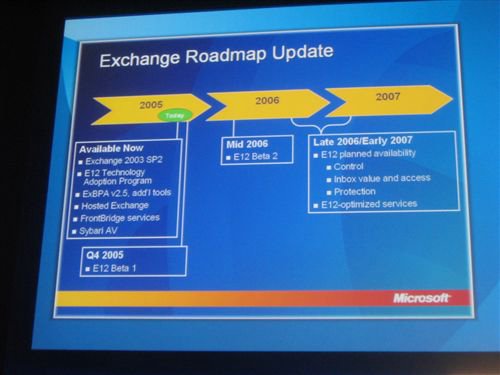
In the meantime, here is some cool reading material. Steven Bink has attended Microsofts IT Forum 2005 in Barcelona and below are his random notes on Exchange 12 which was heavilly discussed during their seminars. Steve has really nailed down everything they said about E12, down right to the video.

Role based deployment:Egde, Mailbox, Routing, client Access etc. So no more need of OWA files or pub folders on all servers
50 Storage Groups total
50 databases total
Page size from 4k -> 6k
IO and large Mem optimized
Target 5MB RAM /user
Full commandline support (Monad)
ESM completly re-written from scratch
90% of new code is managed code
Faster server startup
No more STM files!
14 day dumpster by default
Enable Large, low cost mailboxes
E12=0.25 IO/sec (Ex2k3 1.0)

Logfiles limit 2 billion
Low impact fast re-index
Multi mailbox search
Works with OL and OWA and Mobile Outlook
Local continuous backup, no tape needed
Remote continuous backup
Reduced TCO
Fast recovery (minutes)
No more PST’s! expensive, legal risk.
Managed email folders, corporate assigned folders
Outlook Voice Access
Branding: Demo’s used Beta1 named Exchange 2007
Binaries are version 8!
Only 64 bit, reported 1st by Bink.nu few months ago 🙂
No active/active cluster support
No more OMA support
NTTP?
Last version with public folders
Access intranet and files outside the office without VPN

Update: Page size is actually being upgraded from 4k to 8k according to the ESEdev team reply to this post.

Google Base: All Your Base Are Belong To Us

Uncategorized
2 Comments

They tried really hard to avoid that stigma by the way, when I entered my keywords they would not let me misspell anything, including my last name. Way to go with the strict testing guys.

I’ll admit it, it took me a few minutes to figure out how this could ever be relevant or useful to someone and I think I got it. The Goolge Base service is basically a huge file sharing network. You can upload text, pictures, different objects and make them instantly searchable. Step back a little bit from the microscope and look at the big picture here: They are offering to hold content for up to 30 days and make it accessible and searchable. You can store a paper you are working for and share it with your coleagues. You can share your recipes or organize resources with a meeting.

Thats at least the dream I hope they had. With some access controls this could be an interesting response to Microsoft’s SharePoint technology that has a radically different approach but accomplishes the very same thing – intelligent, accessible file sharing.

Oh, and there is money in this. I haven’t said this in a loooong time but expect Google to make money with this project.

Update on Exchange 12 Features

Uncategorized
3 Comments

So I talked a lot about Exchange yesterday and more news are coming from Barcelona where Microsoft is really taking the covers off Exchange and even MOM to a degree. I have to say I am impressed, it looks like Exchange is heading for the full circle with the VoIP integration and messaging.

Steven Bink posted a video from the conference taping the demo of the call-in to Microsoft Exchange 12 server. I did not have the heart to send all of you and kill his bandwidth with this 6 meg avi so I’ve mirrored it locally.

Click here to view the Exchange 12 demo video.

It looks great. I know how many of you love the Live Communications Server (or at least the idea of it, before you see the price) and this is a direct integration of that. As always, you know the caveats… no idea when this will be out, chances are features will be added/removed, etc, etc. But it is cool!

Note: One thing that Steven noted was that Microsoft announced the change with IMF updates in SP2. Apparently, they will be shipping updates to IMF bi-weekly, something that I have not personally experienced. He brought it up to them and we’re waiting for a resolution.

Exchange 12 will be 64-bit only

Uncategorized
5 Comments


Thanks to Tim Sullivan from the sbslist for finding this one, it is an announcement that Exchange 12 will be released as 64bit only.

Question 1: Why did Microsoft make the decision to offer Exchange 12 as a 64-bit only application?
Answer: Email truly is a “mission critical” application in most organizations today, and we heard from our customers that they were pushing the limits with their current messaging solutions. Demands being placed on messaging solutions continue to grow, and by nature 32-bit email server systems have memory limitations (4GB) which restrict their ability to cost effectively support these needs. Additionally, customers want to consolidate their servers to manage cost and complexity. 64-bit servers provide the system architecture required to meet both of these needs (accommodating new demands and consolidating servers).

Question 2: Isn’t 64 bit only required for very high scale customers?
Answer: The 64 bit architecture enables Exchange 12 to use inexpensive memory to reduce very expensive disk usage. Today, approximately 80% of the capital cost required to run Exchange is for storage. Our testing shows 64 bit Exchange 12 requires 4x fewer random IO’s per second than 32 bit Exchange 2003, which translate into large savings for all customers – especially as mailbox sizes grow.

Question 3: Will customers who want to upgrade to Exchange 12 be required to purchase new hardware?
Answer: The majority of server hardware being sold today is x64-based and many businesses are already enjoying its advantages and will not need to purchase new hardware. If you look at the CPU market today, the majority of the 32 bit only processors are diminishing greatly and being replaced with x64 capable processors. If a customer has not already made the move to x64 systems they will need to purchase new hardware for those servers upon which they plan to install and run Exchange 12.

Above is courtesy of Harold Wong mentioning it at a news conference. This would be a good time to check out the Opteron and familiarize yourself with the AMD x64 architecture. Their chips are very competitive with Intel on price (read: cheaper) and generally perform better (read: oh my god, it smoked a Xeon). Everything is going 64bit, so get ready. I bought a bunch of Celeron D’s last week ($80 chip) and they were all 64bit enabled.

Update: Its not just Exchange 12 going 64bit by the way. Remember, once the components go 64bit, so does SBS. As a matter of fact, Microsoft has promised 64bit optimized versions of Exchange Server 12, Windows Compute Cluster Server 2003, the Longhorn Small Business Server, Microsoft’s midmarket server, code-named “Centro,” and Windows Longhorn Server R2 (the Windows Server release expected around 2009).

Look at all the details in their press release:
http://www.microsoft.com/presspass/press/2005/nov05/11-15ITForum05UmbrellaPR.mspx

Microsoft Virtual Server 2005 R2 – Killing Vmware

Uncategorized
3 Comments

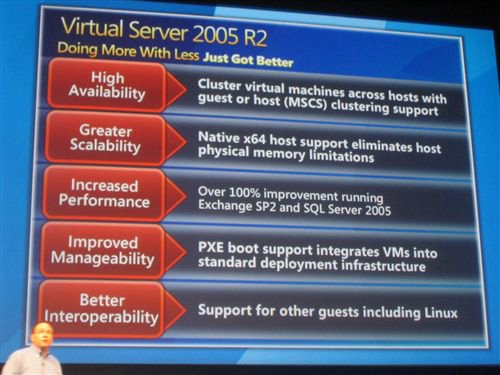
Steven Bink who was lucky enough to go to Microsoft IT Forum 2005 in Barcelona is reporting that Virtual Server 2005 R2 is now available.

“We saw a cool demo of a Running Virtual Machine migrating from a failing Virtual Server host to another Virtual Server host. This was done using new Mom technology, Microsoft cluster services and Windows 2003 Server R2.” – Steven Bink

What is really impressive about this announcement is the price. Virtual Server was a $799 and $1200 product when it was first released with this release being the SP1. Somewhere along the course of beta testing however, Microsoft decided to make this SP1 patch into an R2 and charge more.

The new pricing? $99 for standard, $199 for enterprise. This is how you kill two birds with one stone. You please your enterprise customers that didn’t buy it under SA because they were just testing it against VMware, and you bring in a ton of new customers who would otherwise be going to Vmware GSX server, now a part of IBM. I don’t know about you but I’m happy.

SBS Show Episode #4 – Recovering SBS in Crisis

Uncategorized
12 Comments

The fourth SBS Show episode was a more technical look at disaster recovery with Jeff Middleton and Scott Buchanan. We put the scare tactics aside but still had a presentation with two gentlemen that had to do some serious disaster recovery as both went up against a Category 3/4 hurricane and massive flooding. In contrast to episode #3, this show was more about restoring your business and doing things right.

We had a huge audience for show #3 because I suspect a lot of you forwarded this to your customers (or you’re lurking around) – either way, 15,114 people listened to SBS Show episode #3, 33 voice mails and a ton of nice people writing to us. I really appreciate it, thank you for promoting the show and finding the content useful enough to share with others.

So here is what happened:
– Talked to Scott Buchanan of PDQ Computer (pdqcomputer.net)
– Talked to Jeff Middleton, MVP of Swing Migration (sbsmigration.com)
– Talked about proper D&R design, implementation and restore process
– Talked about how to personally get organized in a crisis
– Jeff offered an exclusive free pamphlet on “How to move an SBS install intact to new hardware”
– Jeff mentioned the full D&R procedure outline in Harry Brelsford’s “Advanced Windows Small Business Server 2003 Best Practices” book, check that out if you’re interested in an in-depth technical overview.
– All else… check the show for details.

We never imagined we would have this many people interested in the show nor did we ever expect guests as impressive as the ones we’ve featured so far. Thank you for all your support and please keep on letting others know about this!

Download SBS Show #4: Recovering SBS in Crisis
Subscribe to the Podcast Feed

Orlando IT Pro event for November 22, 2005: Redhat Enterprise Linux 4

Uncategorized
7 Comments


Orlando IT Pro presents Redhat Enterprise Linux 4
Tuesday, November 22, 2005
New Horizons, Orlando
6:00 PM – 9:00 PM EST

This is your invitation to join us next Tuesday evening for a very technical presentation on administration of Linux servers including installation, configuration and use on Windows networks. Learn how Redhat Enterprise Linux 4.0 is different from other Linux distributions, how it works and how you can take over and manage Linux servers. We’ll cover everything from installation to using it as a supplement to Windows servers and migration processes. As Linux servers emerge you will need to know how to manage them in small business so come over for a free (and free pizza) technical presentation and learn how to manage it yourself.

Please RSVP: http://www.clicktoattend.com/invitation.aspx?code=104833
Directions: Google Interactive Map

Meeting location:
New Horizons Orlando
1221 Lee Road
Orlando, FL 32810

Meeting Reminder: OrlandoNovemberMeeting.ics (click on this file to setup a personal alert in Outlook