
More Vista Timeline rumors

Uncategorized
1 Comment

These come from Paul Thurrott who has many connections with Microsoft so they may be more than rumors but I feel a need to disclose that to any of you that might be making purchasing decisions based on complete strangers blog…. and if you are, I demand consulting fees from you! Make checks payable to Vlad…

Windows Vista

….Microsoft is planning to ship Windows Vista Beta 2 in late 2005, not in early 2006.

According to internal documentation, Vista Beta 2 is scheduled to be “feature complete” by September 29, 2005. Then, Vista Beta 2 will enter lockdown mode between October and November 9, 2005. After that date, Vista Beta 2 will be in escrow and will ship on December 7, 2005, about 3 weeks later.

What about post-Beta 2? According to a second set of documentation viewed yesterday, Microsoft will ship Vista Release Candidate 0 (RC0) on April 19, 2006, and Windows Vista RC1 on June 28, 2006. Microsoft currently plans to release Vista to manufacturing on August 9, 2006, and make the product broadly available by November 15, 2006.

Longhorn Server

Except for the release to manufacturing (RTM) date, all the Vista dates apply to Longhorn Server as well. But once we reach summer 2006, Longhorn Server will fork from the Vista client release schedule. We’ll see an RC2 release of Longhorn Server on October 18, 2006, and the RTM release on January 10, 2007, according to the latest documentation.

That’s a much earlier release date than previously anticipated.

WinFS

Microsoft surprised a lot of people by shipping WinFS Beta 1 yesterday (see more at source), and as it turns out, the project is suddenly well ahead of schedule. In the more recent schedule, WinFS Beta 1 will be followed by at least one Community Technology Preview (CTP) release, which is currently due February 15, 2006. Then, on May 1, 2006, Microsoft will release WinFS Beta 2. Beta 3 is currently scheduled for November 15, 2006, with a Beta 3 Refresh release expected in April 2007. WinFS is currently scheduled for RTM in third quarter 2007, well after Longhorn Server.

SQL Server 2005

SQL Server 2005 will ship within months. On September 13, 2005, the first day of the Professional Developers Conference (PDC) 2005, Microsoft will announce that SQL Server 2005 has hit the RC1 milestone, and the company will place the code into escrow in anticipation of the final release. The English language version of SQL Server 2005 is currently expected to RTM on October 14, 2005, about 3 weeks before its public launch. Other language versions will ship in December 2006 and January 2007.
Changes to Systembuilder Microsoft OEM program

Uncategorized
2 Comments


Are there even any of you guys left out there? A friend of mine from South Florida posted this on a mailing list so I guess there still are people capable of competing with Dell on price so here are the changes:

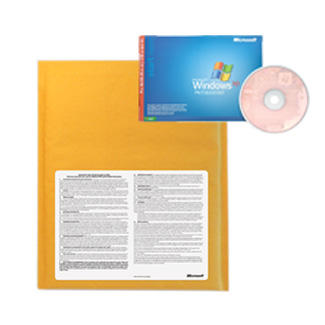
Beginning in August 2005, you will be able to acquire Microsoft Windows XP and Microsoft Office 2003 in packs of one instead of the previous 3-pack minimum. That means you can get whatever quantity you want.

The 1-pack will come in a padded envelope, and will have the OEM system builder break-the-seal license agreement affixed to the front of the envelope. Inside, you will find just one individual software license (which includes the Certificate of Authenticity label, hologram media, and documentation).

The email I received a little earlier today also had the following:

1. Beginning in September 2005, new 1-packs will be available for Windows XP and Microsoft Office 2003 (instead of the previous 3-pack minimums).*

2. There will also be a new simplified license for OEM system builder software and hardware. If you distribute a system builder pack unopened, you are no longer required to sell it with any non-peripheral piece of hardware.

3. Plus, there will be a new system builder-specific Certificate of Authenticity (COA) label to help differentiate system builder software from other OEM license types.

Attend our webcast and get an updated Windows Licensing Kit.*

Attend Microsoft’s free Licensing & Packaging Update webcast and find out everything you need to know about how the changes will affect your business. You’ll learn about the new 1-packs, simplified licensing, COA label changes and more. Don’t miss this invaluable webcast. Register now!

Date: September 7, 2005
Time: 9 AM – 10 AM

Click here to review changes to System builder OEM licensing

Release Cycle Rant

Uncategorized
Comments Off on Release Cycle Rant

Earlier this weekend Susan Bradley replied to my forward of the 6 month extension to SUS 1.0 support questioning the need for extended product support. What follows is my rant on what IT management is actually like when you have to support thousands of users over multiple sites and what IT network management is actually like outside of “small” business. Although I’m not against annual release points software needs to be supported for an extended period of time because each release points has the QA process of its own, not to mention all the other software that interfaces with it. Hope you enjoy the read:

Susan: “June of 2006? We have folks that can’t deploy/debug a free patch management tool in 11 months so now we give them 6 more months?”

Yes, we do need time. If anybody else is thinking along the above lines here is a big reality check:

Not everyone out here is a one man shop running the home office with three computers and a PDA from the Action Pack. Some of us tend to have customers whose applications we support and they tend to require things like service, support, patching, migrations. Takes up some time.

Then we have the operating systems running on computers, both of which require continuous maintenance, tuning, security audits, driver upgrades, hardware replacements, test-bed buildouts abd application testing. That takes up some more time.

None of us are born knowing how to support all this technology either. That requires training, education, experiments, tests, certifications, vendor calls (and TS follow-ups) and waiting on resolution. It also just so happens that any business with more than one employee requires scheduling to get all of the above accomplished. That takes time.

We also tend to like to test the software. Testing software on multiple hardware platforms, release points and remote sites takes time. Feedback takes time. Vendor followup takes time. In the real world upgrades/migrations even for “free patch management tools” don’t work like this: “wow, I can’t believe it installed!!! Add it to SMS Bob!”; No, it takes time.

We also like to document that software. Some of us don’t live and die by the vendor defaults either, some of us extend vendor solutions by writing our own software. Those tend to take time. And when it’s done there is the part of training the helpdesk, sales staff, marketing staff. That takes time.

So yes, more time helps. I am not trying to be disrespectful or sarcastic at all. This is how things work in the real world. You can not just stand on the hill and yell “just upgrade” because when you support large networks the install process is not quite the double-click method. Just because your smallbiz rollout took minutes doesn’t mean that our can take even remotely the same amount of time.

If anybody doubts the above comments please feel free to get an IT job at a big company. See how long it takes you to get anything even approved, let alone tested, supported, documented, debugged, headcount-justified and finally deployed.

Microsoft realizes this and they gave us extra time. They deserve nothing but praise and admiration for understanding what real IT pro’s have to go through to manage IT and I for one thank them.

Rough week ends on a good Microsoft note

Uncategorized
Comments Off on Rough week ends on a good Microsoft note

It indeed has been a rough week for us enterprise folks out there. Software patches. Then the news that Microsoft Virtual Server SP1 will now be R2 with brand new install and more money for a new license. Virus attacks. More spam from spaces.msn.com and uk.geocities.com.. it has been a rough week.

But it is ending on a great note. Microsoft has decided to extend the support period of SUS 1.0 to December 6, 2006 and allow more time for WSUS deployment, troubleshooting. Whats more, the new SKU for mid-market server bundle is being announced shortly, SQL 2005 and Exchange SP2 are coming which will make more data available on the go, securely..

Thanks to Steven Bink for this great find.

Microsoft had previously advised that SUS 1.0 would only issue updates until 6 June 2006. This anouncement extends support a further 6 months giving admins even more time to manage their migrations to SUS2.0.

Microsoft will continue to support Software Update Services (SUS) 1.0 until December 6, 2006. Microsoft will no longer support SUS 1.0 after this date.

SUS 1.0 will no longer synchronize new update content after December 6, 2006. Therefore, SUS will no longer help provide new updates after this date. Additionally, as of August 24, 2005, you can no longer download SUS from the Microsoft Web site.

Important We recommend that you upgrade to Windows Server Update Services (WSUS) before December 6, 2006.

SBS Web & SharePoint Hosting Guide

Uncategorized
Comments Off on SBS Web & SharePoint Hosting Guide

Most of you that have had the pleasure of dealing with me know me as the hosting guy. Well, I’ve taken a little time to create a huge braindump of my hosting expertise and how it can be implemented to serve small business through Windows Small Business Server 2003 (SBS2003). The guide is available here.

It is written in (somewhat) plain English and is targeted at the small business owner or the small business system integrator that does not have intimate understanding of how SBS, IIS and Microsoft DNS work. I cover:
* How to use SBS as the name server
* How to configure multiple hostnames for virtual hosting
* How to configure plain virtual hosts
* How to extend FrontPage webs on virtual hosts for easy management
* How to create multiple SharePoint team sites on the same server, single IP
* How to create a public, anonymous SharePoint team site without using certificates.

The guide goes in depth on all areas of consideration (security, configuration, bandwidth, best practices) and if this doesn’t get you started with SharePoint in small business I don’t know what will.

Click here to read the article.

SBS Web & SharePoint Hosting Guide

Uncategorized
6 Comments

Most of you that have had the pleasure of dealing with me know me as the hosting guy. Well, I’ve taken a little time to create a huge braindump of my hosting expertise and how it can be implemented to serve small business through Windows Small Business Server 2003 (SBS2003). The guide is available here.

It is written in (somewhat) plain English and is targeted at the small business owner or the small business system integrator that does not have intimate understanding of how SBS, IIS and Microsoft DNS work. I cover:
* How to use SBS as the name server
* How to configure multiple hostnames for virtual hosting
* How to configure plain virtual hosts
* How to extend FrontPage webs on virtual hosts for easy management
* How to create multiple SharePoint team sites on the same server, single IP
* How to create a public, anonymous SharePoint team site without using certificates.

The guide goes in depth on all areas of consideration (security, configuration, bandwidth, best practices) and if this doesn’t get you started with SharePoint in small business I don’t know what will.

Click here to read the article.

Google Talk goes live.. barely.

Uncategorized
2 Comments


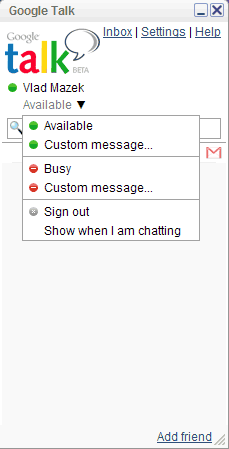
Perhaps I was spoiled a little with the Google Desktop 2.0 but, honestly, I am quite disappointed in Google Talk which many had expected to be the next big chat thing. I’ll give them kudos on basing it on an open protocol (which by the way is the same Jabber IM I wrote about in my latest article) but it looks plain and suffers from the same problem all the other ones do: you have to be a member of Gmail. Problem is, Yahoo has the best video, MSN has the best news plugins, AIM has the largest audience and Google has…. exactly.

And yes, its beta, meaning they haven’t figured out how to make money off it. They released an amateur client with no worth-while features on yet another system that I need to have an account on.

Back to the drawing board guys, this one is not even worth linking to the download site.

—–

In other news, MSN has released the new chat client, MSN Messenger 7.5.

Cisco revealed news of a new SSL vulnerability. If you’ve got any Cisco gear left you really aren’t paying attention.

Ron Grattopp is doing SBSC training through MS Partner Readiness Webcasts, according to JJ it will be done 5 sessions.

And in the best news of the day, August update to Outlook 2003 Junk Filter is available.

Small Business IM Guide

Uncategorized
6 Comments

It has been quite a while since I wrote an article on Vladville and some events during last week prompted me to take a second look at Jabber IM. Jabber is a free, open source, secure, standards-based instant messaging platform that to the untrained eye looks a lot like MSN, ICQ and AIM chat. Under the hood it has quite a bit of features not present in competitive IM implementations but for small business purposes it has two very unique points of interest: price and privacy.

By deploying Jabber IM server internally with Trillian client, small business can get a private, corporate IM system for less than $25. Given the price point (and setup complexity) of other technologies, Jabber is very hard to beat. Thats just my opinion however.

Here is a link to my guide, hopefully it can get you started with your own private IM world:
http://www.vladville.com/articles/smallbizim.asp

SBS Support Blog

Uncategorized
1 Comment

Good news, Microsoft SBS team has announced a new blog dedicated to SBS Support issues. It is being lead by Mark Stanfill:

My name is Mark Stanfill and I am a technical lead on the SBS team. My daily job involves providing 3rd and 4th tier escalations for Microsoft Support, writing and editing technical content, mentoring, and delivering training. I will be moderating this blog and acting as general coordinator.

What will be in this blog?
* SBS-specific components – Questions about components that can only be found in SBS. “How does the POP3 Connector work under the hood?”; “Can I modify RWW?”; “What is the Transition Pack?”
* Component-specific questions – These are questions about the components that make up SBS – Windows Server, Exchange, Windows SharePoint Services, etc. Questions may or may not be SBS-specific, but do deal with the workings of the particular service on an SBS box. “How do I do ‘X’ in Exchange?” “Can you use ‘X’ component of Windows Server 2003 on SBS?”
* Interoperability – How does SBS work with other services, either on the same box or on the network? “Can I install ‘X’ on SBS?” “What are the best practices for installing a second ‘X’ server in to an SBS environment?”
* Non-technical – There’s no way around discussing licensing and business needs as part of a complete technical solution. Questions in this category include: “I have 7 users and 5 CALs, what’s the best way to license ‘X’?”; “I want to migrate from ‘X’ to SBS 2003, what is the least expensive way to do that?”; “I plan on growing to 200 users in 2 years, is SBS a good solution for me?”

Check it out and add it to your RSS reader.

Google Desktop 2.0

Uncategorized
2 Comments


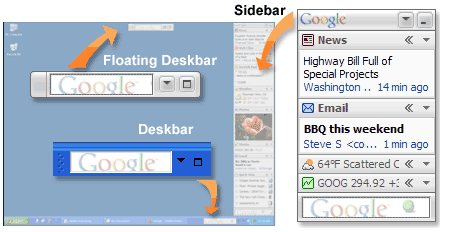
Now this is impressive. I had gotten used to the original Google Desktop Search to the point of just minimizing and embedding it into my start bar but this new release is just incredible. They have added useful plugins (the single most important thing in Firefox, and IMHO the only reason its being so widely adopted) and they seem to be pretty generic but very well put together for me. My email, my rss feeds, my news, my pictures, a scratchpad (will this end my use of Notepad?) and a whole bunch more. I am very impressed.

Disappointment? It’s a beta. Now unlike Microsofts definition of beta (“broken”), Google seems to have another definition: “we haven’t figured out how to make money off it yet” and that is quite sad. There are Google applications that I have used for a long time yet they are still in beta. Same with Microsoft. Are they both afraid of putting a release stamp on something so that they have a piece of software to be evaluated and compared on? I honestly do not understand it. I inherently distrust both MSN and Google on all these applications, despite the “do no evil” mantra, but I do have to admit that I am very impressed with both the desktop and the msn screen savers.

Download Google Desktop here.