Getting around Verizon restrictions for OWA

Exchange
Comments Off on Getting around Verizon restrictions for OWA

Something interesting came over the newsgroups today, Verizon has started restricting inbound traffic to ports 80/443 to their customers on dynamic IP addresses. Now lets for a moment ignore the fact that running a server on a consumer level DSL / Cable connection is usually against the AUP/TOS (and will get your account closed) and focus on how to get around it for a really small business.

Let’s say you’re running SBS and are getting your mail using a POP3 connector. Let’s also say through some miracle all of that is working, how do you get around Verizon’s port restrictions? The quickest way is to simply change the port bindings for the Default Web Site by going to Start > Administrative Tools > Internet Information Server (IIS) Manager.

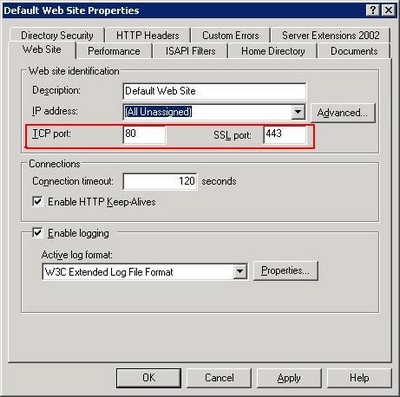
Open the Web Sites container, right click on Default Web Site and select properties. This is where Exchange’s Outlook Web Access files sit so if you change the ports it is accessible on you will be able to access your server remotely.

Exchangeports

For example, change the SSL port to 8433. Your OWA will now reside at https://server.domain.tld:8433/exchange – that 8433 is important, it tells the browser which port to access the server on. Of course, this is still a violation of your providers terms of service so it hopefully gets you by for a day or two while you transition to a full static IP address on business class DSL or Cable service. Good luck.

Eight Simple Rules To Avoiding Flamewars

IT Culture
Comments Off on Eight Simple Rules To Avoiding Flamewars

Untitled document

One of my friends posted this on a mailing list we frequent, reflecting the feeling that many people have towards mailing lists and the few that ruin the experience for everyone:


I am sick of this group turning into nothing more than debates about licensing and every Tom, Dick and Harry's interpretation of the EULA. A short period of time ago, people complained they didn't understand Microsoft licensing, now the room seems to be filled with experts.


But how do you have a good experience in an online community if there are just few people that often ruin the experience for everyone. Certainly, you can always order the group by thread and follow the topics you are really interested in but the people you cannot stand tend to be present on every thread, seemingly contributing nothing. This discourages others from participating, once they see the virtual beating the other sensible person took by bringing another angle to the conversation.


Here are eight simple rules to avoiding mailing list flamewars: 


1. Identify the idiots


This rule in particular applies to people that are lost on professional lists. They seek free help yet at every step reinforce their lack of understanding for the product or technology, yet still hope that the kindness of strangers pulls them through to the other side: "Oh, dear overlord of technical expertise, please carry this newb to the greatness and understanding, ever thankful, yours – The Dumbass"


Do not get into extended discussions with these. There are plenty of books, videos, classes, magazines, web sites and not to mention Google that could train them. What is worse is that 99.999% (scientific) of the time they have likely destroyed their computer to the point that even a forensic team could not put it together again.


Idiots should be ignored.


Cruel, yes, but lets consider the two alternatives that come from trying to help them. First, by attempting to help them you will receive an endless amount of guilt thrown your way and will be expected to help them bring their computer back to the defaults, along with all the personalized training they will ever need. There is nothing worse than trying to answer a question from someone who doesn't know what they are asking. Truth is, it is obvious they have no troubleshooting skills to begin with. Their initial troubleshooting, before they asked for help, could have broken 30 different things each of which could have caused it to "stop working" and you have an astronomic chance of helping them.


The second, and more dangerous result, is that the idiot problem brings down the conversation level of the entire group. This is why Orlando IT Pro has basic membership requirements, so that the conversations remain among professionals and not on the material that New Horizons could knock out in a week.


It is hard for the kind people to ignore idiots, so they try to help. Results are often far worse than the good they tried to provide. Look at rule #8.


2. Identify the worthless


As the age old saying goes "Opinions are like as**oles, everyone has one."


Same goes for ITPRO lists. Every list has their resident unemployed consultant who feels a need to tag on every thread and provide his computer science criticism based on his GED. There are exactly two criteria to determine whether someone's opinion requires a response: their knowledge and experience.


This tends to be a cornerstone of Linux user groups but is also growing on the Windows groups as well. You have a guy who in his entire live has not written a single line of code, yet jumps on every thread to criticize decisions of software developers. Same unincorporated hobbyist billing 3 hours a week also has the might to debate business decisions of a multi-billion dollar conglomerate.


The problem with arguing with the worthless? You will never be able to reason with them. That’s the beauty of having infinite spare time, they can write pages and pages of arguments without a bit of common sense. A long time ago one of my friends gave me an easy way to identify the worthless: "Organize by the posters name and look at who posts the most. If they have the time to do that chances are they do nothing else"


Look at rule #8.


3. Identify "passionate beyond reason"


Passionate beyond reason are easy to spot. They will jump into a discussion thread and throw a tantrum or an overly dramatic argument which to a casual observer has nothing to do with the topic at all.


There is no reason to ever respond to anything these individuals make. First of all, their responses will never challenge the discussion, facts or circumstances – they will challenge you. They are not looking for a differing point of view (similar to rule #4) they are simply retaliating against what differs from whatever causes their insanity.


It's like seeing crazy people on the street – just keep on walking and don't look make eye contact.


4. Identify "religiously devout"


"Religiously devout" (nothing to do with religion) are a special breed of "passionate beyond reason" that do not have the ability to convey their message with much dramatic effect. They have the core of opinions which they consider to be "the word of God" and nothing can ever disagree with that. Even if one word is in direct conflict with another, they have a way of reasoning around it, without common sense of course. Common examples:


Mac users.

Mutt/vi users.

Windows95 evangelists.


You cannot have a conversation with them. You cannot disagree with them. You cannot point out that they are wrong, no matter how much factual evidence you have against their argument. They are always right. They have the understanding of the world that you simply do not.


Take a look at rule #8.


Now that you know the four typical difficult personalities on mailing lists, here is how to avoid getting in trouble.


5. Steer clear of opinionated threads


One easy way is to make your contribution to the community on the facts alone. Facts that are documented, published and otherwise available for everyone to take a look at. Yes, #1-4 will certainly have their inner angle on all the facts but you can let them argue with the facts and not with you. Saves you time, wears out their keyboard.


Stay away from opinionated threads. It is easy to get dragged into a virtual conversation about the pointless, but you would never start one in real life. One way to bring life to a boring list is to constantly prod for an opinion on something that nobody has a strong enough of a feeling to carry on a discussion… except the individuals in #1-4. You can always get a crazy person to rant. Need the input of the uneducated, just ask – how can they be wrong with their guesses. Lonely and bored ALWAYS want to talk.


Stop. Stay away. Leave it.


6. Steer clear of undocumented "facts"


Great way to get in trouble on a mailing list is to start extended conversations over rumors, unsubstantiated quotes, grapevine and worthless opinions of people who obviously don't get out enough.


Do not go down to the level of #1-4.

"I think… I believe… I wish… I'm not sure, but…" are clear indications that the opinion does not warrant a reply, even further, does not deserve to be read completely to begin with.


This is a flame war bait by the devout, worthless and passionate. They are just looking for someone that’s dumb enough to disagree with them so they can pummel them with their righteous arguments. 


Great way to avoid being sucked into an argument is to never reply to a reply. Never engage in a conversation with the #1-4, no matter how much you disagree with them. You will not win, regardless how factually correct you are and how ridiculous they seem.


7. Forgive before you kill


Now that you know the personalities and their common traps, there are two ways to avoid them.


The simplest one is to consider what your response would be had you met this person face to face. If you started a passionate argument in the middle of the street and the other person obviously appeared crazy and clueless, you would walk away, wouldn't you? (if not, you're likely one of #1-4)


"Forgive before you kill" is simply an admission that you have nothing to gain from a fight that you do not need to fight. Let the insane person carry on and make an ass out of themselves in front of everyone, they do not need your help or fuel. Let them talk. Given enough mic time we can all say enough stupid things to lose everyone's respect. Let them do it, step back.


While it is always tempting to put the clueless into their place, remember that there is much more at play, far more than you can fix with a few quick facts to settle an argument. It is not your problem.


8. Use the blacklist, Luke.


Do you go into bars looking for a fight?

Do you go into a church with a burning cross?

Do you go through a rough neighborhood yelling racial slurs?

Do you stand around in traffic with a huge sign inciting others to be violent?


Then why in the world would you want to allow others to do that to you on your computer?


There is a wonderful feature in your mail client that allows you to keep #1-4 at bay:


Blacklist.

Ignore list.

Delete rules.


Most mailing list become very pleasurable when they are pruned of the few that are only present to cause trouble. Remember why you joined the list in the first place. To help. To get help. To discuss things with people going through the same things you are going through. To talk to your peers.


Always remember that there are real people behind these postings. They are not automated or randomly generated. There is a human being behind every word. Human beings have problems, sometimes serious ones. Humans tend to be shaped by their circumstances. Humans tend to have absolute feelings, cultural traits, strong biases. In real life, you can read whether those are a joke, sarcasm, or pure and utter insanity. Online you cannot. So stick to the safe side and keep your cool, avoid the fights you do not need to fight.


Vista Beta 5456 Hits Connect

Beta
Comments Off on Vista Beta 5456 Hits Connect

Beta software, suicidal only, yada yada yada.

Latest version of Vista beta (build 5456) is up on Connect. If you have no life and are reading my blog on Saturday ~9 PM EST you’ll be happy to know that. Also, in case you can’t do the math, it also helps to remember that most of Europe is asleep right now. So instead of hitting the USA mirror that most  will attack, aim for the European mirror to get the really beefy transfer rate. USA ~60 KB/sec with Europe kicking butt at 522 KB/sec  I installed the first really useful build of Vista at TechEd and promptly turned off UAP – according to the few that have been working on this latest build the UAP has really undergone a severe amount of changes to make it more appealing to the end user and still adequately protect them.

iPod Dominance is Over: Enter Sansa

Gadgets
Comments Off on iPod Dominance is Over: Enter Sansa

Untitled document

SansaI often get blamed for iPod purchases by people who listen to my podcast. After a while you just can’t remember to pack stuff into your PocketPC and as the more interesting stuff comes online in the audio form the more reasonable the investment in a portable music device becomes. I must admit that I’ve cringed at the number of iPods I’ve sold not simply because I hate the arrogant Mac users who think they are englightened but also because I have first hand experience with the awful quality of the iPod Mini that my fiance has. She is on replacement #2 or #3, stuck with iTunes and quite unhappy with it. The problem is that even given those downsides there was no comparably useful device that supported WMA and Plays for Sure and still appealed to the sight and to the touch. I’ve held back on this post for quite some time because I wanted to make sure that this doesn’t become yet another gadget in the drawer or a Best Buy return.

Sandisk Sansa E260 is the winner.

I’ve played with everything on the Microsoft side and until now everything has sucked. Either from the lack of features, poor design, poor sound quality or just poor all over. Who wants to carry around a brick that plays video (Creative Zen Vision M) – that 20 year old technology of portable television is available at your local flea market for $50.

This is different. Sansa costs around $180 for the 4GB version (cheaper than Mac Nano) and quite comparable in size. It has a rather intuitive interface and is far less prone to scratches than Mac Nano. Unlike Nano, you are not restricted to a single proprietary software or music store – you have a choice of going with Yahoo, Napster, Rhapsody, allofmp3.com  and more. This is important because you are not stuck paying $0.99 for one song after another, you just pay ~$15 a month and download as much as you want and the content is yours to use for as long as you keep your subscription. Sansa has a built in microphone so it can easilly function as a voice recorder, something Nano does not because Jobs is in bed with the recording industry and doesn’t want to allow people to record live concerts. Sansa also has a built-in FM radio tuner when you get bored of your mp3’s and want to listen to talk radio or get traffic updates. Sansa also works as a USB drive which means you can drag and drop files, pictures, music and anything else you want onto it. The USB interface is also the charger so you don’t need to keep a stack of batteries or carry around a cradle when you’re traveling. The battery is solid, 12–20 hours of playtime on a single charge.

And the killer feature – Video. Yes, this tiny device can play video. Even though it is as small and as light as Nano it does have a significatly bigger screen which allows you to play rocketboom on the device. The sound is spectacular. The video, likewise, is bareable but lets face it, you’re using this device to be entertained while doing other things, not to enjoy theatre-like movie performance. I’m starting video blogging later this month so this is what sold me on it, David Ciccione did an awesome video blog episode on this device and I got it just a few minutes later.

As for how I use it – first of all, all my music is directly ripped from CD’s so I simply moved my desktop library to the device and that was it. For podcasts and vlogs I use Yahoo Music Engine which keeps stuff up to date and syncs my Sansa with the desktop when its plugged in. Thats all there is to it.

So if you’ve got an iPod, throw it away and go get Sansa. You will not regret it.

Embracing New Technology: Origami

IT Culture, Microsoft
1 Comment

Untitled document

Call this an op-ed if you will, there is something I would like to share with you about the Origami project Microsoft has been working on for quite some time, along with a spectacular vaporware  marketing campaign. Much like its flashy Apple friend, most were disappointed at what the device actually did and of course only appealed to the few hippies that still dream of sticking it to the man by thinking differently. It almost seems as if Origami is Microsoft’s self-inflicted confession that they are a dull looking midlevel manager that Apple portrays them to be in their latest commercials. Quite the contrary.

Rewind back about ten years with me, please. I worked at a major ISP and one of our NOC engineers was an avid Palm user. He walked through the halls never lifting his head up from the glaring green screen. He would break out the device in the middle of a conversation and almost seemed to do important work as he launched the freecell.

He was the revolutionary geek on the team, he wore his Palm III on his toolbelt.

He was so cool that we renamed him “tool.”

Rhymes with cool but its quite the opposite. I was arguing the concept of wearable computers with Jim Harrison and Tom Shinder last week at TechEd. Their stance was that there is a market between tablets and Pocket PC’s and that every new evolution of computing would be met with some hesitation. But wearable? Oh, heck no. When did we all begin to wear our Pocket PC’s and PDA’s? When they got the phone functionality.

My argument? Wearing a computer is essentially begging to be beaten.

I actually had a chance to meet a fellow MVP that specialized in Mobile Devices and I just had to know how this could possibly be useful. His take?

Well, this device has a stand that I place it in. Monitor, Keyboard, Mouse, peripherals are all plugged in at my desk. If I need to run into a meeting I take the device off and its instantly a tablet.

Now just how this differs from a Tablet PC was a sketchier answer (oh.. size.. weight) and the idea that this gadget was somehow worth 100% markup of a more powerful, more flexible solution was as laughable as any argument that your average Mac user comes up with as a justification for their overpriced, yet highly glossy and polished, WinTel clone choice.

Call me ignorant here but have we solved the problem of blind using computers? How about deaf? How about the millions of people that suffer from carpal tunnel? Is Internet Explorer THAT perfect that we need to lose more money on Xbox while our bank accounts are owned every other day?

I have an idea. Bill. Steve. How about the two of you go back to the garage and come up with a revolutionary way for us to use computers and help those who have physical disabilities — not just empowering the mentally disabled with deep pockets who have a need to be different from the rest of the world as they so casually separate themselves from it with the trendy white headphones.

Messenger Plus! This Weekend

Beta
3 Comments

Untitled document

I’m a big fan of Microsoft Messenger – sure, it has some bits and pieces missing (like ability to sign in from multiple computers) but its the only thing that has made me leave Trilian and dump all the other networks. I downgraded back to beta because the production release of Messenger Live! blows (or leaks) to the tune of allocating 160 MB ram and 40% CPU if given the chance. Um, no thanks.

Anyhow, if you have already upgraded you’ll be happy to know that the Messenger Plus Live 4.0 extension is going to be out this weekend. This is a must-have extension without which I could not live. Until the latest betas you could not rename contacts, you had to live with the way they chose to “display” their name. So if your friend was showing his state pride and changed his display name to “Choking the Chicken at 16th Annual Gordo’s Mule Day & Chickenfest” you’d have to live with it.

P.S. Yes, it’s real. This year they even had a 5K run. I am NOT joking here, if you’ve never been in the South, these kinds of things actually do happen. We often get looked down on because off things like Daytona and Gator meals but man does it get worse. A lot worse. I am not sure how the chain reaction happens but essentially you take a large density of rednecks, add Budweiser and they’ll blow up a f’n bridge. And you thought that the “BP Gasoline & Crazy Ed’s Fireworks” was the worst idea possible…

Update: Someone called BS on this one so here you go. Official Muleday / ChickenFest web page, with a live webcam and children tractor race to boot. I'm a creative guy but even I could not come up with something this good.

Angry Vlad

System Admin
23 Comments

People often wonder what causes things like Vladfire and other acts where I pour more gasoline on the fire. I tend not to share what goes on in my professional life because, honestly, putting this type of stuff in writing hurts. Nobody likes to document their abhorent failures or reinforce that no matter how far we get in documenting and perfecting the process things tend to go horribly wrong.

Such is the case that happened yesterday. Let’s play a little game here of “Guess how this goes wrong”; Here is the scenario, one of the customers servers needs to be reprovisioned as they are ready to move to MySQL 5 and start implementing their old spaghetti php-mysql code as stored sql procedures.

Vlad: I would like to have one of the servers reimaged with CentOS 4.3, minimal install. The box in question is a small Dell SC420 server in … rack, it is the only one of the kind. It is labeled as … as far as I recall

Make the system one big ext3 partition filling up all available space (- swap of course)

Username: root
Password: …

Disable firewall
Disable SeLinux
Grub Boot Manager

IPADDR=…
NETMASK=255.255.255.128
GATEWAY=…

Connected to the … switch.

Please update the ticket when you unplug the server before you proceed – I want to make sure that the correct server is being reimaged and not a production one.

Now if you’re in IT you can probably see where this one is heading. So here is Marlon’s response:

Marlon: We will begain the install now and update you once the work is complete.

Thanks!

Ok, sounds like he didn’t read the last part of the ticket, doesn’t it? Maybe I’m misinterpreting what “update the ticket when you unplug the server before you proceed” – perhaps I’m also misinterpreting what “once the work is complete” means too, but I’m smart enough to clear it up. Here is my response:

Vlad: I just want to make sure the correct box is pulled off the rack – as far as I can tell this system is still online.

Now certainly Marlon will read this part and respond with something along the lines of  “Not a problem, will update the ticket when I unplug it and before the imaging starts” but instead I get one of these:

Marlon: Currently, we do not have CentOS 4.3 on hand. WOuld you like me to proceed with CentOS 4.2?

Am I talking to the wall here?

Vlad: Absolutely — but the server I wanted you to reimage is still online. Have you pulled it off the rack yet? I have to make sure that the correct one is pulled off because I no longer remember the label that was placed on it.

Now certainly at this point he understands what needs to be done here, case closed. Right? Right?

Kevin: Vlad,
The server should now be down. OS installation is in progress.

Umm. Not quite.

[root@… ~]# uptime
 14:29:11 up 20 days, 23:39,  0 users,  load average: 0.00, 0.00, 0.00–

Yup, They reimaged a production server. What more can you possibly say?

New SBS Shirts

IT Culture
6 Comments

Now I’ll beg to differ with Ms. Bradley but this shirt was launched at TechEd – and I’ve got video evidence. Thanks for the shirt Susan, now go get yours.1741194

Now, why a roach? Well, according to her friend “we are little, we are everywhere, we are indestructible…” Though, I must say its far more admirable than her “Mushroom MVP” designation for me. As Dana put it perfectly: So you’re kept in dark and fed ….

When things go down

SBS Show
8 Comments

Untitled document

I can always ride through to the other side knowing that my work is positively impacting people:

BTW – Thank you for the SBS Show dude. I had a 6-hour road trip this weekend and got caught up on the show (with a couple of re-listens). It really made the trip go fast and I learned tons!

My day could not have sucked any worse, until I got that IM. Now, granted, I get a little boost but it will take quite a bit more till I’m doing well enough to get my own castle, like some other SBS Show hosts.

Leeds2 

But I’m not complaining. After all, it could be much worse.

Cletus107

The entire SBS Show crew, poles, shoes, Nascar and the famous dental plan will broadcast live from WWPC in July.

Live Buzz

Web 2.0
Comments Off on Live Buzz

Untitled document

Lot’s of buzz on the web about the re-launch of live.com and many services going live this week including the much improved Messenger Live. Now this may still be koolade talking from TechEd but I am really impressed with what Live.com is bringing to the table when it comes to developers. Even though I play one on TV I have to admit that even a monkey slinging a banana at the keyboard could develop a mashup Ajax project driven by live.com’s content. We’ll be spending a lot more time in ASP.NET this quarter, I have definitely been sold on it. But keep an eye on live.com this week, lots of stuff seems to be going live there, especially when compared to betaland.

That, in case you were wondering, also played a part to the nuking of Google ads on here. First of all, I like it when a search engine query for Vlad Mazek actually points you to this site instead of suggesting a search for lead. Second and a little more personal reason was that nearly all the useful ads pointed directly to my competitors. When it couldn’t figure out my spelling mistakes it properly pointed you to a place where you can start your own blog – don’t let borderline illiteracy hold you back! At the end of the day there was no amount of money Google could bring in that would let me sleep at night for sending money to my competitors. Bitter? You bet.