How Microsoft loses customers

IT Business, Microsoft
Comments Off on How Microsoft loses customers

This is not a rant about Microsoft patching, QC, pricing or licensing. This is a simple business article about how Microsoft’s core technology is not living up to customers expectations and leads to both lack of satisfaction, lack of future sales and lack of loyalty to the product and the platform.

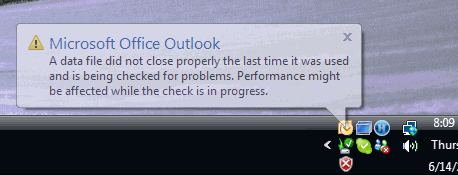
Everyone has Windows on their desktop, they are prehaps not even aware of what it is or if they are it’s unlikely that they know whether its Vista or XP. One thing they are aware of is how they get their email – they all know Outlook. And Outlook 2007.. isn’t cutting it. It’s Thursday and my helpdesk is swamped with issues like these:

C1

Why did it not close properly? Because Vista automatically updated and shut off the computer without waiting for Outlook to properly close. Thats a big bug in the product, don’t you think?

But what infuriates the user is that they are effectively unable to work now, because as soon as the message above fades away, Outlook stops responding:

C2

Oh, and does it ever stay there.

At this point the “information worker” is sitting there, staring at the screen. They go for a smoke / coffee break. Their boss asks why they aren’t working. The client asks if they received their email (“No, we upgraded 2007”). Everyone in the entire chain becomes affected.

The Solution

Don’t be so locked down to your client. If you are on Outlook 2007 chances are there is an Exchange 2007 or Exchange 2003 server somewhere in your organization, running Outlook Web Access.

For example,

Exchange 2007: https://scrooge.exchangedefender.com/owa

Exchange 2003: https://daisy.theofficeserver.com/exchange

Can’t wait for Outlook – pop up Internet Explorer and navigate to those links. If you’re lucky enough to have Exchange 2007 the experience is amazing, almost Outlook-like, sans the 2 hour rebuild process.

Don’t have that? How about a Pocket PC? Blackberry? Spare computer? Terminal server?

My arsenal includes:

Exchange 2007 at the core

Outlook Web Access 2007

Pocket PC: T-Mobile MDA (Windows Mobile 6 Professional)

SmartPhone: T-Mobile SDA (Windows Mobile 5)

Corporate Terminal Server

Second profile on the same PC with Outlook not in Cached mode.

The last part is quite important because it can work for you SOHO / mobile users, Google for fast user switching.

The Problem

This is unfortunately a problem that comes after the solution: Microsoft software is percieved as “not good enough” for corporate use. Scroll up, not only is the customer unhappy but s/he is telling their customer that they are unhappy with the upgrade to 2007.

Yes, there are plenty of contingencies.

Sadly, Microsoft doesn’t sell contingencies. Microsoft sells productivity and features. And when those features and productivity are negated by a product that doesn’t live up to the customers expectations… well. You don’t have a customer anymore.

What is particularly frustrating here is that Microsoft is building on top of Outlook, a product that only I seem to be happy with. Yesterday I chatted to a partner of ours, she had waited 1.5 hours for Outlook to start up – and was talking to me instead of working. Perhaps I should also note that her primary responsibility is selling Microsoft as well.

Microsoft ought to be afraid of Linux and Apple. But Microsoft ought to be more afraid of itself – for years I’ve heard Microsoft sales drones discard Linux as “We are our biggest obstacle, our products are seen as good enough so people won’t upgrade.” – I’m afraid to say that way of thinking needs to change. We’re not dealing with people that resist change, we’re talking about the customers that embraced new products, upgraded and are not seeing quality in Microsoft releases:

“Our customers are not happy with our products and are seeking alternatives.”

TS2 helps you get certified

Microsoft
3 Comments

SWAG that actually means something – free MCP (Microsoft Certified Professional, Microsoft Certified Technology Specist) exams from Microsoft TS2 guys, along with a free retake. There is a catch, you have to take the exam by June 29th. But, there are some great news here — it seems every TS2 guy has a code. So if one is claimed completely, try the next.

Mike Marshall: TS2MAR

Woody Walton: WAL or OVE

Peter Gallagher: TS2GAL

Even Eric has one: TS2MAR

You really have no excuse. Send an email to uspr@asentus.net and get a free voucher. There are more details on what you can do to pass one at http://www.msreadiness.com/partnerskillsplus but be aware that these exams are not easy so start studying.

24 – Vlad Edition

Misc
Comments Off on 24 – Vlad Edition

So how was your schedule yesterday? He’s mine.

0-3 AM Troubleshooting IAX and CID problems with Asterisk
3-7 AM Sleep
7-10 AM Driving from Orlando to Miami, confcall AhSay
10 AM Client Meeting
Noon Returning calls, approving ExchangeDefender patch
1 PM Driving to Boca Raton, meeting
2 PM Client Meeting
4 PM Driving back to Fort Lauderdale, phone conference
5 PM Finished phone conference, driving to West Palm Beach
7 PM Palm Beach ITPRO Meeting, presenting Shockey Monkey
9 PM Driving back to Orlando, listening to C2C
11 PM Passing out, eating BK at a rest stop
12:45 PM Back in Orlando, taking notes

So those of you that keep on asking how my 6 hours a day schedule is going… Needs improvement. To be honest, it is rare that I pull a full 8 hour day on “work” nowadays but when it rains it pours.

Impressions of the SBS Migration ITPRO Conference

Events
Comments Off on Impressions of the SBS Migration ITPRO Conference

I’ve had this post in the buffer for about two weeks; I wanted to let the euphoria of the social aspects of hanging out with my friends/peers/partners wash off so I can give you an objective view of just what went down, the good, the bad and the ugly. In terms of disclosure, my company Own Web Now Corp was a sponsor of the conference, I presented there and was involved in some pre-conference discussions but was not compensated for it. Nor for this review, for what its worth.

Define “Valuable.”

For me, every conference has a value that can be summed up in two ways – I either got a tangible income from it or I saved me time. If I got paid for speaking, if I sold a service, if I found a partner in XYZ city that gives me local presence with a client – money in the pocket. The flip side of that is time savings – I obviously do not work in the eBay PowerSeller / printer cartridge swapping business; I run a very high tech business and need to stay on top of the latest technology, something that requires classes, lectures, training, books, webcasts, virtual labs, executive luncheons – so if a conference gives me all that in one sitting it’s valuable. Get both of those components and it becomes spectacular!

Let’s face it, time is money. You’re either saving me money or you’re saving my time – or you’ll never see me or my wallet again. Pretty simple, right?

SBS Migration ITPRO Conference

I had no idea what to expect. When Jeff first pitched the idea to me he first told me about the SBS cruise ship followed by “I just want to throw a community conference, I don’t see at this as a commercial venture so this can happen without vendors.” Naturally, I expected to show up in New Orleans and watch a giant SBS group meeting.

It wasn’t that.

The conference happened over the course of two days, both during the weekend as to impact the work-week the least. I have to congratulate McLennan, SBS MVP for running the entire operation like a Swiss watch store clerk. Everything in terms of presenting and festivities was controlled down to the smallest details, felt like a wedding – for the first-time conference the execution and organization was almost perfect. That in itself is likely what made the show go on and make it a worth-while investment of my time.

Presentation content was fresh, for the most part. What was particularly interesting was the exchange that went on back and forth between the podium and the audience. It wasn’t just “You should do this” but every now and then the audience would ask “How? Who do you use? Who do you recommend? How do you do this? What type of hardware do you use this?” As we all know, the devil is in the details. The details were very worth-while. What made the entire trip worth it was the Sunday “Disaster Recovery” presentation marathon where over the course of the five hours or so you could see how people prepare and execute a disaster recovery plan. Not just disaster recovery as in “Too bad your stuff blew up, here is what you should have done” but more of the “Things to plan, things to do, things to follow up with!”

What made the conference absolutely phenomenal isn’t a single presentation, single person, single speach. It was the overall sense of what I need to focus on that was more clearly defined by being surrounded by people, presentations, lectures and idea exchange. How do I quantify that? On the flight back home I wrote five pages of talking points, agenda items and research leads that will affect our 3–5 year plan.

Size matters.

What put this conference over the top was the relative size. There were maybe 150 people in the audience, give or take depending on the session, time, day, vendors, family members, etc. What this basically means is that you can easily find the person that said something that interested you and you could go follow up with them. “Chad, what do you mean SharePoint 2.0 restoration is not bullet proof?” Got a business question? Technical question? Poll? Hardware recommendation?

This is what made it for me. We’re all geeks, we talk about geek things. We also talk about how those things make us successful, lets face it, everyone there was successful enough to take the Memorial Day weekend out of town – so on that logic alone it might follow that they might know more than your local “Can I have a tshirt” SBSer.

The Challenge.

Perhaps I’m alone at this, but I can deal with the intensity. Pack even more stuff in the space of two days, show me everything I may need to know about even if I don’t care. The stuff I care about I’ll follow up on and research, I’d rather be over informed than ignorant. The challenge of course becomes whether the people that are next to me, that are on my level, keep on coming back. If the people in the audience keep on having the same problems I have – staffing, training, billing, policy management, business goals and decisions – I’ll be back as well. This is a huge challenge for the conference organizer. On one hand, you risk the fact that the more resourceful/trained an individual becomes, the less they need you – plus you lose that sweet sponsor money because vendors don’t want to keep on selling stuff to the same audience that either already bought their product or isn’t going to buy it no matter what. On the other hand, if you focus the conference on entry level 100 slide-o-rama you lose your community following and people start ignoring you as irrelevant, or worse, a sellout vendor whore.

From what I know about Jeff, I know he will keep it close to the interests of the community and the leaders in this field. Why? That’s just the kind of a guy he is, and if you saw his closing speech you’d know that the driving value of t/his effort isn’t commercial. Jeff is a very good and smart guy, the way 1.0 went off I wouldn’t be surprised if the conference easily doubled to twice its size next year. Like SMBTN conference in the spring, this event was worth-while to a lot of us that have been in the business for years, that need some more sophisticated in-depth presentations but most of all need a good networking atmosphere so we can share and solve our issues with the help of our peers. That’s what SBS Migration conference did for me, and for OWN. Worth the money? Absolutely. Do I feel good about sponsoring it? Absolutely. Do I feel like I’ve mislead anyone by talking up the conference in my Vladcast podcasts? Not at all.

I’ll be back next year.

Developer conference? Really?

Events
Comments Off on Developer conference? Really?

Watching the “news” pour in about Apple “innovations” like mobile phone, mobile Ajax, another  browser for Windows and more jaw-dropping technology that would amaze us all…. in 2002.

Welcome to 2007. This past year has been a long, ironic journey in which Apple claimed victory over Microsoft by selling shiny hardware to Microsoft users…… thats right, so they could run Vista on it! Way to get em boys!

But today Jobs takes the hordes onto another ironic journey, that of a “Developer” conference that prominently displays no developer content but only delayed vapor eyecandy.. and the only concrete solid piece of release – the new Apple store.

British Invasion on Vladfire

Vladfire
1 Comment

As you may have noticed, Vladfire has had a sudden rejuvination.

And as my bandwidth stats note, you’ve (my dear valued audience) really taken to it. Just goes to show that people are looking for the more entertaining and portable way to learn about their profession. Last week at TechEd someone walked up to me and showed me my Exchange 12 deployment videos on their Zune. (yeah, someone out there owns a Zune! Bob I think)

Anyhow, as my road trips come to a close, I can dedicate more time to these things. So, later today the brand new Vladcast podcast will be out. Slightly longer, maybe closer to 10 minutes to discuss some of the interesting things at TechEd. Later this week, the british invasion. I have two gentlemen from UK that became very successful selling Microsoft CRM implementations there. Obviously, pricing / offerings in UK make it easier to offer these high end solutions to SMB customers, something that USA still does not have a firm grip on. I think you’ll like them.

On top of that, I have enough video of some remarkable people in IT, enough to release one a week for the rest of the year. So that, along with VladCast and some new projects / mashups is whats coming “real soon now” to Vladville.

How Erick Simpson defines success

IT Business
1 Comment

One of Erick’s articles got published this weekend.

http://www.channelpro-digital.com/channelpro/200706/?folio=38

Now Erick is a dear friend, an executive, teacher, presenter, an IT guy, a published author and now apparently magazine eyecandy. But if you’ve read his books, attended his workshops, listened to the man… you still wouldn’t get the keys to his success.

What makes Erick better than all of us? Well, a picture is worth a thousand words! Power a monitor and display a picture on it without power or video cables! That’s the future friends, wireless power!

Shocking the Monkey in new ways: Now via RSS and integrated via VoIP, SharePoint, Vista Gadget and more

Shockey Monkey
Comments Off on Shocking the Monkey in new ways: Now via RSS and integrated via VoIP, SharePoint, Vista Gadget and more

Every now and then you need a break from writing useful code that people will really rely on… and you start coding crap just to see if it would work. Earlier today I had lunch with one of my buddies that just passed the Asterisk/Fonality – Certified Asterisk Administrator training and just had to have Shockey Monkey integrate with Asterisk!

So, move over accounting integration. Forget about partial page rendering and display optimization. Who cares about a more extensible WMI reporting agent? It’s the stupid feature day for Shockey Monkey.

Today I took a big break from the studying, writing useful code and solving problems… to work on more creative ways of shocking the monkey. The big idea behind the monkey was to integrate all the features that are currently a part of the everyday IT interface and rely on them, instead of replacing them. So, today I worked on some syndication and integration features that precisely 3 people will use: RSS XML feed and HUD Lite integration into Asterisk.

RSS/XML

Implemented using as barebone RSS 2.0 spec as functionality will permit, Shockey Monkey tickets are now available as an RSS feed. The XML file is dynamically generated and supports updating tags as well, meaning that the stuff will stick in your RSS feed at the top until you close it. Thats right, RSS is for closers!

Upon clicking on the item you will see the support request details, such as which company its opened for, who opened it, when, priority, status, category, etc. Click on the subject of the item and it logs you straight into Shockey Monkey with ability to update.

How have I implemented this so far? Well, I’ve thrown it into a Vista RSS gadget, into my Google Reader and into the SharePoint portal. The big idea, of course, is for the open tickets to reach your users in as many ways as possible. Let’s face it, we don’t look / live in the same place all day, I catch things out of the corner of my eye all the time. Again, I hope this helps the 3 people that will actually use it 

VoIP Integration

As I mentioned, we’re sitting around and Judd says: “I want this integrated into Asterisk. When the user calls I want to look up their Caller ID and bring up their contact. If we can bring up their contact we can know what they want, work on it immediately. If we can’t, off to the sales they go!

Why didn’t you say we could make money from this from the getgo?

Less than an hour later it was done. Four hours later, a fight with PEAR, PECL, hash and some more RTFM on the intricacies of encryption… it’s flawless. Someone dials in and the Internet Explorer or Firefox window pops up with the search results of all contacts that have that phone number listed in their phone or contact areas.

Can you wait a day?

This obviously deserves some documentation, I will have a video up tomorrow detailing it all.

However, if you can’t wait, these features are already in your portal.

For the RSS feed:

https://demo.mspticket.com/rss.xml?
username=your@emailaddress.com&password=yourpassword

For the HUD/Asterisk integration:

https://demo.mspticket.com/search.asp
?search=%%caller_number%%

And with that, the stupid-feature-day comes to an end. Is this useless?

Update: Not a minute after the post went live I get an IM: “Awesome! Count me in as #4!” – I’m almost tempted to do Count von Count impressions.

Funniest video of TechEd Attendees (Not Microsoft owned)

Vladfire
1 Comment

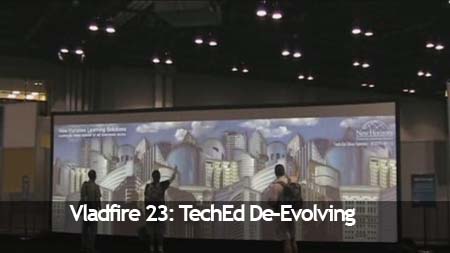
Microsoft TechEd 2007 had a lot of cool things, the tagline this year was “Make your Mark” and one of the coolest interactive toys was this motion-responsive projector screen. Basically, there was an image projected on the screen (mostly advertisments and Microsoft brands) and activity / motion in front of the screen would trigger various special effects. Things like butterflies following you as you walk by the screen, raising buildings by lifting your hand, etc. Very cute stuff to try on your own.

But, as usual – the true entertainment comes with others that are easilly amused by this. The guy in the video spent some 15 minutes jumping around this thing with likely a 25 lb bag on his back and another one in his hand (as you can tell everyone around the screen is hunched over). This video is the undeniable proof of evolution – in reverse!

Vladfire23

Click here to stream the Quicktime (.mov) video

Click here to streap the Windows Movie (.wmv) video

Please watch the video, I guarantee it will crack you up. The music helps a lot too, courtesy of the geek folk singer Jonathan Coulton. This is perhaps my favorite Vladfire episode, it is the best way you can spend 4 minutes today to lose faith both in our profession and our species.

Shockey Monkey Installfest

Shockey Monkey
Comments Off on Shockey Monkey Installfest

As usual, Shockey Monkey community installfest happens tomorrow night, Saturday, from 8PM till Midnight. If you haven’t had your service turned up and you plan to hop to the front of the list add shockeymonkey@ownwebnow.com to your MSN IM list and contact me during the window above, I will issue the SSL certificate signing request, DNS and get you up and running immediately. This has worked rather well for a few weeks now so I’m doing it again.

SMB IT provider and you don’t have a customer portal? What are you waiting for?

Update: All done for the evening. I’m in a particularly good mood so the process went far faster than usual. I’ve never activated this many people in one sitting, Shockey Monkey has really picked up on the popularity levels as of late, I’m seeing a lot of “XYZ showed it to me and I’m dying to have it in my business” type of comments on the new signups. It’s all good. It also helps to do the scheduled activation window, the brainchild of Erick Simpson who suggested I pick a time and have a “Vlad free-for-all” slot in my schedule instead of doing 1 on 1 stuff. I originally ignored it because I wanted to get as much direct feedback as possible but I must say that both the satisfaction and the feedback levels (in terms of bugs and feature request numbers) have increased since I started doing this.

So thanks to everyone involved in the project, you guys (and gals) really help!