

Something To Get, Something To Avoid

Web 2.0
4 Comments

On the subject of getting stuff, Skype 2.0 is out. Skype, for those of you under a rock, is a VoIP network that allows callers to do video and audio chat, including conference calling. Unfortunately, it has had its fair share of criticism from paranoid security experts that do not understand peer-to-peer technology. Chris has a great writeup on the irrational fears that people have toward Skype. Anotherwords, get it. Now what to avoid: Google Desktop. This is perhaps the best piece of Google software ever released (yes, better than Gmail) but the new version has "Search Accross Desktops" feature which apparently mirrors documents on Google's servers:

Google today announced a new "feature" of its Google Desktop software that greatly increases the risk to consumer privacy. If a consumer chooses to use it, the new "Search Across Computers" feature will store copies of the user's Word documents, PDFs, spreadsheets and other text-based documents on Google's own servers, to enable searching from any one of the user's computers. EFF urges consumers not to use this feature, because it will make their personal data more vulnerable to subpoenas from the government and possibly private litigants, while providing a convenient one-stop-shop for hackers who've obtained a user's Google password. – EFF

I don't care about the do no evil, this crushes all boundaries of reasonable privacy compromise to make your personal information more discoverable. As a card-carrying member of EFF I urge you to avoid this one.


Advice on Spreading Product Launch News

IT Culture
5 Comments

Key word being: spreading. Fabio is back:

"I'm happy to be back, spreading the news about the new, great tasting I Can't Believe It's Not Butter!," Fabio announced recently. "My romance with I Can't Believe Its Not Butter! never really ended so it is fitting that the love affair is out in the open again through an exciting new advertising campaign."

How does this matter to you? Well, the key lesson here is that there is no shame in promoting oneself. Be it your role in IT or your IT business, you cannot be ashamed about what you do to the point that you cease to promote it. If you're not proud of it, improve it.

MSFP Beta Leaked

Mobility
1 Comment

Microsoft Mobility & Security Feature Pack (MSFP) beta has been leaked. Check it out, it seems to be an older beta of MSFP, try at your own risk. This one requires a flash so please think twice. Download it here.

OneCare Live to go Live in June for $50

Security
2 Comments

Kevin Remde is talking about OneCare Live pricing: $49.99 per year, protecting up to 3 PC's. To thank everyone for testing the beta, Microsoft will offer the first year of OneCare at $19.99 to its beta friends. Anotherwords, go sign up for the beta today 🙂 This certainly deals a new hand to the Norton franchise that has for years pushed their collection of broken paranoia (I don't dare associate "security" with Norton brand) software for $99 / year. I know I am not alone at this but I for one do not feel I should be paying for antivirus software. The backup, firewall, etc – Do you take Amex? But to pay for flawed software design, thats what I thought the actual Microsoft Windows XP license was for! You can't double charge me for a broken OS and fixes, thats like Cisco trying to charge me for drivers. Oh! P.S. Fifth blog post today, and its only 3:40 AM. I must be getting that Susan Bradley disease. I've even run out of creative title ideas.

Free Mobile Push for Windows Mobile & Blackberry

Mobility
2 Comments

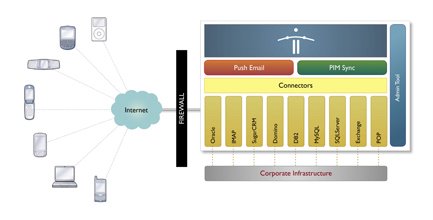
I realize this post is coming up at 3:30AM and I was dead tired about 20 minutes ago but this is just too cool to sleep on. Funambol is an open source company that provides mobile sync software for Windows Mobile, Blackberry and a ton of other commodity wireless devices. This is earth shattering, at least in my little world. I may never have to pay Blackberry ever again. It cuts out the middle-man and it also cuts out the need to have Blackberry or Exchange service on the backend. Software (Apache & Tomcat java based) can fetch data from multiple backends including Exchange, POP3/IMAP accounts, even freeware groupware and CRM packages. This is big. This means you can have push email from your aol.com address to your Windows Mobile 5 if you want to. It means this mobile sync will bring email, contacts, tasks, etc to your device. There is a server component, backend connector and the client software for your device. I am absolutely dying to check this out, it is by all means, the most exciting piece of code to come out in 2006 so far. It is java based which means cross-platform goodness that will run on Windows or Linux. Great time to give that free Vmware Virtual Server beta a try. All are available as a free download.

Leaking The Cause of MSFP Delays

Mobility
Comments Off on Leaking The Cause of MSFP Delays

The speculation over MSFP being delayed by the Visto lawsuit is fairly rampant, but I've found another gravevine that has a somewhat more believable excuse:

AKU2, which is the release you are discussing, has MAJOR memory leaks and is not what could be considered viable (and yes, I am using the release). Patches are being worked on, but I think anything you see in the next 2-4 weeks is unpatched and therefore likely to require frequent resetting (but hey, these are MS devices!)

Whatever the outcome, expect MSFP to delayed in USA significantly (as is anything mobile coming to USA since we're the third world of mobility) and even further if it is not solid. I do not think carriers have forgotten the need to pull HP 6315 off the shelf three times before a solid firmware was delivered.

Peter Galagher on SBS MobileAdmin

Mobility
4 Comments

The following comes from the guys over at Inside SBS, talking about MobileAdmin on SBS. This topic was recently brought up on the SBS2K list and Peter Galagher forwarded over a little tweak that allows MobileAdmin to work on SBS:

  1. Download the Mobile Admin pack
  2. Backup the metabase in IIS (right click the servername in IIS -> all tasks -> backup/restore -> create backup)
  3. TEMPORARILY set the default website to “all unassigned” (if it is not already)
  4. Run MobileAdmin.exe that you downloaded in step 1.
  5. Reset IIS back to the way it was before step 3, if applicable
  6. Open the properties for the ExAdmin virtual directory under the default website -> directory security -> Edit for Secure Communications and uncheck “Require SSL”
  7. Restart the IIS Admin service

Basically the same steps as in the guide but uncheck "Require SSL" from the ExAdmin directory in IIS. And as Mark states in big red font: No, there is no MSFP available yet and the remote wipe/mail push requires it.

I Got The Hookup: Windows Mobile Specialist

Mobility
7 Comments

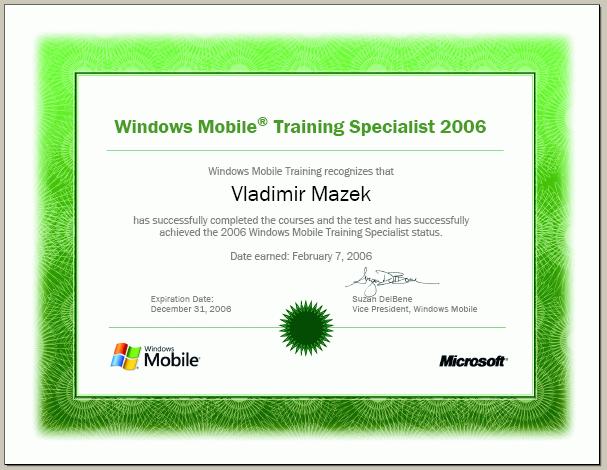
The Windows Mobile Training site is a resource I have mentioned a number of times as perhaps the second best resource on Windows Mobile, second only to msmobiles.com. It has a ton of sales, technical, demo and lab information to help you understand Windows Mobile solutions, get training on both the sales and technical side (as all IT Professionals should understand the business problems before they can begin to solve technical ones) and more. Well, I was checking on the site to see whats new with the Cingular 8185 device that is coming on sale in USA and I noticed they had a "Windows Mobile Training Specialist" program. So I took a few minutes to pitty it. Hey ma, clear some room on the wall we got another one! Before you're allowed to take the specialist exam they make you go through the training on hardware and on the sales (it's actually at least three sales labs and exams that basically introduce you to the Windows Mobile 5) and one technical (Where you get to find out what the device does, whats special about it, etc). So I'm a Windows Mobile Training Specialist now. Let the training begin: There is no Windows Mobile 5 Microsoft Mobility & Security Feature Pack (MSFP) available on the market today. There are no public MSFP emulator images available today. Consider yourself trained!

Gmail now logs Gtalk traffic, WOW!

Google, Web 2.0
5 Comments

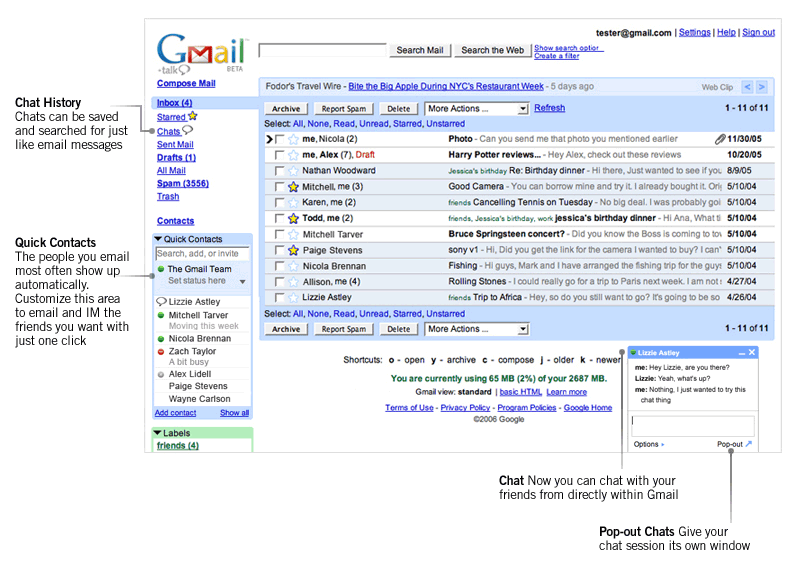
Gdon't care, not really. I only know of one person that actually installed this program and believe me, I tried hard to find someone to play with me and see what Gtalk can do. At the time, not much, aside from a branded stripped down Jabber client it didn't have anything to offer. Google seems to keep on pushing forward with this, it has integrated Gtalk message history (conversations) into Gmail. Aside from being based on an open platform Gtalk really has nothing to offer, especially when you consider other clients that have it beat by a mile. Furthermore, nobody really uses the Gtalk software – everyone seems to be on Gtalkr. So why post this at all? Well, there are such high expectations for Google to provide a Google Cube, power the Google Internet, deliver Google Office, Google Linux… Yet they can't even write a decent IM client and get spanked at it by two Flash programmers. I hope this puts the rumored Google ambitions in some context, if it doesn't go check out Google Pack and it's merry bunch of freeware and you'll see what I mean.

Back from the rock: ISA 2004 SP2

Security
1 Comment

With all the drama in the Microsoft partner world I seem to have been under a rock for the past week or so. Turns out Microsoft ISA 2004 Service Pack 2 was released last week! SBSers feel there isn't much in this one for them, I disagree: Support for BITS caching Think of this as the ghetto WSUS without reporting or policies. Basically ISA can now cache BITS traffic so if all your systems are using Windows / Microsoft Update you will not have to destroy your network connection by having each system download the patch. They will download it direct from ISA which will fetch it from Microsoft once. Very slick. HTTP Compression ISA can now fetch and serve compressed HTTP content from its cache. Think faster OWA. Well, think faster any-web-app-you-serve. I am not a 100% sure if this will automatically apply gzip to everything that goes out of the ISA cache. Traffic Prioritization You can set QoS on packets based on the URL they are going to. Let's say your main business is clearing stuff on eBay but your workforce just happens to spend a lot of time surfing around sports.yahoo.com. Well, add ebay.com as the first priority and sports.yahoo.com as the second and you've got your very own QoS. Check out the whitepaper for full details. Update: There is now a blogcast walking you through the installation of ISA 2004 SP2. Certainly check that out and RTFM before rolling it out. Susan also has a warning about doing this remotely although many are reporting it is not an issue.