What in the world is a Podcast?

Podcast
10 Comments

I was at the Tampa Bay SBS group meeting last night and a few guys asked if there was supposed to be any video in these podcasts. While I'm sure plenty of folks would pay for some video of our Queenie, no, there is no video in podcasts. Not to mention that Chris and I "have the face for the radio" and would effectively have to kiss our audience goodbye. But the guys I spoke to are pretty active SBSers and if they didn't know what to expect out of a podcast then its likely that most people out there don't get it either so let me see if I can sum up what a podcast is, how to use one, etc. What is a podcast? Podcast (personal on-demand broadcast) is a recording of a radio show you can download off the Internet. No video, just sound, and usually quite low quality to make it a smaller download. Unlike a streamed audio file, podcasts are intended to be downloaded and listened your own pace, time and place – on your computer, on your mp3 player, on your media center PC or while driving. Files are quite small (less than 20 megs for over an hour of talk) and traditionally involve one person with nothing to say recording a show for someone that has nothing to do. SBS Show is technically an icecast because we always have guests and more than 1 person talking which basically makes it a lot like talk radio except without Garliq commercials. So I just download this? You can, but that is not the preferred form of transfering these. Much like blogs the cool thing behind podcasts is that they are wrapped in xml/rss enclosures and come with a wide set of tools to make subscription to these shows easy and effortless. For example, the SBS Show has a feed which is integrated into places like Yahoo and Itunes. You can just go to these sites, subscribe to "SBS Show" and those clients will automatically download the mp3 of the show when it becomes available to your mp3 player or your computer. You can also use series of aggregators which are programs designed to collect podcasts and download them for you so you don't have to navigate to places like www.sbsshow.com every week – its done automatically. Got it! What now? Once you have the mp3 file you sit and listen to it. Or in Joey's case you put it on an mp3 player and take it to the gym. There is a big misconception that podcasts are somehow related to Apple, they are not. You do not need an Ipod and for the love of god don't give money to Apple. Any dinky $30 mp3 player will be a champ at playing back podcasts, after all, they are just mp3 files. You can play it at the office, in the gym, on your way to work/client/wedding/during sex. It is just a very versatile form of distributing information and quite entertaining at that – for those of you in the business world think about getting useful technical and business information without powerpoint. Whoa, sounds pretty complex. Dumb it down. Ok. Go to podcasts.yahoo.com and search for SBS Show (or click here) – Scroll down the list until you find the show you wish to listen to. Click listen and enjoy. Now lets say you had an mp3 player or wanted to listen on your computer. Well, go to http://www.sbsshow.com and click on the download link and either save to the mp3 player or open with the media player of your choice. If thats too complex just open up a recent version of iTunes, click on Podcasts and in the search field type SBS Show – list will drop down, pick the one you like the most and hit play. Thats it! But wait, I'm a power user! Wooohooo. Okay, in that case you'll want to subscribe to podcasts and really waste some hard drive space. First thing you need to get is an aggregator which will collect these podcasts for you. They are called podcast aggregators or podcatchers. Yes, they are all free. At the simplest level there are Yahoo Media Player and iTunes. Both will collect podcasts for you. If you'd rather put the mp3's on something more exotic, such as a Media Center PC or a PocketPC (or a Linux workstation) there are things to that as well. My personal favourites are Doppler which is available both for your Windows desktop and your mobile PocketPC. If you're looking for something cross-platform there is always iPodder. Whichever software you select you'll need to find a feed. Feed what? We ain't on a farm boy! RSS/XML feed is the file that podcasters use to format their podcasts for syndication. They include the link to the file, date it was made, length of the recording, brief description, etc. It is how iTunes tells you what you're about to get. While most people will never see this because 99% of people use Yahoo and iTunes I figured I'd mention it. Let's say you're browsing around a random site and you really find a podcast that you're really interested in but you're experiencing an out-of-attention issue. You can't find it in iTunes but they have this little RSS/XML orange icon. Well, that means they published their podcast feed. Right click and copy the address and paste it into your aggregator. Few minutes later you'll be downloading a collection of that podcasts recordings. Subscribe to the SBS Show Overview Don't buy an iPod. If you've found stuff you enjoy lisitening to online you can use an aggregator to subscribe to your favourite digital radio shows and listen to them at your own pace. And no, SBS Show has no video's of Susanne you can download.

Microsoft Security Bulletin MS06-003

Security
Comments Off on Microsoft Security Bulletin MS06-003

Microsoft released a security bulletin today that may be panicking a few more people than usual, namely the Microsoft Security Bulletin MS06-003 titled Vulnerability in TNEF Decoding in Microsoft Outlook and Microsoft Exchange Could Allow Remote Code Execution (902412). Now if you read the bulletin all the way through, and I know for a fact nobody out there actually does this so here it goes: This security bulletin does not affect Microsoft Exchange 2003 SP1 and SP2, just Exchange 2000. There is another one that does affect the server so get ready to patch. Tomorrow as usual is the Technet webcast to discuss these patches.

Fun with Microsoft’s CEO

Microsoft, Misc
27 Comments

This has been quite a good week so lets see if we can have a little fun with this one shall we? Below is the picture of Steve Ballmer (CEO of Microsoft) presenting at the Microsoft TechReady conference. Steve is famous for… well… his hurling ability. I have $5 worth of advertising that Vladville has collected over the past 12 hour or so and I'm sharing the wealth. So here is the game: So the person to put the best quote into Steve's mouth gets $5 😉 My guess is: "Wanna bet I can throw this podium over that wall?" P.S. Picture credit 2006 (c) Kevin Remde.

Preparing for Windows Vista in Small Business

Microsoft, OS, SMB
5 Comments

So in today's mailbag comes a question from Nick asking: "Love the SBS Show especially one thing questions and I have one for you: What should we do to prepare for the Windows Vista?"; Just among the many folks in the one thing fan base so let me look at this from as many angles as possible: Find or become Microsoft Small Business Specialist Microsoft Registered Partner Program is running towards extinction, rightfully so, and all the money is going into the SBSC program. If it were not for Microsofts insecurity about their monopoly (god forbid someone find out there are folks other than Microsoft writing software) the Action Pack would go off the cliff as well but the risk of having Action Pack on eBay and massive licensing fraud actively practiced by many small business consultants is a small price to pay for locking them into the Microsoft platform for decades. Those are the just the ugly realities of the marketplace, you can't expect everyone to behave ethically and MAPS does benefit a fair amount of partners that are just starting their businesses. In my humble opinion, that will be the only perk left for the uncertified partners. Now sit back, relax and even if you're a consultant consider who you would trust with your systems and your network. One-man-band or a Microsoft Certified Partner / Microsoft Small Business Specialist? That ought to be a really simple question to answer. Microsoft is thinking the same way. Microsoft is finding competent consultants and businesses that understand their platform and can support it. They are also Microsoft's sales force, and Microsoft is putting the money into the pockets of Small Business Specialists. For example, this month will be the last PEP (Partner Engagement Program) extended to people NOT in the Microsoft Small Business Specialist program. What does this mean? Better network deployments for the small business clients. Actually competent, certified and backed by Microsoft. It will also be cheaper. Yes, cheaper. Microsoft is throwing many incentives down the Small Business Specialist chain, for example you will almost be totally compensated for costs involved in consulting/deployment if you buy Windows XP / Office 2003. So if there is one, I repeat, one thing you should to on your road to Vista its to get a Microsoft Small Business Specialist certification or at least partner with someone who is. The second, third and fourth… In no real order there are more than a few non-business technical things you should pay attention to. Remember that you're looking at something that will not be available for another year (which probably means you will not be deploying it until at least next Spring/Summer). We still do not even know which features Vista will offer so its a little too presumptious to assume you'll even want to move up immediately (if even in the mid to long term). There are several features (such as Limited User Access) that might be very appealing but I'd argue its more a factor of the poorly written application than an OS. Either way, if you're sure you'll be upgrading your existing infrastructure right away Start purchasing AMD 64 X2 series workstations. Dual core is quite affordable and offers a lot more performance than single core processors. Look for things that have hardware DEP (or if you're going with Intel Execute Disable Bit switch) so you don't have to relive the recent WMF scare. Spend the extra money on the upgraded video card. Yes, really. Vista is very graphics intensive and there is a lot of talk about Microsoft DRM requiring hardware co-operation. Keeping that in mind you might want to get a video card that is actually supported by the designer (ATI, Nvidia) and not the El Cheapo of East Taiwan. Of course there is the going concern of turning your workforce into a big deathmatch party every Friday but those things do boost morale. Finally, the more things change the more they stay the same. Get more ram. Lot more ram. There are so many memory intensive things coming out already before Vista (like Microsoft Bloat-namics CRM which recommends over 1GB of ram just for the client piece) so spend the extra money on memory. Vista will (hopefully) include a feature that allows you to apply a security patch and reboot w/out losing your work state. Imagine a process by which a security patch is installed without you having to exit Excel or stop that long email to me 🙂 There is a lot of evidence that Microsoft will make Vista easy to move up the feature chain. Media will include all the bits for everything from Home up to Enterprise, so if you ever need a feature that requires a higher-up edition of Vista you can do so by just re-entering the product code. Keep that in mind when you're making a decision on whether or not to spend extra $15 on a memory upgrade – if you do minimum spec for a Home edition and then one day need it to work in a domain the last thing you'll want to learn is how to add more RAM or try to swap out a CPU 🙂

27 miles later Vlad is Back!

Misc, Vladville
10 Comments

Yes, I'm back. Not really running, more like limping and crawling. Last year I ran my first half-marathon at Disney World and it was such a thrill for me that I only remember telling my girlfriend that I could have easilly done the full 26.2 miles. I don't do anyting small. It is one of the reasons I started running in the first place, I would always manage to out-eat my break-even at a chinese buffet. Take all you want, eat all you take! So yesterday was the big day and I ran the marathon. It was perhaps the best 18 miles I traveled on this earth. Miles 19-22 were a little rough. On mile 23 I actually contemplated taking a nap and I am not sure how exactly I made it to mile 25 but I did take a picture. From there on I can only imagine I felt like my friend Jen who is habitually drunk (FUBAR-style) at Epcot. No wonder she never wants to go anywhere, it definitely seemed much further than ever before and I've been to Epcot 100's of times. Suffice to say, I finished the full 26.2 miles plus about two miles during the start, looking for the parking lot, starting corall, etc. Now the big question is usually, why? Why do something so suicidal. Here is my somewhat honest answer and there are a few parts to it. Mainly, stupidity which is reinforced by being male. Next in the line is ego.. I'm extremely good at what I do and marathons are very much a humbling experience. If you're not an athlete and you've never been physically beaten by someone twice your age you might want to give competitive sports a shot. It gives you a really good perspective on where you stand despite your successes in other areas of your life. At least it does that for me… but man, never again. I'll just stick to my wuss half marathons and feeling great after ~ 13 miles. On the other hand, I've been virtually crippled for the past day or so.. and here comes the new Vladville. I am still working on little bits and pieces but it has some of the stuff I've really wanted on here for a while. I think the best description of the blog comes from Guy Kawasaki: "blogger, n: someone with nothing to say writing to someone who has nothing to do."; This blog has had a purpose since day one when I set out to mobilize IT folks in Florida and drag them to all the places they could get better at thier job. That eventually grew into the world-wide reach with over 57 countries leaving comments and sending email. I think this new design makes it easier to find what you're looking for without drilling through a bunch of junk and believe me… 3 million article downloads and hundreds of thousands of SBS Show listeners hit the piggy bank pretty hard – so I figured I'd do to Google what they wanted to do with me: Make that money for me . Hope you enjoy the new Vladville!

Pardon The Dust

Misc, Vladville
Comments Off on Pardon The Dust

… we are working on making this more magical for you 🙂 I'm working on updating the layout code and templating for Vladville over the next few hours. Please ignore any errors or "unreadable" issues you encounter with Vladville until you see me say I'm done. Thanks! Update: I give up. 2006 is not going well so far, I think I'll just try later and see where it gets me. Quite frustrated. -Vlad

SBS Show #12 – Business Success in SMB with Beatrice Mulzer

SBS Show
18 Comments

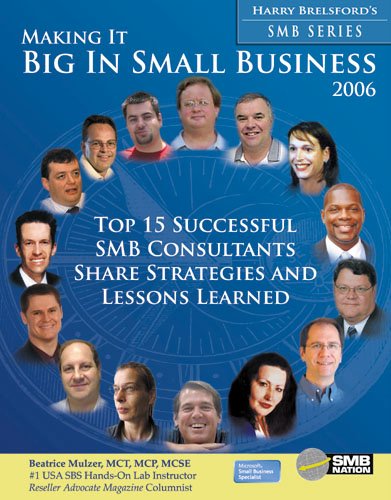
SBS Show #12 features Beatrice Mulzer talking about her new book: "Making It Big In Small Business 2006: Top 15 Successful SMB Consultants Share Strategies and Lessons Learned"; As promised in the SBS Show #11 with Eriq Neale where he talked about his new technical reference, SBS Unleashed, we are doing our part to review some of the books that we feel would make you a better technician or a business(wo)man with SBS. The better business part, in my humble opinion, is covered by Beatrice's new book. It is a detailed look at the business leaders that have built successful practices on SBS Worldwide. In her own words "SMB Consulting Best Practices is a wonderful MBA book, and this is the next step. It is a look at how others have successfully implemented Harry Brelsford's techniques." Download the SBS Show Episode 12: Click Here http://www.vladville.com/sbsshow/sbsshow-episode12.mp3 We're also running a little contest. During the show I read a small passage from the book so the first person that emails me with the person that said what I read gets a little unique SBS Show prize. 🙂

Talk about starting off on the wrong foot

IT Business
Comments Off on Talk about starting off on the wrong foot

About three hours ago Chris, Beatrice and I got together to record the 12th episode of the SBS Show and talk about Beatrice's new book "Making It Big In Small Business 2006: Top 15 Successful SMB Consultants Share Strategies And Lessons Learned" and we recorded the whole episode. Over 1:30 in raw time (obviously there are many things that would get cut and edited out from the whole thing since the show is not live) and the Windows XP box that I've used to record every show so far just blew up. Not a little crash, not a timeout or a non-responsive application — all out blue screen of death, nothing left but a few temp files and a few periodic saves I made. In the interest of giving this subject its right attention we decided to attempt again tomorrow night. I'm sorry if you wanted to have some entertainment when you go back to work on Monday but those are the breaks… If you can't wait for the interview go and buy the book from Harry.

My 2006 Resolutions

IT Business, Misc, Vladville
1 Comment

In a few minutes I'm taking off to bring in the new year but before I hop on to that I figured I'd post my professional New Years resolutions. I'm farly public and up front about almost everything I do so here is what I'll strive to dedicate more time to in 2006. Communication Support & Development 2005 was a big year for me in this respect. My Exchange series of articles covering service packs, small business deployments, instant messaging and so on has been downloaded well over a million times. It has been an unbelievably gratifying experience to help so many people and I thank every one of you that took the moment to tell me how much time I've saved you. It has been my plesure. The 2006 looks to be a very big year in terms of next generation of messaging platforms, mobibility possibilities and how we use computer networks to stay in touch. I hope to help at least twice as many people through my Vladville and SBS Show efforts. Keeping it Real, Honest and Fair Honesty is the cornerstone of our society. Being objective and reasonable in technology choices is a mark of a true IT professional. While it does not universally build friendships with every vendor, I would have no respect for myself or anyone else that blindly follows Microsoft, Linux, MacOS X, or any other thing or diety. I'm going to work a lot harder on keeping an objective technical as well as business-oriented look at everything that is available to make us more productive and less hung up on data-entry details. Not moving to Firefox, MSN Messenger, Google Desktop and RSS Bandit faster has been a personal failing of mine in 2005. In 2006 I will look at more opportunities to make myself better and more efficient when it comes to personal time management and the management of my clients. Hit it Harder In 2006 we're (as in my Own Web Now Corp team) are going to hit small business a lot harder than we ever have before. As I already said, there are so many opportunities out there and I feel that we now have a huge network of professionals that feel the same way. I'm going to dedicate a lot more of my time and a lot more of OWN resources to growing that channel, growing the brainshare in that channel, and making every single individual I deal with a more successful technician, business man.. a true IT Professional. If you thought the initiatives through Vladville, SBS Show, SMB Nation and Orlando IT Pro (not to mention all the other SBS groups I've supported) were something in 2005 you'll really be surprised in 2006. But most of all.. remain positive. Finally, and this is not a promise, I will do my best to be less critical. I take enormous pride in what I do and who I do it with. I never take things personally in business but I'm very aware of my SWOT, ROI, TCO and I re-evaluate it month-to-month, day-to-day, minute-to-minute. In 2006 I hope to take that to the next step and start focusing on the many positives that I've helped generate, not the very few disappointments that came as a side-story.

Patch for WMF exploits

Security
6 Comments

I'm sorry to interrupt your New Years plans but there is now a patch available to stop the exploit of WMF (and all the other images processed by the vulnerable shimgvw.dll library). It is made public, along with the source code, by Ilfak Guilfanov who is a very popular decompilation expert. http://www.hexblog.com/2005/12/wmf_vuln.html Should you patch? Yes, immediately. Even if you've blocked WMF files at the firewall and everything else is up to date there is now a first worm running in the wild under the file xmas-2006 FUNNY.jpg so exercise caution and start patching.