
Microsoft Small Business Summit Replays

IT Business, SMB
2 Comments

As we're all busy with the new quarter, taxes, speaking engagments, product rollouts and conferences the SBS Show is taking a little spring break. However, it is not an excuse not to learn. I for one have been working on C# and Mono for about two weeks now and there is no greater satisfaction than getting better at what you do. Along those lines, not everyone is at the same level. Microsoft held their first-ever Small Business Summit and broadcast it over the web. This caught far too much flak over the poor organization and execution (LiveMeeting) but the content was beyond excellent. Eric Ligman has posted the replay information so bookmark it and view in your spare time:

Day 1: Keynote Sessions

– Kevin Turner MS COO: Celebrating and Supporting Small Business: View Replay

– Maxine Clark: Putting the Heart Back into Retailing: View Replay

– Keith Ferrazzi: Skills & Techniques for Building & Maintaining Your Network of Contacts: View Replay

– Douglas Leland: Learn How Small Business + Can Help Your Business: View Replay

– Michael Park, MS VP & Cindy Bates GM: What to Expect from Days 2-4: View Replay

Day 2:

Keynote

– Mike Nash MS VP: Security Alert: How To Protect Your Business: View Replay

Sales & Marketing Track

– Guerilla Marketing – Big Budget Marketing on a Small Business Budget (Breathing Life Into Your Marketing Strategy): View Replay

– Demo – Microsoft Office Live – MS Small Business Services: View Replay

– Customer Case Study – Chez Jane (Gourmet Garlic Spread Co.): View Replay

Financial Management Track

– Microsoft Small Business Accounting Demo: View Replay

– Technology That Evolves With Your Business: View Replay

– Have you Outgrown Quickbooks? (Is it Time to Look for A Better Solution?): View Replay

Productivity & Mobility Track

– Is My Business Ready For A Server?: View Replay

– How Software Can Help You Run Your Business More Smoothly (Transforming Your Business With A Server): View Replay

– The Next Generation of Small Business Server: View Replay

Computer Security Track

– Keep Your Computer Free from Viruses and Worms: View Replay

– Windows OneCare: Automatic PC Maintenance: View Replay

– Why Pirated Software Will Cost You in the Long Run: View Replay

Day 3:

Keynote

– Gary Hoover : How to Become a Forward-Thinking Business: View Replay

Sales & Marketing Track

– Hold a Meeting from the Comfort of Your Office: View Replay

– Small Business Webcast:Business Contact Manager for Microsoft Office Outlook Demo: Connecting with Customers: View Replay

– Get the IT Advantage with a Microsoft Specialist: View Replay

Financial Management Track

– Techniques for Managing & Maximizing Your Cash Flow: View Replay

– What the Small Business Administration Can Do For You: View Replay

– Case Study – CAL Business Solutions: View Replay

Productivity & Mobility Track

– Take Your Office with You Using Windows Mobile: View Replay

– Technology Trends in Small Business: View Replay

– Small Business Offer: Core Technology for the Price of a Daily Cup of Coffee: View Replay

Computer Security Track

– Top 5 Reasons to Protect Customer Data: View Replay

– Peace of Mind with Microsoft Windows Update: View Replay

– Is Your Business in Regulatory Compliance?: View Replay

Day 4:

Keynote

– Jeff & Rich Sloan: The Devil is in the Details: View Replay

Sales & Marketing Track

– Get the Most Out of Microsoft Office: View Replay

– Sales and Marketing 101: How to Boost Recognition, Improve Credibility, and Develop Customer Trust: View Replay

– When Fish Fly: Beyond Customer Service, An Opportunity to Make A Difference: View Replay

Financial Management Track

– How to Pick the Right Financial Solution for Your Business: An Interactive Quiz: View Replay

– Beyond Bookkeeping: Software Strategies for Growth: View Replay

– Online Resources for Your Business: View Replay

Productivity & Mobility Track

– Business Mobility – Gaining Access To Your Data From Anywhere In The World: View Replay

– Business Agility – Helping You to Make Decisions Faster: View Replay

– Demo: SBS – Small Business Server – Remote Technologies, Learning How To Share Calendars And Contacts: View Replay

Computer Security Track

– Vista Demo – The new look of Windows and how it will change small business: View Replay

– Seven Steps To Better Security: View Replay

– Adding Network Security in Minutes: View Replay
Downloads to check out this Weekend

Programming, System Admin
1 Comment

Here are few downloads that caught my eye and are sure to fill up a boring weekend assuming I get more than an hour off to play around. Enjoy. Windows RSS Screen Saver Sample in C# Creating Windows Mobile 5 Line of Business Applications (code & webcasts) Microsoft Exchange 2003 SP2 Standalone Help File

Stupid Mac Users: Decade later, still blind.

IT Culture
Comments Off on Stupid Mac Users: Decade later, still blind.

Earlier today I posted a rather puzzling and apparently inflaming article towards the Apple's latest attempt to convince people that their platform is not a niche for desktop publishers, low-end media and kids. What ensued was a slight flame war in my comments between Mac fans and Mac haters. I chose to end it when someone called the Mac users to "get back on the short bus" What is ironic here is that Mac fanatics have been undying fans one Apple blunder after another, constantly feeling that they are somehow special and better while being pushed to a more and more obsoleted solution. From 68K to PowerPC, from OS9 to OSX, from DRM to iTunes, from AOL to .Mac, DRM, locked BIOS and overpriced hardware with limited vendor support.. there is nothing that can ever smear their cherished platform. Now in spite of all that, one company gets that opposite is quite true. Their name? Apple. Yes, that Apple. They realize they are a niche platform and that is the reason their market penatration always resided on the verge of computing obscurity. They want the iPod-like share extended to a similar share of laptop and desktop market. That is why back in 95 Apple claimed to be better at running Windows 95 than XP. They wanted people to buy Apple computers. That is why for years Apple tried to emulate x86 with software and add-on cards. They wanted people to buy Apple computers. That is why Apple allowed OEM's to make their hardware but pulled back quickly when they realized they were just an OEM box maker. Apple computers got sold by someone else. That my dear Apple users is the cold hard truth of your "platform" which for a decade you swore was better than 68K than Intel. Then better than PowerPC than Intel. Now better than Intel on… Intel? Yup. Same argument, different decade: Apple runs XP better than Intel/Microsoft? Whats interesting is that Mac users love to live in a delusional state where they consider their "platform" to be more supported, more "user friendly", more "affordable", more "featureful"… But one company gets it, oh faithful Mac users. It's Apple. They are a gadget company now – iPods is the name of the game and iXP is next. Apple is a WinTel box maker today. Today it's a WinTel box running XP! Face it guys, three decades of innovation by Apple will in a year evolve into a shiny plastic finished Dell box running Microsoft Vista.

Schiller said Apple "absolutely has no plans to sell or support Windows. We're just helping our customers with Boot Camp to install Windows if they want to."

Look at the above paragraph. Now substitute "MacOS" instead of "Windows" up there and you'll see the picture. What Schiller really meant to say was:

Schiller said Apple "absolutely has no plans to sell or support MacOS. We're just helping our customers with Boot Camp to install ANY OS they want to so long as they buy our boxes.

Apple does not want to be an OS company. They want to be a gadget company. Thats where you can overprice the crap out of your offering and make a ton of money. It's not Windows users switching to a Mac. It's Apple switching to PROFITABILITY and DOMINANCE. Mac users exist in an isolated part of space where they must justify their poor purchase choices of flashy and sparkly overpriced gear. Apple, on the other hand, remains in the realm of business where they need to sell more of their gear. So even though they basically turned into a premium box maker today, something that Mac users hate being identified as, Apple stock went up 9% because they will sell more devices and make more money. And at the end of the day, hey, its all about ca$h.

IIS 7: First Looks

Microsoft, System Admin
4 Comments

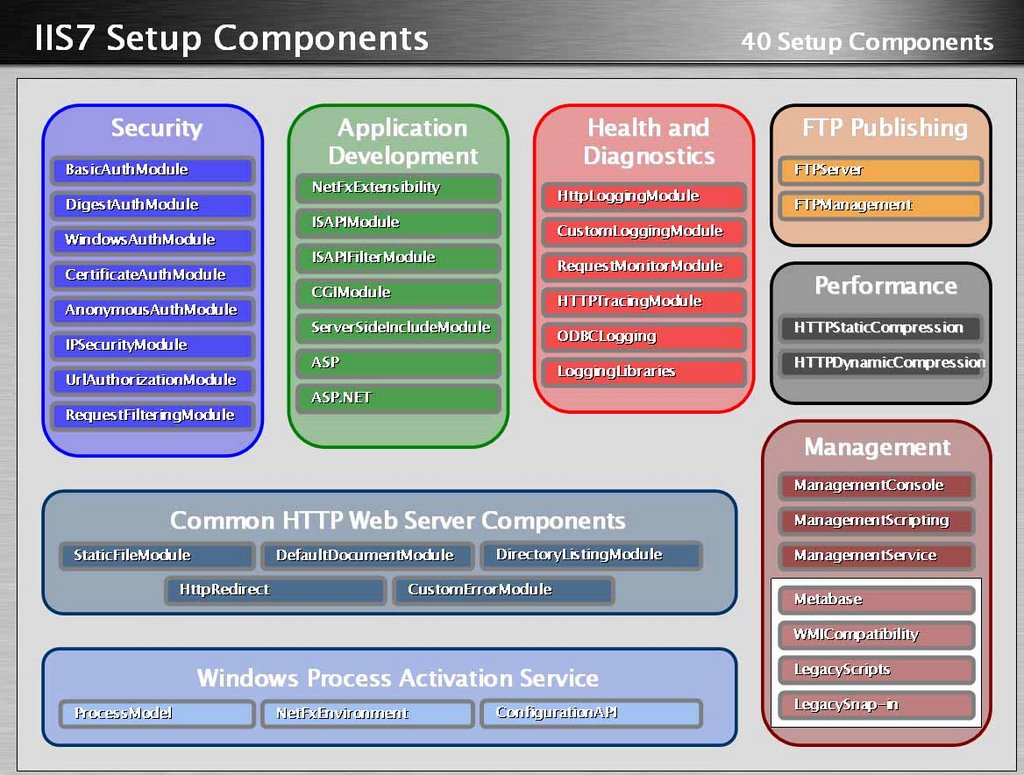
Note: As a Microsoft MVP I'm entitled to some confidential information. All the information contained in this post is public knowledge and does not reflect the final product nor my experience with the beta. Legal stuff out the way: WOW IIS 7 is going to rock. While this will not be very exciting for the Apache faithful its going a long way to help out us IIS admins (hey, its no secret that Microsoft has been copying ncsa httpd / apache since day one – not only is it in the license but one of my close friends dropped out of college to work on IIS ISAPI in the long long ago). Like SQL server, the IIS 7 brings a very friendly XML interface and a 3 panel control panel. It also empowers the web site admin without granting system administrator priviledges (unix folk: read .htaccess). So here are some notes from a recent webcast: Metabase is gone! No more metabase hacks, all the configuration for IIS will be handled by XML files. If you've had a misfortune of dealing with DNN 4 or .NET development you know too well how much must be tweaked with web.config — well its getting bigger. Not only will you be able to manage your web site (and more) with a web.config but all the configuration for IIS will be in the ApplicationHost.config XML file. Reduced Attack Surface & Enhanced Performance This makes IIS admins mouth water. For the longest time IIS (4/5/6) security involved loading various plugins, application firewalls, checkboxes, metabase hacks and one hotfix after another. Well, thats going away. Because capabilities of IIS7 will be controlled by different DLL's (instead of one major one) you'll be able to selectively turn features on/off (via XML!) and only open up what you need. This is awesome and way overdue. You know how you can restrict IIS from running .NET, FrontPage, WebDav, etc? Well, imagine being able to turn off things the same way you do in Apache with the backing of .NET. It's coming in IIS7. Think about the performance that a stripped down IIS can deliver – specifically if you're using IIS for image or video content serving farms. Tweaks and Wizards, oh my! With the additional functionality and options its going to get a lot more difficult to manage these servers. Do you really want to spend 20 minutes configuring each server to your liking or tweaking around XML files and keeping track of them? Well, IIS 7 will come with a lot more wizards to precisely tune your configuration without XML editing or reinventing the wheel. Of course you can tweak that through XML directly afterwards but the time savings will be significant. We were recently setting up a SQL cluster and Albert literally clicked through maybe 50 screens just to setup cluster aware COM+ properly. The bad news? Still not ready for performance testing. You will still be able to run ASP.NET 1.1 on IIS 7 which means you will still have to support yet another piece of old code which means it can be further ignored and obsoleted by your developers (until they have all found new jobs) and you'll be the one answering questions about why you're constantly being hacked because someone else hired incompetent developers. IIS 7 will only run on Longhorn / Vista so you will have to upgrade/migrate if you want the new feature sets. All in all, I am really looking forward to IIS 7. We manage a ton (well, many many tons in terms of steel alone) of IIS 6 and I would really love the ability to massively roll out and manage my IIS networks the same way we do for our Apache ones. It appears as if that is just around the corner!

New Podcast Logo

Podcast
4 Comments

This German site recently held a contest to create a new logo for a podcast, the recorded/straeamed radio program. The SBS Show will proudly abuse this logo in addition to our own. Speaking of which, the SBS Show #20 will be our first all-international show with Susanne Dansey broadcasting from Amsterdam at SMB Nation Europe.

Fun’N’Gun: Gators Win

Misc
1 Comment

Hail to the mighty Gators, my Alma Mater is the NCAA National Champion in basketball. And boy did we make it look pretty: Wooohooo! So pretty, oh so pretty. So many dunks, so little time. Just like 34-7 shaming of that little girl school, stand up Gator Nation. Update: 1:19 AM EST; This is the first basketball championship for Florida, not just the school but also the state. Glad to help represent our great state. I've been waiting to say this since 1997 when I got to UF: It's great to be a Flooooooooooooorida Gator!

Virtually Free Server R2

Microsoft, System Admin
3 Comments

John Howard recently left Technet and moved on to become a Program Manager for Windows Virtualisation. Today he announces, on the heel of many rumors, that Virtual Server 2005 R2 is indeed free. Why, you may ask?

Although there are many reasons (see presspass site), the nutshell answer is relatively straightforward. If you look into the future of where we're heading with Windows Virtualisation in the Longhorn Server timeframe, virtualisation can be thought of as a "commodity" – commonplace, extensively used and most importantly free functionality out of the box. Windows Virtualisation will include full migration capability from Virtual Server 2005 R2 to Windows Virtualisation, so this is somewhat of a no-brainer to get people onto the next release.

Enterprise edition is free, both 32bit and 64bit one.

How Windows Mobile Push works

Mobility
2 Comments

Skip a webcast this week, get a to-go sandwich and read this article by Vanitha Prabhakaran. It explains the Direct Push technology, how it works and how its troubleshooted. This should be required reading by anybody involved in Exchange/Mobility. Read it here.

Microsofts Desktop Live Strategy

IT Business, Microsoft
9 Comments

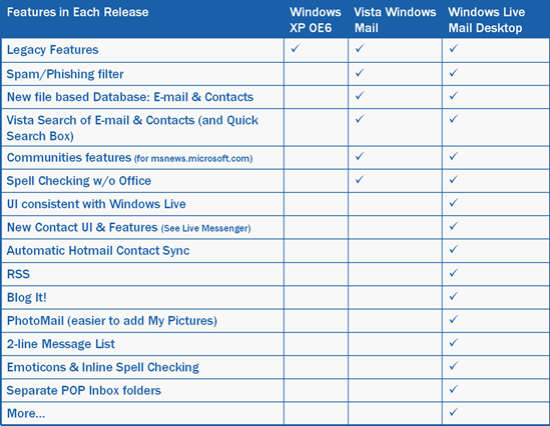
Found a cool new blog with a cool old story but I feel it warrants mentioning if only for the cool community features it brings to the table. Cool! The Live Mail Desktop blog is outlining the features that will be available in the next incarnation of Outlook Express (Windows Vista Mail) and Windows Live Desktop Mail. Windows Vista Mail … brings the Outlook Express core features plus community integration (Microsoft newsgroups), file based databases for mail and contacts, integrated search with Vista, as well as a spam/phishing protection and spell check. Windows Live Desktop Mail … goes a few steps further. It integrates an RSS reader, Blog It! features, Photomail, emoticons, separate POP3 inbox folders. This is great news.. for Jen & Sarah and Gmail. You see, these two will hump anything with a Google logo on it. It's kind of like Microsoft Koolade, the undying loyalty for crappy beta-level applications. While there is slim to no chance that Blog It! will integrate with third party blogging tools this might give a lot of folks that rely on Gmail that offline/archiving functionality that is simply critical. Jen recently had a mental breakdown over Gmail going down ("Gmail is ungodly") and she couldn't get to her homework. Now I'll give you that she is a PR major and doesn't understand the meaning of free or beta or TINSTAFL but it illustrates the biggest problem with "free" services in that there is simply no guarantee, no support and no expectation whatsoever. How do I explain this to my PR folks out there… "If it breaks it cannot be unbrokened." There is no support Indian to call, there is nothing you can threaten to sue because you already gave ownership of all your mail to Google (yes dear, read the agreement you accepted to open the account), and you have no backup because…. well, why would you backup if you have 2GB of storage? Right? Right? Wrong. So how do you use Windows Mail in the most suicidal way with Gmail? Well, open two Gmail accounts. Setup the first account with Gmail as pop3 and then store your nightly backups in the second Gmail account using GMail Drive.

Is your next PC ready for Vista?

Microsoft, OS
4 Comments

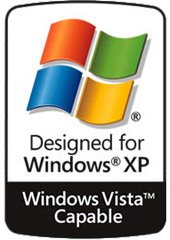
Kind of, sort of, maybe? You're not the only one unsure about it, as a matter of fact it is one of the most puzzling conversations on the Internet as of late – what kind of hardware will Vista demand to run efficiently? The latest beta builds have improved the performance quite a bit, I am typing this post on a laptop that now boots into Vista faster than XP. The same machine required close to a day to install November builds with the latest one completing in less than an hour – on battery. Chairs have been thrown people, the performance gains are there and it is looking solid. But how do you spec your next workstation so it can run Vista? Well, go with at least a beefy 64bit chip (no Celeron, no Sampron) and get as much ram as you can. That is about the end of the known minimum requirements but since Vista is overflowing with graphical gadgetry you might want to avoid the el cheapo brand of video card. You know the names… the S3's… the Trident's… the integrated Intel … Basically feel free to consider anything that Dell includes as inferior and upgrade to the nearest best (non-shared) alternative. Much more on this as we get closer to launch but in the meantime spend your money on memory. Looks like 512 is the new basement. What does Vista Capable mean? Basically its designed for Windows XP and will be capable of running Windows Vista Home Edition. In my humble opinion, save your money for a few months. Unless there is a smell of burned silicone in the air you might as well feed your piggy bank for the next year and run Vista the way its supposed to be run.