The Unified Theory of IT Economics

IT Business
6 Comments

No "strings" attached 😉 And if you don't get the joke then you should really seek a refund from your engineering school. Here, for your Monday reading, is the fundamental unified theory of IT economics when it comes to a hardware purchase of any kind:

CHEAP + FAST != GOOD GOOD + CHEAP != FAST FAST + GOOD != CHEAP

Think about that when you make your infrastructure purchasing decisions.

whoami

Podcast, Vladville
2 Comments

"Ah crap, he's not gonna talk about Linux again is he?" echoed somewhere in Redmond as this headline popped up in their aggregator. Relax! I'm just posting that the interview Bob with with me a little bit over a week ago is now on the web at theworkingnetwork.com. Hop over there and take a listen, Bob is trying to put together interviews with IT Professionals who blog and what drives them to do it.. I've talked about it on here a number of times but do check it out if this is the first time you're hearing about it.

Of note, Vlad didn't give me permission to use his photo, or to refer to him as the Mayor of Vladville — so I'll probably end up suffering somehow. Anyway, as Vlad points out in "Meeting Bob…" we had a chance to chat last week and I recorded it (MP3 version, WMA version) — I should've probably told him I was wearing a wire huh?

The fact that we will someday be related is suffering enough, I'm sure.

Orlando IT Pro Meeting

Events
1 Comment

We talked about the essentials of networking and Active Directory. About IP addressing, layers, routing, switching, subnetting and so on. JJ Antequino from Microsoft talked about the basics of Active Directory domains, trusts, master operation roles, active directory troubleshooting and editing. We wrapped with basic TCP/IP network troubleshooting and various tools to help you pin the fault on someone else. This was as basic and as low of a topic as we’ve ever had (or ever will have) and after it was all said and done most felt it was at or below their expertise. I hope it functioned as a good refresher on some of the concepts and gives you an incentive to find a mentor and study more. Why did I just tell you this? Well, we recorded it and depending on how the sound comes out we will turn it into SBS Show like podcast so those of you that miss meetings for some business reason….. will not miss out on anything but networking opportunities and group discussions.

Microsoft Small Business is seeking Feedback

SMB
Comments Off on Microsoft Small Business is seeking Feedback

Our buddy Eric Ligman must have built a pretty good bomb shelter up in Redmond as he has started seeking input from Partners on what has or has not worked so far. Click here to respond Eric is one of the few Microsoft people that continuously seek feedback and actually do something with it. In his own words "Send me the bad, Send me the good, Send me your wishlist, Send me your best of and worst of" so if you're in small business and you do things with Microsoft this feedback directly impacts how Microsoft can help you!

PSSing around Dallas

Events, Misc, Vladville
11 Comments

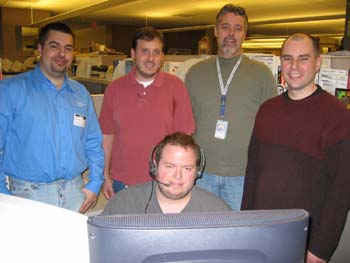
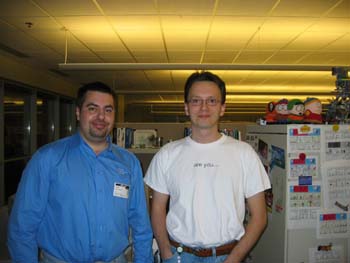
Oh thats a good post title and you know you love it! Last Friday I had a great time touring the Microsoft PSS (CSS for Exchange and SBS, support guys) HQ in Las Colinas, Texas. It was quite an experience for me to actually meet some of these guys that I have an immense amount of respect for. After seeing what they do that respect has almost doubled. Below is the picture with the SBS podcast team of Inside SBS, and I have some inside info: Inside SBS podcast will be back very soon. In this pic, from left to right: Vlad, Damian, Peter, Mark and Justin playing the center. Now this guy, despite having met him for the very first time, is the person that contributed the most to Vladville by writing excellent high level Exchange articles on the Microsoft Exchange EHLO blog. His name is Nino Bilic and he is the Tech Lead for Exchange 12. Dilbert fan too (go figure, they live in Cubeville) but the coolest thing was that we grew up in the same country and speak the same language (actually spoke it in front of Mark). How cool is that? It was awesome meeting these guys. I did not get any Koolaid served, but I did get the free Microsoft coke. Very much like the Redmond campus, except this one has soda machines that drop cans 2 feet so they can eventually explode on the Microsoft Small Business Specialist shirt yours truly was wearing. I saw a lot of cool stuff on how Microsoft support works… most of which I will have to take to my grave. And I saw the test lab. My, oh my, oh my. When they say dog-food, they mean dog-food! P.S. Thanks to Melissa Travers for hooking me up and to Mark Stanfill for giving me an awesome tour of the campus.

Despite all my rage I’m just a monkey in a cage

Misc, Vladville
12 Comments

Certain someone said they would pay for this picture. So before it ends up on eBay I'm just going to out myself. I'm a total and complete idiot. I managed to lock myself in our datacenter cage and had to call to get help. In the meantime, this wonderful picture was snapped. Yup. I am that brilliant. Yup… global network. 2,000 servers. Locked myself in a cage. I have no excuse.

yoda.msmvps.com, so cool I gotta wear shades

Misc
3 Comments

yoda.msmvps.com is perhaps the most personal server in the world not just because it has its own email address and a blog, but also for being capable of holding Susan Bradley and a ton of other MVP's online. Yoda lives in one of my data centers in Texas and I snapped this picture of him chilling with his Ray Bans, sipping on Mountain Dew.

Vista Signed Drivers: Good or Bad Social Move?

OS
6 Comments

Yesterday brought the news of Windows Vista requiring, here's some jargon:

"Vista driver developers must obtain a Publisher Identity Certificate (PIC) from Microsoft. Microsoft says they won't charge for it, but they require that you have a Class 3 Commercial Software Publisher Certificate from Verisign. This costs $500 per year, and as the name implies, is only available to commercial entities."

How is this a bad social move? Well, there are several factors that play into this both from the standpoint of rights you have to run software of your choice on your PC/OS but also from the PR point that makes this look very disheartening towards the x64 archtecture. Lets look at them one by one. Social Problem When you purchase a computer should you be allowed to make a decision on whether or not you trust a piece of software to work on your PC and OS? Microsoft does not think so. There are far too many security implications which make this move more than valid but it effectively eliminates the ability for open source developers (read: kids playing around with software development at home) to publish software. The trouble for Microsoft is two fold now: it looks bad for discouraging young people from developing software for the Microsoft platform and it deals a blow to the open source movement which is thriving even for the Windows world. This is not a short-term bad move that you're accustomed to, this is a long term move of further encouraging software developers to seek more open platforms. Windows will be more secure though. Valid tradeoff? Business Problem Microsoft, right after Intel, should be blamed the most for the lack of 64bit adoption. They sided with Intel Itanium (or Itanic) chip on the server and nobody showed up. Same was done with the 64bit Windows XP but AMD X64 effectively cornered that market with cheaper, cooler and more powerful chips. But I challenge you to find people that are happy with Windows XP 64bit or that have had a positive experience. You will not find many. So what do we have here, enforcement and restriction of development on the 64bit platform while the 32bit one is free to roam. Is this a good business move for the platform that you are trying to encourage everyone to upgrade to? Certainly not. So what we have here is a tradeoff between security and rights of use, public relations confusion over whether to upgrade to X64 now or never. I have to admit, it bothers me, but I'll be fine with X64 and signed drivers. There will always be a way to pirate stuff even with the DRM junk. No more dealnews hardware though 🙂

Whats better: SmartPhone or PocketPC Phone?

Mobility
4 Comments

Here is a little humor for your weekend: I own several Microsoft-powered mobile devices but spend virtually all my productive time on a PocketPC. I carry around a 2lb brick attached to my hip, attached to my Exchange and all I do. It has a huge screen, slide-out keyboard, phone, fax, bluetooth all the accessories that Taiwan can export and a enough battery to keep me online for a day. In many ways it is far more useful than my laptop, especially in terms of mobility. But why strap a huge brick to your hip and not a cute little SmartPhone? Ladies love PocketPC. There is nothing more appealing to the ladies than a man with a PocketPC. It is a geek equivalent of the gun. Just clip your holster to the side of your belt and you're the most dangerous thing out there. Lethal too. Just try to impress your date with what you can do on the PocketPC! Not as efficient as a bullet but far easier to clean up when they eventually die of boredom. Integrate Voice Command and you quadruple the danger factor. Think about it, what do you do when you see someone walking down the street talking to themselves? "Call Katie!! Close. Call Katie. Uhh you #@%% @#@#%. Show Kathleen. Call Kathleen at home." – Imagine someone walking behind you listening to that exchange? You will never lose a PocketPC. Since I've gone mobile I've lost many things, my mind included, but there is simply no "misplacing" the PocketPC. It has infinite functionality. Forget about Word and Excel, find yourself in a dark parking lot at night… turn up the brightness and you've got an instant flashlight. Nothing good on the radio during the long trip? Forget about an iPod, crank the volume on your PocketPC and watch it dance around the seat. Alone on the trip and missing your family? Instant album and video player. Signing paperwork during the business lunch at the restaurant and they sat you right under the fan? Instant paperweight. There are also way too many social situations in which a PocketPC can save your day, life and marriage. Got into a fight over whether "love rollercoaster" is by Red Hot Chillpeppers? Google will save the argument before it goes back to "Why don't you get along with my sister." Need to find a good restaurant nearby? Directions? Want a stock quote but don't want to pay $50 in commissions or admit to your friends you bought Apple stock? Point being, PocketPC is a lightning fast way to get stuff done without carrying around a suitcase. Forget about mobile Word. Forget about Pocket Outlook. Say hello to the danger-filled, sex-icon world of PocketPC fans. Mobile solutions for Girly Men There are very few things in life more frustrating than trying to type on a cell phone. SmartPhone combines that frustration with the traditional stability of a Windows operating system. Smartphones are small. Perhaps smaller than your current cell phone. They do not require frequent reboots but they also lack in functionality. For example, no touchscreen. Without a touchscreen you can't pretend to be at work when you're out and about without a laptop. You can not easily connect via TS to your server and restart the services. What's worse is you've actually taken the call and are aware of the problem! Smartphones are functional, somewhat. You can browse the web on your SmartPhone, you can get email on your smartphone. You may even be able to play a little game. But forget about taking notes in silence, doodling the network diagram, process flowchart. At the end of the day you're sacrificing functionality for the smaller size. If your functionality demands are fairly basic and you just bought a slightly bigger purse – SmartPhone is for you. If you're a guy and too weak to carry around an extra pound or two on your hip this will fit in your pocket without dragging your belt down to your ankles. But as a guy, the number one reason not to go for a SmartPhone, all things considered… is the fact that your girlfriend/wife will actually use your cell phone. PocketPC is like kryptonite to women. I've never lost my PocketPC to my girlfriend. I lose my SmartPhone daily… "Hey, does this one have StrikeForce on it?"; So if you're looking for a mobile organizer and you don't want to have a two hour conversation about how you didn't mention that you're going to a July conference in January…. Stick with something she won't steal from you. This is just my experience, feel free to flip the gender for your own circumstances. So which one should you pick? The one you like. The one you can use. The one you can carry. In that order. Bottom line – its not all about applications. Yes, both SmartPhone and PocketPC share Excel, Word and Outlook. Both can take pictures. But mobile devices are more than a laptop, more than a cell phone. They become your lifestyle. You have to like it. You have to like to use it. You will find yourself spending more time in applications outside of the Microsoft's big three – this gadget is an mp3 player, cell phone, fax, remote desktop client, video camera, voice recorder, file storage, presentation, remote control, flashlight, paperweight, mugging deterrent and a sex symbol.

Next SharePoint?

Microsoft, Web 2.0
2 Comments

One of the best ways to dodge feature criticism is to say "it will be in the next releases." I know that, because in our own products everything that didn't get classified as "We tried that, failed miserably, it turns out only one guy actually used it" automatically becomes "it's on the spec sheet, stay tuned.". Well, I was reading Lawrence Liu's article about how SharePoint will embrace RSS with Office 12:

Discoverability is another much needed advancement that needs to be done. One way to achieve it is through syndication (via RSS) of content sources that is filtered by popular keywords such as "offline" or "scalability" or "migration." Another way is through proactive searches where the results are RSS enabled, so the content sources don't have to be as is the case in the former method. Perhaps the most exciting advancement of all is the ability for members of the community to create a "personalizable" community portal, so each person can configure exactly how one prefers to search and discover content. Think of it as the Live.com for the SharePoint community!

It's no secret that one of the most widely used SharePoint parts is the one displaying RSS feeds. Yes, document storage with all the interactive stuff and centralized contacts are nice but despite all the flexibility SharePoint is for the most part ran "out-of-the-box" on nearly all the portals we manage at TheOfficeServer. None of them go in via FrontPage to tweak things (that I know of, based on the support call volume) but oh do they love their RSS part. What is the real problem? The biggest obstacle not just in personal searches but in business as well is finding relevant search results. Bob Rebholz hinted at this the other night in talking about the pitfalls of how the most popular search engines return results based on the number of links. Apply this to a real SharePoint site. Real? Yes, real. Don't look at the cute out-of-the-box SharePoint, look at the real SharePoint site with hundreds of documents, updates, workspaces, contacts, linked lists… finding things in that mess is impossible. So lets say you decide to get organized – create a workplace, with another list. Well what if (not really if, more like when) the next person looks at the way you organize stuff and does in the exactly opposite way? Another workplace with a set of links. See the problem and complexity this introduces? Now look at RSS. Look at tagging. Look at the ability for everyone to create their own custom portal based on the way they organize information. I'll take that over the workplace idea any day!