Is that an SBSC logo in your window?

IT Business, Microsoft
4 Comments

Eric writes about how SBSC partners will be recognized for their SBSC certification at a location basis instead of the organization as a whole. This is particularly useful for us bigger folks with multiple points of presence because we now have the ability to showcase our expertise in each location we have an SBSC qualified individual. (multiple locations = multiple listings = mo leads = mo money) 

In less than two years that SBSC has been around it has really matured into a seriously relevant Microsoft program. For a list of additional changes please check out the blog post over at Small Business Community Blog.

Wishlist: Bring to USA some of the recertification requirements that UK has. There are too many people in the program already that barely passed 70–282 and with the bootcamp and paper-SBSC conferences popping up it could seriously damage the credibility of the program if a person that is 70% comfortable with SBS/Vista is allowed to continue advertising themselves as a certified entity years after they have been certified. While I’m sure things are wide open to grow awareness, participation and membership in SBSC I hope Microsoft soon considers measures that control the quality of the program’s members.

Office Mobile on WM5 Smartphones

Mobility
Comments Off on Office Mobile on WM5 Smartphones

Now this is cool. msmobiles.com has an article about how you can get Windows Mobile 6.0 Pocket Office on your Windows Mobile 5 smartphones – which with the exception of T-Mobile Dash are not officially upgradeable to Windows Mobile 6. Add to that the fact that WM5 smartphones had no mobile office to begin with and you have a beautiful, beautiful hack to make you more productive on the go. Details here.

Six months later, 100% caught up

Shockey Monkey
Comments Off on Six months later, 100% caught up

Over six months ago I began the long process of activating everyone interested in Shockey Monkey, provisioning it for them, getting feedback, integrating it into the solution, learning about their business, learning about their management and processes. This was undoubtedly interesting to a LOT of you, a LOT more than I could handle. But, six months later I am 100% caught up. Thats right, everyone that wanted to ride the monkey got the chance and everyone is up and running (or at least waiting for CSR/certificate provisioning)

So, where do we go from here?

Well, first of all, the web page needs some serious tender love and care. That will be the project of the week because it will alow me to deliver the training materials that you’ll need to make the most out of the Shockey Monkey. Remember folks, it’s not about the tool. As much as I’ve done to build this on best practices and SMB features, it is all about your discipline and your implementation.

I’m also considering making Shockey Monkey an invitation-only software for the remainder of the free period. I’d actually like your opinion on this one. The only reason people were denied Shockey Monkey so far is because they did not appear to be able to follow simple directions or didn’t seem to run a real IT business. Perhaps it’s just my bias but I figure that if you can’t even put together a web site for your own business you have no business consulting anyone else on their IT solutions. And because Shockey Monkey is meant to be built by the way the best run their businesses it wouldn’t make sense to dilute it with people that are struggling with the concept of SSL certificates and filling out HTML forms. Maybe you’ll see that as insensitive and mean, but this is business we’re talking about here and I don’t think anyone would expect anything but the best.

So, thinking about making it invitation only – that way at least there is some anecdotal info on you being more than a hotmail.com alias.

Still working on adding everyone..

Shockey Monkey
Comments Off on Still working on adding everyone..

Few notes on the Shocky Monkey activations that I’ve been processing for the past day or so.

  • “You’ve already received an email with the authentication info” as the video says, so naturally you’d proceed to login to our support/order portal. If you haven’t received that email yet it follows that your account is not ready yet so why are you trying to login, why are you trying to get the password reminder from the portal? The account is not there until you receive the welcome email. 
  • “Please don’t email me for support” says the video, yet I woke up to 8 messages in the inbox describing how they can’t login because of bullet point above. Which part of don’t email me doesn’t make sense?

There is a “Vlad’s School of Customer Service” post just brewing in this one.

Shockey Monkey Rollout Completed

Shockey Monkey
2 Comments

6 months later, more than 2,000 partners online and god knows how much time, emails and code lines…. I’m caught up. Yes friends, today I mailed the last 200 people that signed up over the course of the last few months and they’ll be up online tonight or tomorrow. Thank you all for your patience.

Take a look at the activation video, if you’d like to sign up for it.

10 minutes, ordering, configuring, obtaining SSL cert, etc.

Now the fun stuff begins! What’s on Shockey Monkey today is on stable code from November – and now that everyone is signed up, that I know the system can scale, that I have all that feedback you’ve given me over the past year or so of development.. now that its all on the pile I can go back to development and start integrating all of it for the most kicka.. well, let’s be honest, the ONLY practice management software designed for SMB IT solution providers by SMB owners themselves!

Thank you for joining me on this journey.

VladCast Episode 4

Vladcast
Comments Off on VladCast Episode 4

Untitled document

VladCast 4, the SMB ITPRO world condensed into a loud 5 minute podcast:

Bow down to Shockey Monkey: Signup
Dell to offer Ubuntu Linux
WSUS 3.0 for SBSers: Susan, SusanAndy
– Much ado about nothing: SCE, Forefront
– Blog of the week: UK SBS Guy

Play VladCast: [audio:http://www.vladville.com/media/VladCast4.mp3]

Add feed to iTunes  / File Attachment: VladCast4.mp3 (2012 KB)

Fixed Shockey Monkey Video Links

Shockey Monkey
Comments Off on Fixed Shockey Monkey Video Links

Fixed Shockey Monkey links for the few of you that cached the old posts:

Flash Movie (20 minutes)

Windows Media Movie (20 minutes)

Both can be viewed/streamed online and they are identical just offered in two formats if you’re not on Windows or if you don’t have a Flash plugin installed. Either should work, I hope you enjoy it.

Note: This is apparently popular. It’s beating up my 20 Mbit network connection so it may be flowing slowly please be patient. As for emails saying “I signed up, I haven’t been turned up, so I submitted it again”; Please don’t do that. I am going down the list of when the accounts were created and all the requests are stored in the database. So when you sign up again the system updates the timestamp and you fall to the bottom of the request list. While I am extatic that so many of you are so anxious to get started with this please keep in mind that this is a freebie project I am working on my own so please cut me some slack as I get you all turned up.

Shockey Monkey Video

Shockey Monkey
9 Comments

The week of the monkey continues, and today I proudly present the Shockey Monkey: First Look video. This is probably the best 20 minutes you’ll spend today, 20 minutes to see what Shockey Monkey is and how it works.

I hear you, I hear you – 20 minutes? Good lord, I don’t have that kind of time. Please keep in mind that in those 20 minutes I’ve completely customized my portal, added customers, opened and closed a support request, billed / invoiced the call, made an announcement and customized the experience for the customer. All that, and an explanation of why this is something you need to consider for your business. It saves time, it enhances customers support experience and it makes you look great without robbing you blind! The unCRM. Turns out that was trademarked so we’re going with MSP Ticket (My Support Professional Ticket, Managed Service Provider Ticket, My Super Powerful Ticket);

Flash: Shockey Monkey Video (20 minutes)

The wmv version is being produced, will be up shortly. (5:37 updated broken link)

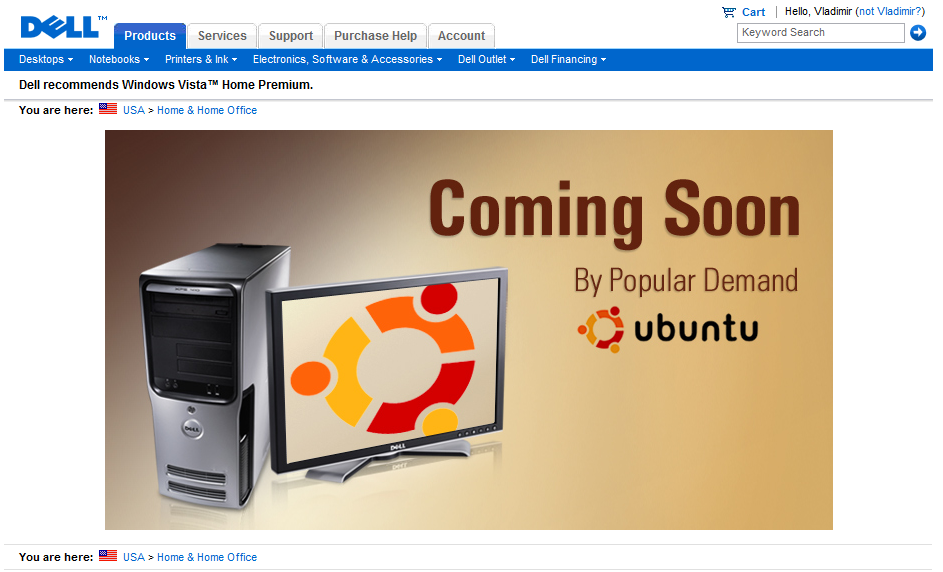
Ubuntu on Dell – By Popular Demand

Linux
1 Comment

So the cat is out of the bag – Dell officially supporting desktop Linux. Linux desktop has been a tough sell on the desktop particularly due to the lack of IT solution providers capable of supporting it for the SMBs. However, with the Dell push things will certainly change. Have your customers considered Ubuntu? Do you know that you can install Ubuntu and sync it up to Exchange in less than an hour? As I mentioned on Vladcast #2 two weeks ago, the time to wreck your test box with Linux desktop is now.

Ubuntu

You know who I feel sorry for most of all? Imagine that poor sucker that has to figure out how to roll all the crapware Dell packs their desktops with on Linux. All the meetings and decisions, decisions, decisions – “So we need to annoy the user with more popups but they have multiple desktops in their window manager – so how do we broadcast the popup to every single deskop available without crashing the box?”

I’m curious to see how this is taken by the SBS community that has been traditionally afraid of open source solutions. Will you try it out? Ignore it? Wait for it to show up at the customer site like Mac’s? Support it already? You know where to find me..

Windows Mobile 6 SDK “Refreshed” & Codename Quandry

Mobility
2 Comments

Folks over at msmobiles.com, pretty much the best blog covering Windows Mobile, are talking about a refresh for Windows Mobile 6 SDK. We just kicked off Shockey Monkey mobile agent coding today so this comes at a really good time but I realize this sort of thing is not really very interesting to the readers of Vladville.. so why talk about it?

Well, Windows Mobile is rebranding. Again. As some of you that have been following the developments over the years can attest to, there has been a fair amount of confusion over just what constitutes a PocketPC, SmartPhone, Windows embedded, WindowsCE Powered, so on and so forth. To contribute to the confusion, some manufacturers labeled their PocketPC’s as SmartPhones, so when people bought those devices and didn’t get the right software or experience in the bundle Microsoft was to blame. So something that got announced and really explained in full detail over at the MVP Summit is the reasoning behind the rebranding. The public info is as follows:

  • Windows Mobile for Smartphone = Windows Mobile Standard
  • Windows Mobile for Pocket PC = Windows Mobile Classic
  • Windows Mobile for Pocket PC Phone Edition = Windows Mobile Professional

So here is an easy way to think about this. At the bottom of the pyramid is the Windows Mobile Classic, your traditional PocketPC that doesn’t have cell phone functionality. Think of it as the old iPaq’s. On top of that are Windows Mobile Standard, or the old “smartphone” term for a Windows Mobile powered cell phone without a touchscreen. Think of that group as the old Audiovox SMT 5600 and iMate SP3 candy bar phones. On the top are cell phone, touchscreen and then some – now known as Windows Mobile Professional such as Siemens SX66, T-Mobile MDA, Windows Mobile powered Palm Treo’s and so on and so forth.

I’ve always had success explaining it this way (with new language adopted):

If you just need a PDA that doesn’t need to be a cell phone, get Windows Mobile Classic. If you need a really good cell phone with occasional need to check out email and correspond, get a Windows Mobile Standard. If you need a touchscreen, type in large amounts of text and don’t mind a big bulge in your pocket (or purse for the ladies) then go with Windows Mobile Professional.

That last point is blurring a little. With the arrival of T-Mobile Dash (first US phone offered with a Windows Mobile 6 upgrade) and Samsung BlackJack from Cingular you can easilly enter large amounts of text without the touchscreen functionality because these devices now come with keyboards eliminating the need for old T9 type of feeding text into the cell phone.

Whatever they call it, however they rebrand it, Microsoft deserves a mountain of credit for the work on Windows Mobile 6. While at TechEd last year I got to meet the guys in charge of the Windows Mobile 6 development, at Exchange Connections I got the first build for my MDA and I saw some awesome presentations at the MVP Summit – all in all putting a big axe in the heart of BlackBerry. While I am sure BlackBerry will continue to be a viable commercial alternative, the feature set is simply no longer worth the premium or the hassle of supporting BES. As a matter of fact, we do not offer BES or Good on any of our Exchange hosting plans and we’ve run into no obstacle at all.

Congrats WM team.

Update: Thanks to Tim Barrett for correction of my sales pitch.