Stupid Mac Users: Decade later, still blind.

IT Culture
Comments Off on Stupid Mac Users: Decade later, still blind.

Earlier today I posted a rather puzzling and apparently inflaming article towards the Apple's latest attempt to convince people that their platform is not a niche for desktop publishers, low-end media and kids. What ensued was a slight flame war in my comments between Mac fans and Mac haters. I chose to end it when someone called the Mac users to "get back on the short bus" What is ironic here is that Mac fanatics have been undying fans one Apple blunder after another, constantly feeling that they are somehow special and better while being pushed to a more and more obsoleted solution. From 68K to PowerPC, from OS9 to OSX, from DRM to iTunes, from AOL to .Mac, DRM, locked BIOS and overpriced hardware with limited vendor support.. there is nothing that can ever smear their cherished platform. Now in spite of all that, one company gets that opposite is quite true. Their name? Apple. Yes, that Apple. They realize they are a niche platform and that is the reason their market penatration always resided on the verge of computing obscurity. They want the iPod-like share extended to a similar share of laptop and desktop market. That is why back in 95 Apple claimed to be better at running Windows 95 than XP. They wanted people to buy Apple computers. That is why for years Apple tried to emulate x86 with software and add-on cards. They wanted people to buy Apple computers. That is why Apple allowed OEM's to make their hardware but pulled back quickly when they realized they were just an OEM box maker. Apple computers got sold by someone else. That my dear Apple users is the cold hard truth of your "platform" which for a decade you swore was better than 68K than Intel. Then better than PowerPC than Intel. Now better than Intel on… Intel? Yup. Same argument, different decade: Apple runs XP better than Intel/Microsoft? Whats interesting is that Mac users love to live in a delusional state where they consider their "platform" to be more supported, more "user friendly", more "affordable", more "featureful"… But one company gets it, oh faithful Mac users. It's Apple. They are a gadget company now – iPods is the name of the game and iXP is next. Apple is a WinTel box maker today. Today it's a WinTel box running XP! Face it guys, three decades of innovation by Apple will in a year evolve into a shiny plastic finished Dell box running Microsoft Vista.

Schiller said Apple "absolutely has no plans to sell or support Windows. We're just helping our customers with Boot Camp to install Windows if they want to."

Look at the above paragraph. Now substitute "MacOS" instead of "Windows" up there and you'll see the picture. What Schiller really meant to say was:

Schiller said Apple "absolutely has no plans to sell or support MacOS. We're just helping our customers with Boot Camp to install ANY OS they want to so long as they buy our boxes.

Apple does not want to be an OS company. They want to be a gadget company. Thats where you can overprice the crap out of your offering and make a ton of money. It's not Windows users switching to a Mac. It's Apple switching to PROFITABILITY and DOMINANCE. Mac users exist in an isolated part of space where they must justify their poor purchase choices of flashy and sparkly overpriced gear. Apple, on the other hand, remains in the realm of business where they need to sell more of their gear. So even though they basically turned into a premium box maker today, something that Mac users hate being identified as, Apple stock went up 9% because they will sell more devices and make more money. And at the end of the day, hey, its all about ca$h.

IIS 7: First Looks

Microsoft, System Admin
4 Comments

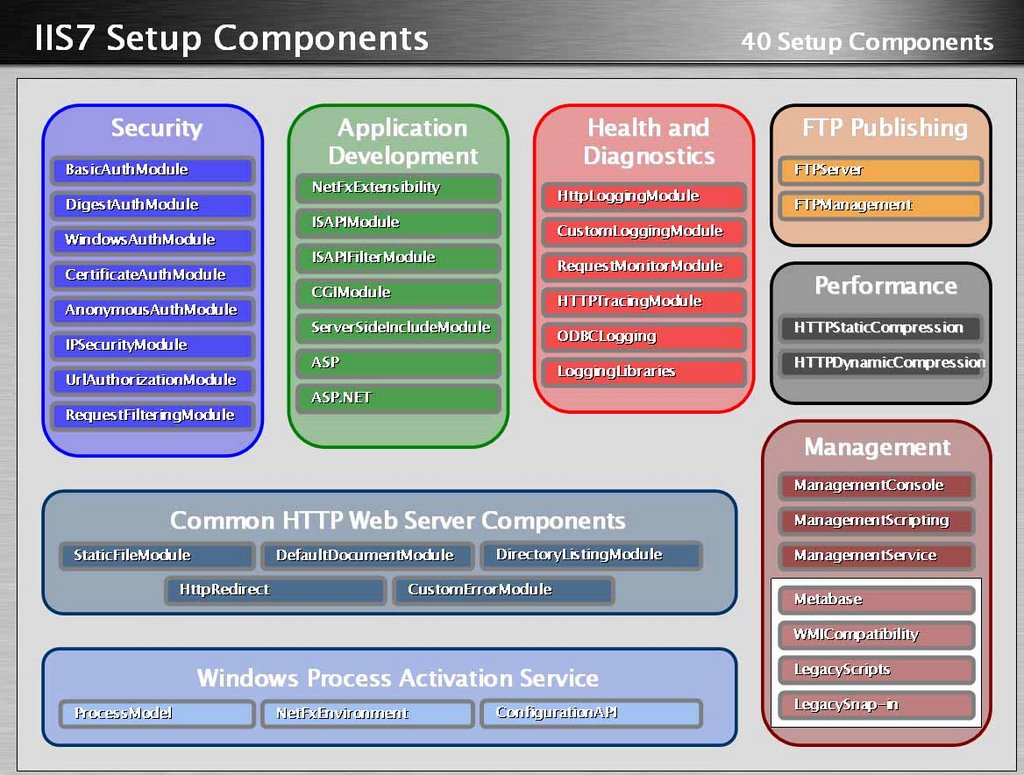
Note: As a Microsoft MVP I'm entitled to some confidential information. All the information contained in this post is public knowledge and does not reflect the final product nor my experience with the beta. Legal stuff out the way: WOW IIS 7 is going to rock. While this will not be very exciting for the Apache faithful its going a long way to help out us IIS admins (hey, its no secret that Microsoft has been copying ncsa httpd / apache since day one – not only is it in the license but one of my close friends dropped out of college to work on IIS ISAPI in the long long ago). Like SQL server, the IIS 7 brings a very friendly XML interface and a 3 panel control panel. It also empowers the web site admin without granting system administrator priviledges (unix folk: read .htaccess). So here are some notes from a recent webcast: Metabase is gone! No more metabase hacks, all the configuration for IIS will be handled by XML files. If you've had a misfortune of dealing with DNN 4 or .NET development you know too well how much must be tweaked with web.config — well its getting bigger. Not only will you be able to manage your web site (and more) with a web.config but all the configuration for IIS will be in the ApplicationHost.config XML file. Reduced Attack Surface & Enhanced Performance This makes IIS admins mouth water. For the longest time IIS (4/5/6) security involved loading various plugins, application firewalls, checkboxes, metabase hacks and one hotfix after another. Well, thats going away. Because capabilities of IIS7 will be controlled by different DLL's (instead of one major one) you'll be able to selectively turn features on/off (via XML!) and only open up what you need. This is awesome and way overdue. You know how you can restrict IIS from running .NET, FrontPage, WebDav, etc? Well, imagine being able to turn off things the same way you do in Apache with the backing of .NET. It's coming in IIS7. Think about the performance that a stripped down IIS can deliver – specifically if you're using IIS for image or video content serving farms. Tweaks and Wizards, oh my! With the additional functionality and options its going to get a lot more difficult to manage these servers. Do you really want to spend 20 minutes configuring each server to your liking or tweaking around XML files and keeping track of them? Well, IIS 7 will come with a lot more wizards to precisely tune your configuration without XML editing or reinventing the wheel. Of course you can tweak that through XML directly afterwards but the time savings will be significant. We were recently setting up a SQL cluster and Albert literally clicked through maybe 50 screens just to setup cluster aware COM+ properly. The bad news? Still not ready for performance testing. You will still be able to run ASP.NET 1.1 on IIS 7 which means you will still have to support yet another piece of old code which means it can be further ignored and obsoleted by your developers (until they have all found new jobs) and you'll be the one answering questions about why you're constantly being hacked because someone else hired incompetent developers. IIS 7 will only run on Longhorn / Vista so you will have to upgrade/migrate if you want the new feature sets. All in all, I am really looking forward to IIS 7. We manage a ton (well, many many tons in terms of steel alone) of IIS 6 and I would really love the ability to massively roll out and manage my IIS networks the same way we do for our Apache ones. It appears as if that is just around the corner!

New Podcast Logo

Podcast
4 Comments

This German site recently held a contest to create a new logo for a podcast, the recorded/straeamed radio program. The SBS Show will proudly abuse this logo in addition to our own. Speaking of which, the SBS Show #20 will be our first all-international show with Susanne Dansey broadcasting from Amsterdam at SMB Nation Europe.

Fun’N’Gun: Gators Win

Misc
1 Comment

Hail to the mighty Gators, my Alma Mater is the NCAA National Champion in basketball. And boy did we make it look pretty: Wooohooo! So pretty, oh so pretty. So many dunks, so little time. Just like 34-7 shaming of that little girl school, stand up Gator Nation. Update: 1:19 AM EST; This is the first basketball championship for Florida, not just the school but also the state. Glad to help represent our great state. I've been waiting to say this since 1997 when I got to UF: It's great to be a Flooooooooooooorida Gator!

Virtually Free Server R2

Microsoft, System Admin
3 Comments

John Howard recently left Technet and moved on to become a Program Manager for Windows Virtualisation. Today he announces, on the heel of many rumors, that Virtual Server 2005 R2 is indeed free. Why, you may ask?

Although there are many reasons (see presspass site), the nutshell answer is relatively straightforward. If you look into the future of where we're heading with Windows Virtualisation in the Longhorn Server timeframe, virtualisation can be thought of as a "commodity" – commonplace, extensively used and most importantly free functionality out of the box. Windows Virtualisation will include full migration capability from Virtual Server 2005 R2 to Windows Virtualisation, so this is somewhat of a no-brainer to get people onto the next release.

Enterprise edition is free, both 32bit and 64bit one.

How Windows Mobile Push works

Mobility
2 Comments

Skip a webcast this week, get a to-go sandwich and read this article by Vanitha Prabhakaran. It explains the Direct Push technology, how it works and how its troubleshooted. This should be required reading by anybody involved in Exchange/Mobility. Read it here.

Microsofts Desktop Live Strategy

IT Business, Microsoft
9 Comments

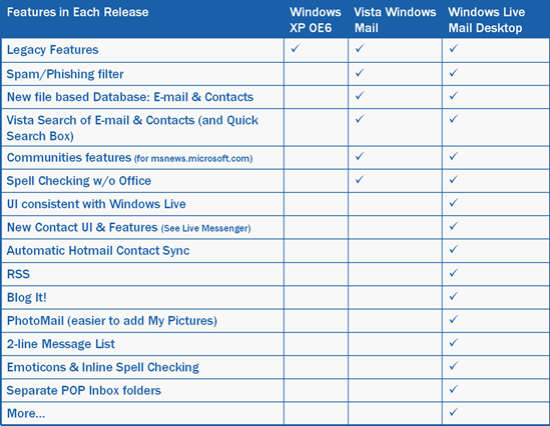
Found a cool new blog with a cool old story but I feel it warrants mentioning if only for the cool community features it brings to the table. Cool! The Live Mail Desktop blog is outlining the features that will be available in the next incarnation of Outlook Express (Windows Vista Mail) and Windows Live Desktop Mail. Windows Vista Mail … brings the Outlook Express core features plus community integration (Microsoft newsgroups), file based databases for mail and contacts, integrated search with Vista, as well as a spam/phishing protection and spell check. Windows Live Desktop Mail … goes a few steps further. It integrates an RSS reader, Blog It! features, Photomail, emoticons, separate POP3 inbox folders. This is great news.. for Jen & Sarah and Gmail. You see, these two will hump anything with a Google logo on it. It's kind of like Microsoft Koolade, the undying loyalty for crappy beta-level applications. While there is slim to no chance that Blog It! will integrate with third party blogging tools this might give a lot of folks that rely on Gmail that offline/archiving functionality that is simply critical. Jen recently had a mental breakdown over Gmail going down ("Gmail is ungodly") and she couldn't get to her homework. Now I'll give you that she is a PR major and doesn't understand the meaning of free or beta or TINSTAFL but it illustrates the biggest problem with "free" services in that there is simply no guarantee, no support and no expectation whatsoever. How do I explain this to my PR folks out there… "If it breaks it cannot be unbrokened." There is no support Indian to call, there is nothing you can threaten to sue because you already gave ownership of all your mail to Google (yes dear, read the agreement you accepted to open the account), and you have no backup because…. well, why would you backup if you have 2GB of storage? Right? Right? Wrong. So how do you use Windows Mail in the most suicidal way with Gmail? Well, open two Gmail accounts. Setup the first account with Gmail as pop3 and then store your nightly backups in the second Gmail account using GMail Drive.

Is your next PC ready for Vista?

Microsoft, OS
4 Comments

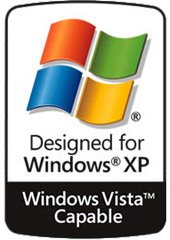
Kind of, sort of, maybe? You're not the only one unsure about it, as a matter of fact it is one of the most puzzling conversations on the Internet as of late – what kind of hardware will Vista demand to run efficiently? The latest beta builds have improved the performance quite a bit, I am typing this post on a laptop that now boots into Vista faster than XP. The same machine required close to a day to install November builds with the latest one completing in less than an hour – on battery. Chairs have been thrown people, the performance gains are there and it is looking solid. But how do you spec your next workstation so it can run Vista? Well, go with at least a beefy 64bit chip (no Celeron, no Sampron) and get as much ram as you can. That is about the end of the known minimum requirements but since Vista is overflowing with graphical gadgetry you might want to avoid the el cheapo brand of video card. You know the names… the S3's… the Trident's… the integrated Intel … Basically feel free to consider anything that Dell includes as inferior and upgrade to the nearest best (non-shared) alternative. Much more on this as we get closer to launch but in the meantime spend your money on memory. Looks like 512 is the new basement. What does Vista Capable mean? Basically its designed for Windows XP and will be capable of running Windows Vista Home Edition. In my humble opinion, save your money for a few months. Unless there is a smell of burned silicone in the air you might as well feed your piggy bank for the next year and run Vista the way its supposed to be run.

The importance of taking time off

IT Business, SMB
20 Comments

Take time off in the IT world? Surely this is some sort of an April Fools joke, right? Nope. You see to the right of this text is a picture of my fat ass chilling in a lazy river many, many pounds ago. Before marathons, before a global network nightmare, before the company and all the ITPRO community things there was plenty of time to be spent in the water parks. I blogged earlier today over on my QuickVlad blog about a public comparison between working in IT and working in jail. Perhaps that is why I feel most my readers are prisoners? Either way, it does seem like that every now and then. Your network activity is tracked, your email is being read by half a dozen people, you have 30 RDP and SSH sessions open and OH! someone needs the site turned up right away even though they had a proposal in their hands for three months and just never sent it back. This is every day in Vladville and a reason I write this blog. I also talk to my buddy Rich Walkup (he is still a slave, not quite a masta yet) about how we've never been this successful and how we've never worked quite this hard. So today I'm disonnecting my home WAN and going down by the pool to kick back a little and relax. No books, no whitepapers, no schematics, no reports, no FPGA boards, no specs of any kind. Just me, my mp3 player and a dilbert book. Why? Relaxing helps you remember details It is far too easy to forget and misplace details that go on during the weekday (weeknight). You're not always in a position to take a note, document a conversation, send an email. Kicking back and not trying to hit 100% all the time lets you reflect and remember the little things you meant to do before something bigger fell in your lap. Relaxing allows you to review your process You cannot review your process in a meeting, I'm sorry. You're looking at the clock and thinking about how you're actually going to get things done with the process you currently have without the hour you just blew "talking" about it. Think, really think, about the intricacies of the processes you are currently spending the most time at and find a way to change them for something better. Relaxing opens your mind to new opportunities When you're stuck working on the same old thing your enterprising skill set falls apart. You're more likely to get demotivated than actually inspired to try something new. So take a minute, kick back, and don't think about what you're doing right now but what you could be doing (to make yourself happier, to make more money, to look better in front of your staff/clients/coleagues/peers). If you just stick with the tunnel vision you will not go far. Relaxing helps you get the big picture Same as the above, drop the tunnel vision. We all have a point we're at now and a point we'd like to be at but sometimes it is hard to look at the sky around the two. Further, the longer you work at what you're up to right now you lose perspective or even the reason you desired your end goals. For example, lets say you took on a project that would buy you a new car. Three months later you're 10% on your way to that Lamborghini and you look at the poster every day and say – "my ass is so gonna love those leather bucket seats" – to each his own, right? Well, we lose the big picture sometimes. Our priorities in work and in life tend to change. In the grind its hard to recognize that. So take a day and see if the big picture you used to have grew any or suddenly became a lot clearer. Here's to a start of your beautiful day! See you on Monday.

PSS and Change Management

Podcast
2 Comments

Let's face it, most problems with SBS happen when changes are made. Patches, hot fixes, service packs, migrations, upgrades. SBS PSS guys take on the topic and R2 issues in the latest Inside SBS Episode #17. They are drinking that sweet sweet Livemeeting coolade but don't let that turn you away, I'm listening to it right now and the voice quality is excellent. Download #17