

Microsoft Small Business Specialist Community Quarterly Webcast

IT Business, Microsoft
Comments Off on Microsoft Small Business Specialist Community Quarterly Webcast

What she said. Do yourself a favor and register for the SBSC Quarterly webcast right now. It’s tomorrow at noon and the last one we sat in on was more valuable than most conference sessions targeted at SMB last year. Honestly, if you’re an SMB sales monkey or an SMB IT owner this is the singe most important event you need to pay attention to, bar none. If you do business with Microsoft you need to clear your afternoon.

Register here.

Finding Network Connections in Vista

Vista
2 Comments

One of the most shameful things you can do in IT (short of locking your boss in a data center cage) is having someone show you a really simple solution to your collosal problem… especially if you’ve spent days doing it the wrong way and cannot figure out how to do it right.

So on Friday I’m listening my folks chatter about Network Connections and what a pain the new Control Panel in Vista is. First you have to go to the control panel. Then you have to go to Network panel. Then to Network and Sharing Center. Finally, click on Manage Network Connections. Finally you’re at the screen where you can actually do something. 

Vlad: “Why don’t you just make a shortcut?”

So here is this big secret. Vista has friendly (read: designed for Mac idiots) paths in its explorer windows. Instead of showing you  a path it shows a dynamic navigation bar so you can quickly move throughout the entire hiearchy without clicking back/forward. Though, if you click on any inactive part of the field the path the field goes back to plain full path and gets highlighted. Copy it, paste into a new shortcut and you’re done!

Remember this simple advice when dealing with Vista: If something is starting to look too difficult, you’re thinking too much. Vista was designed to make users too stupid for Windows XP more efficient in getting around areas of Windows they should not be in to begin with. Now when they do make significant configuration changes it will be that much more difficult to troubleshoot. Though to take the other side, something needed to be done with the control panel: there were too many places that needed to be checked, too many boxes and screens to review, too many options. Is the new control panel in Vista a worth-while upgrade or just an annoyance for people that should be in the control panel in the first place? Only time will tell.

Shuttle Discovery takes off

Misc
Comments Off on Shuttle Discovery takes off

IMG_0736Shuttle Discovery took off roughly an hour ago. This was a spectacular event for two reasons: it is the first time I saw a night shuttle launch live and it is the first time a human being has ever seen a night separation of the shuttle from the fuel tank. I think one of the funniest quotes of the evening, short of Benz running outside and staring at the shuttle, is the NASA commentator saying: “That’s 23 Hoover Dam’s worth of power output right there.. Thats whats taking us to space.”

I live in Central Florida and we take great pride in our space program. As should all Americans, I hope that whereever you are you at least once get a chance to watch the launch live. Not only can you feel it but the sight is as spectacular and as unimaginable and undescribable as it gets. Mickey Mouse blows up a ton of dynamite in my back yard every night so it takes quite a bit to impres me. This did. To say “it lit up the night sky” is an understatement.

In a true American spirit we sat around in our warm living room and watched the countdown and main ignition start… then ran out to see it live. Talk about the enormity of it all!

Exchange 2007 Signed Off

Exchange
Comments Off on Exchange 2007 Signed Off

Exchange 2007 has been signed off on. This means almost everyone has agreed that the product is ready to ship, the pricing is known, etc, etc, etc.

This has been quite a journey. Unfortunately, I am still under an NDA so I can’t talk about all the details yet but I’m participating in like a dozen events in Florida to launch this thing so you’ll hear/see it all live and in person.


Is Google Still Around?

Google, Microsoft
1 Comment

I think its a fair question to ponder: is Google still around?

Last year around this time Google was really in the eye of many techies wishful for a free, on-demand collaborative suite that was readilly available. Google was rolling, first with mail then calendar but a year has passed since and um.. what have you been up to Google? Acquisitions have brought word processing and spreadsheets which raised about as much excitement and adoption as Microsot Zule. Nearly everything is still by invite only, no clear roadmap or direction or really much going.

The clock is ticking.Google sure killed MSN.com & Live.com search efforts but just how far will it be able to go toe-to-toe with Microsoft when that Office 2007 marketing budget hits the street?

Got Slots? Vista driving motherboard feature set

Vista
1 Comment

13-128-012-02Like it or not we are entering the age of Vista and with it comes the inevidable 64bit age. I’ve discussed this in some detail perviously but nearly every processor you can get on the market is 64bit. The only current downside is the driver support for peripherals. For example: HP’s most popular consumer HP Color Laser line for two years running has no 64bit drivers and no intention of coming out either. Unsupported.

But what are computer manufacturers considering to be the biggest upgrade driver with Vista? They are betting on graphics and storage. For example, as little as a year ago the predominant feature on the coming motherboards were still generic audio chipsets, 2 SATA + 2 IDE ports and if you’re lucky 1 PCI-E port.

Today and going forward? Take a look. 6 channel audio. 6 SATA-2 ports with RAID5 support. 3 PCI-E ports, one at 16x. It is clear that the bet being made in the Vista age will be on the media. Big on fast graphics, big on audio and very big on storage.

Microsoft Small Business Value Program

IT Business, Microsoft, SMB
Comments Off on Microsoft Small Business Value Program

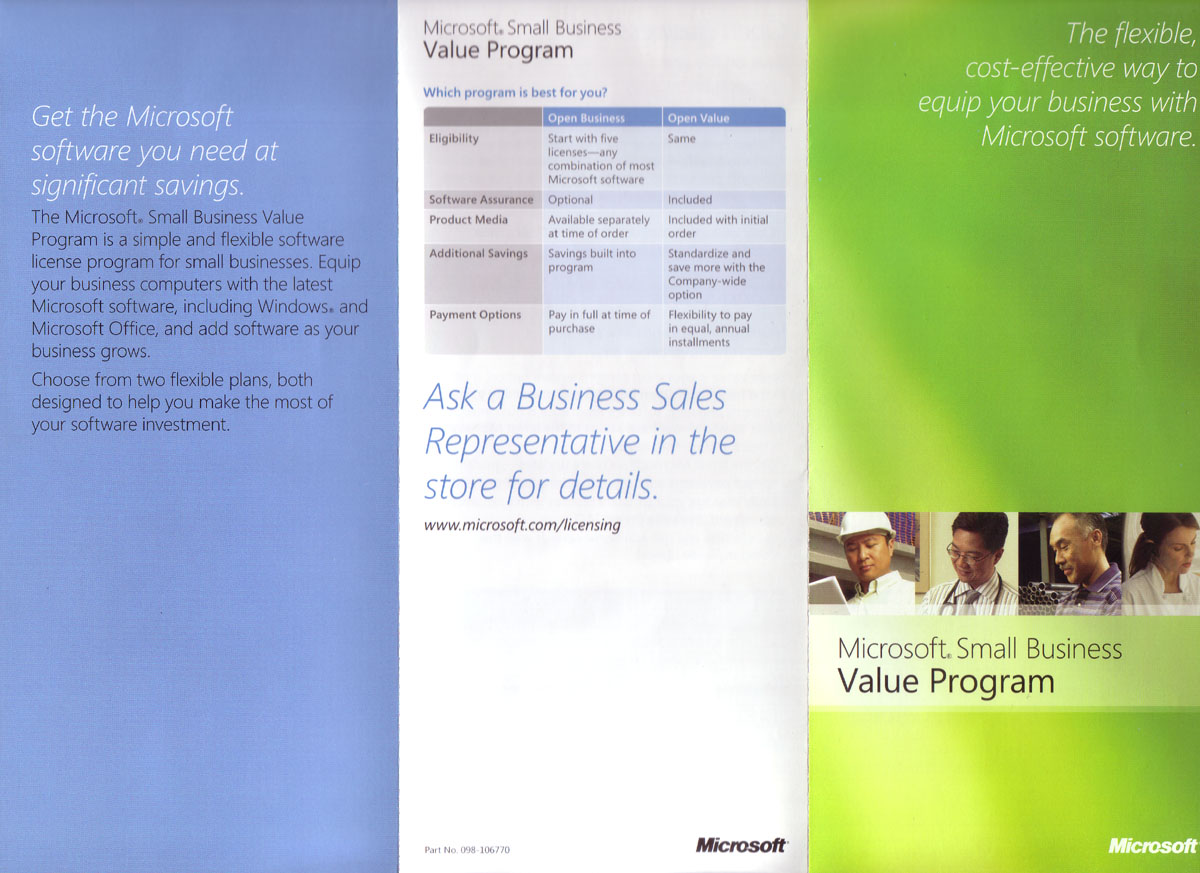
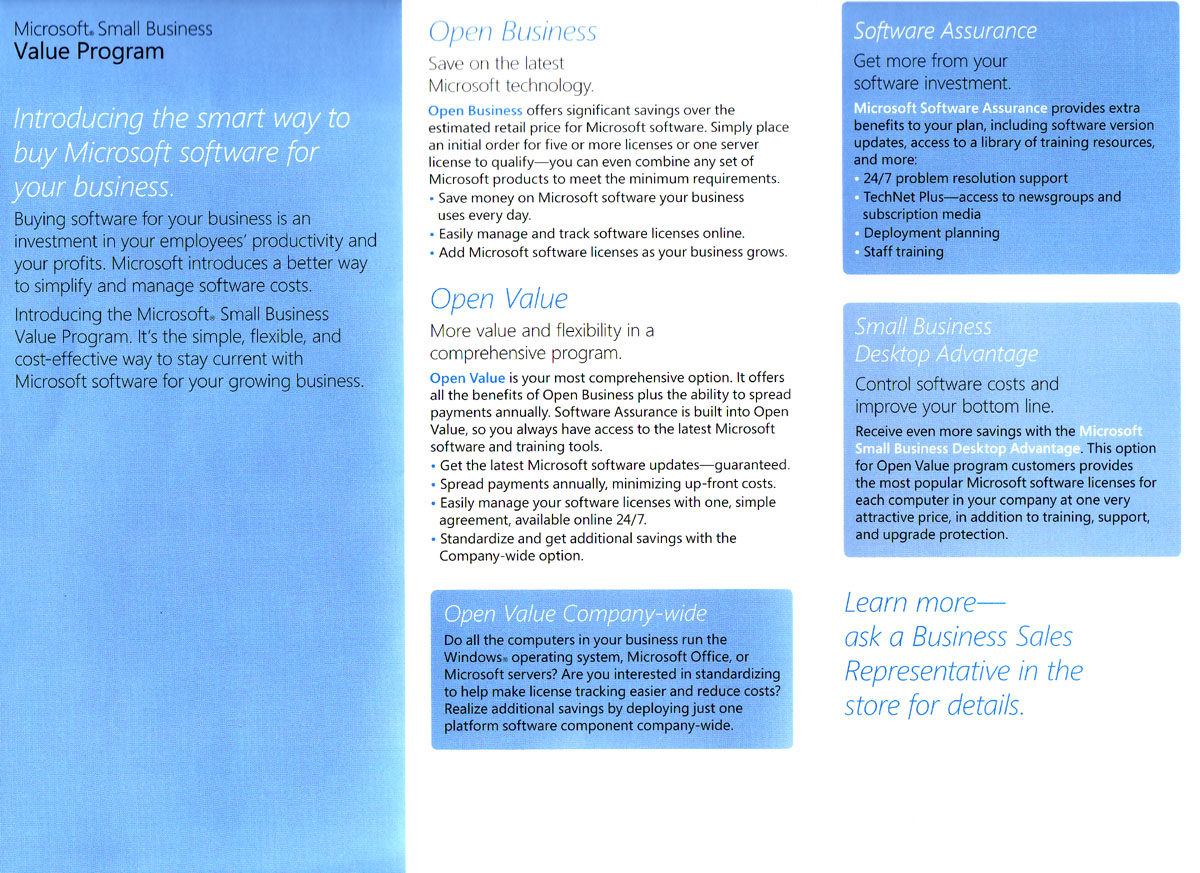
I mentioned the Jimmy Joe Bob launch that CompUSA had. The following is the flyer they had on the promotion that I figured might be helpful to some of you trying to position the marketing materials for the coming year around what Microsoft is doing with the Vista/Office/Exchange launch.

The front: (click to enlarge)

Vista-front

The back: (click to enlarge)

Vista-back

Personally I’ve found Eric Ligman’s marketing work to be more effective and in-line with the skeptical attitude most SMB owners take towards Microsoft licensing schemes but thats the beauty of marketing, not everything appeals to everyone equally.

Adding Software Assurance to Gifts

Microsoft
4 Comments

‘Tis the season for giving and donating and one thing every Microsoft Partner is sure to have on hands is a bulk of software that they are not going to be using. I have a few copies of SBS, Small Business Accounting, Windows and Office that I will be donating to charities and the one thing that recently came up was “How do I add Software Assurance to a gift?”

Considering that Microsoft Vista and Office 2007 are right around the corner this is perhaps the best advice you can share with your charity. It comes courtesy of Eric Ligman:

I am assuming you are referring to Retail Boxed product that you received from Microsoft through a Promotion or some other form of give-away, correct? If so, they answer is, “yes, you can add Software Assurance to that product within 90 days of it being given to the client.” The way you would do this is to invoice the customer for the software at a $0.00 price or any arbitrary number you and the client agree to. By doing this, this establishes the transfer of the software to the client and thus provides them with a purchase date to enable their 90 day window for adding Software Assurance. I hope that helps.

Another place to remember when dealing with non-profits is TechSoup.

CompUSA “launches” Vista for Business

Vista
1 Comment

Southpark101-771689Last month Microsoft and CompUSA announced a joint effort to launch Vista under Volume Licensing. A misleading headline “CompUSA to Offer Early Sales of Vista” drew a lot of heat from VARs and consultants that went into the traditional anticompetitive manpile and shouted South Park’s “they took r jobs!” slogan as it appeared that retailers would once again get a competitive edge.

And man did they make the most out of this advantage. CompUSA created a launch that would make Jimmy Joe Bob’s Bait & Computer Shop proud. Talk about style points! They dragged out the finest lunch table from the break room, put that 26pt Times New Roman on some flourescent paper, covered it with some Microsoft trifolds and voila

IMAGE_00051

I am sorry about the blurry shot, I just couldn’t hold the camera steady enough as I laughed at this launch. At least they kept it real “Vista – Slightly more popular than our CompUSA branded CD Jewel Cases”

At least they didn’t squirt this one..

Overheating for Dummies

Gadgets
2 Comments

Untitled document

You can consider this a public service announcement or at the very least an attempt to introduce you to the wonderful world of thermal compounds. I am writing this because I had a talk with my wife earlier today and she mentioned how many warranty problems her employer has had with Dell systems overheating. The IT person she spoke to didn’t know what Arctic Silver was so I figured it had to be covered. Ankle deep water, you’ve been warned.

The Processor

19-103-023-02To the left is the computer processor, the CPU. This little beast can run over hundred degrees F and is perhaps the most sensitive (and generally the most expensive) component of your PC. This is what Intel has spent billions of dollars on in seemingly worthless commercials featuring the Blue Man Group. What they sell is the silicon assembly to the left. I’ve selected the one from AMD as you can tell.

The Heatsink

35-166-035-02The heatsink, or the heatsink assembly, is a collection of devices that help spread the heat generated by the operation of the processor over a greater surface. As you can tell from the processor above, the surface area is quite small so even fanning that surface is usually a futile attempt. Without a heatsink to spread the surface area and a fan to flow the air through the system the processor would overheat and burn.

Now the bottom of your heatsink generally comes with a thermal transfer compound. This compound melts and bonds with the processor to create a cohesive thermal transfer from the processors surface with the collective surface of the heatsink. This can go on into the laws of thermodynamics and considering I got a B in college physics I don’t really want to shame myself again. Just take my word on this, the greater the surface the more room for heat to spread thus the overall lower temperature at any given spot on the processor. 

The Problem

The problem with overheating systems is generally that of the thermal compound. Over time the thermal paste that your computer maker managed to shave 0.0003 cents off by bying a cheaper mix will lead to the less effective heat transfer from the processor to the heatsink assembly. The less effective the heat transfer gets, the warmer the processor gets and the warmer the surrounding area gets. As the system runs warmer other components start heating up and… well, back to the thermodynamics. In simple terms: “can you smell something? it smells like someone burned a plastic fork.”

There are many programs out there that will give you an idea of how hot your system is running. One of the best (and free) is the SiSoft Sandra and it can tell you just how hot your system is. Nearly all modern boards have sensors that report back in realtime how things are going. The more load you put on your processor the warmer it gets so you can test your temperature at the low load (from the BIOS for example) or at full blast while playing that new FPS game. So lets assume you find out your processor is running hot (70 degrees Celsius for example) – what to do, what to do?

The Process

The solution is simple: Buy a quality thermal compound. We use Arctic Silver 5 and Arctic Silver Ceramique.

If your computer is up and running: You have two options, either run your computer under high utilization for a while (give it a whole bunch of benchmark tests and let it run em for 10 minutes) or disassemble the PC and melt the current thermal compound by hand. Either way, unless you’re a girly man you should not be putting in a significant force to separate the heatsink assembly from the processor – if you are odds are that you’ll end up ripping your processor out of its socket. Or you haven’t disconnected the heatsink assembly from the motherboard – in which case you’ll be ripping out the motherboard from the case. Either mistake will yield hilarious results so please take a moment to RTFM before you do this. You want to separate the heatsink assembly from the processor. Then you want to clean off both the processor and the heatsink of any thermal residue (usually gray stuff) which can be done with simple rubbing alcohol. There is something more sophisticated you can use but I never have and don’t quite remember what its called. Just whatever you do, don’t take the screwdriver to it. If you’re chipping this paste off the processor in the same way people engraved tablets… you’re heading in the wrong direction.

35-166-035-03If you’re assembling the brand new PC – just strip out the ghetto cheap compond from the bottom of your new heatsink. You can do so with a razor and finish off with an alcohol cleanup. It really is quite simple.

35-100-009-01The installation? Very very simple. Just drip one grain (very little tiny dot) of thermal compound onto the top of the chip, set the heatsink back on, rock it a little bit and secure the assembly. Don’t worry about painting it edge to edge, or trying to level it off. It’s not a cake to be frosted, it is a thermal compound that assures the place with the most heat generated (directly above the processor’s core) has the best bonding to the heatsink assembly.

The cost

The cost is surprisingly low. The picture above shows the Arctic Silver Ceramique which you can get from NewEgg for $5. This tube will cover 20 processors at least so you’re not talking about a significant amount of money at all. Not to mention the fact that its not even close to what a shipping charge would be if you had to ship that Dell back to them to take a look at or to your neighborhood IT shop.

So there you have it – one $5 tube and a weekend project can put a whole new life into your PC and give it a lot more room to breathe. I’m done with suggestive puns, hope you give this a shot. Proper thermal management of your PC is not something that just gamers and overclockers do, many big IT firms (such as mine) do this to reduce cooling costs and it turns into millions of dollars worth of savings. I’m not suggesting you go out and buy a $300 liquid cooling system, just a $5 tube of thermal compound.

Read more about this on the web, check your temperature and if you’re in any way responsible for computers and are learning about this for the first time…. Maaaaaaaaan. Smack. 

Update 1: It didn’t take a long time to get a bunch of questions on this one.

How do I melt it by hand?

Point the fan directly at the heatsink (“the metal looking part”) and run it for a few minutes until it becomes hot. If it starts turning orange you’ve gone too far. Basically keep it going but don’t let it heat until you burn yourself! DO NOT run the heat at high and do not point it at the motherboard – your goal here isn’t to melt the surrounding components, it is to heat up the heatsink so that the thermal compound will lose grip from the processor.

Does this work on server processors?

Yep, works on all sorts of processors even on video cards.

Define “hot”…

Difficult subjective question. Generally for Pentium 4 processors temperature over 60 at semi-idle speeds is a lot. The Northwood core runs a lot cooler than the Prescott core. Intel Core 2 Duo’s are in the similar ballpark. Basically, expect it to idle in 40’s and heat up through 50’s under heavy load. Athlon AMD 64 processors are a few degrees less than that, in my experience at least 10 degrees.. I don’t offer/extend advice on performance metrics so try hitting the overclocker boards and find out what they claim as their “stock” temperatures (that is, the temperature reached by the retail processor with the stock/enclosed/included heatsink/thermal pad).  

Keep em coming…