

So Howard emails me yesterday about a problem he’s been trying to figure out. His Outlook Web Access 2007 on the Exchange 2007 installation suddenly stopped working. Nothing changed 🙂
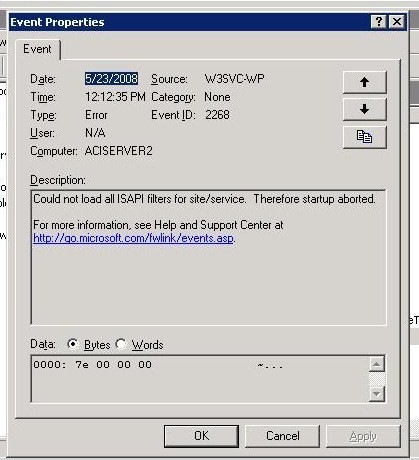
There are many reasons why Outlook Web Access 2007 will give you the “Service Unavailable” error message, mostly because the mail/public databases are not running, something you will be able to quickly determine from the Event Viewer. However, this one was slightly different. This event viewer generated the following error message, with event code 2268:
Event ID: 2268
Raw Event ID : 2268
Record Nr. : 3746
Source: W3SVC-WP
Category: None
Type : Error
Machine : ACISERVER2
Description:
Could not load all ISAPI filters for site/service. Therefore startup aborted.Event ID: 2274
Raw Event ID : 2274
Record Nr. : 3745
Source: W3SVC-WP
Category: None
Type : Error
Machine : ACISERVER2
Description:
ISAPI Filter ‘C:\WINDOWS\Microsoft.NET\Framework\v2.0.50727\aspnet_filter.dll’ could not be loaded due to a configuration problem. The current configuration only supports loading images built for a AMD64 processor architecture. The data field contains the error number. To learn more about this issue, including how to troubleshooting this kind of processor architecture mismatch error, see http://go.microsoft.com/fwlink/?LinkId=29349.
Confirm it, restart IIS and you will see the following error:
Basically, you (or the software you were installing) switched your IIS site where OWA is installed into either a 32bit mode or ASP.NET 1.1. Since Exchange 2007 Outlook Web Access 2007 only runs on ASP.NET 2.0 in 64bit mode, you need to fix it back.
First, disable the 32bit mode for your web site. By default OWA goes into the Default Web Site context (0) so the following will take care of that:
cscript C:\inetpub\adminscripts\adsutil.vbs SET W3SVC/AppPools/Enable32bitAppOnWin64 0
Second, register ASP.NET 2.0 as the default framework for that web site:
C:\Windows\Microsoft.NET\Framework64\v2.0.50727>
aspnet_regiis.exe -i
Start installing ASP.NET (2.0.50727).
……………………………….
Finished installing ASP.NET (2.0.50727)
Restart IIS and you should be all set.
Remember, you have to be careful with third party software deployments and IIS on the 64bit platform. Before you do your rollouts create the web site for it, put it in its own worker group. If you allow it to do its own deployment it will usually go into the Default Web Site, DefaultAppPool and you’ll be reading this blog post again. Also remember that just because the software says it’s 64bit it doesn’t mean all the components of it (like web control panels) are 64bit as well.
In this case, it was Symantec AV that did it.
Also, I write technical articles on weekends so that Damian Leibaschoff can score a few hours of overtime. Time to give brother a raise…
Pingback: Vlad Mazek - Vladville Blog » Blog Archive » How do you work this thing?
Pingback: Vlad Mazek - Vladville Blog » Blog Archive » Here you go..
Pingback: asp errors owa framework « JC’s Blog-O-Gibberish