

Some of the new software we are building at Own Web Now manages it’s own password complexity, sometimes much to the chagrin of the default policies built into Windows Server 2008. You’ve heard about Security By Obscurity, so get ready for the new model: Security by presenting GPOs where you would expect to see them, just disabled and uneditable, forcing you to go modify them in a completely different place – Security By Ambiguity. Where does one modify the local security policy in Windows Server 2008?
Local Security Policy used to be managed through Administrative Tools >Local Security Policy. Things like minimum and maximum password age, minimum length, complexity and so on were tweakable under that console. In Windows Server 2008, those screens are still there but you have no way to edit them:
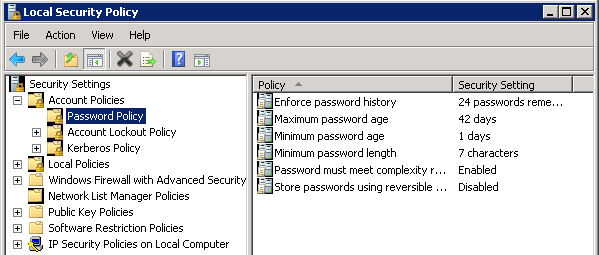
So, how does one disable all this stuff in Windows Server 2008 because the external application is intended to manage it (and you presumably do not want your policies to break because they override some of Microsoft’s?):
Start > Run > gpmc.msc
This is the Group Policy Management Editor, nifty tool that used to be optional with Windows Server 2003 and XP (free download) is now the way to manage your security policies.
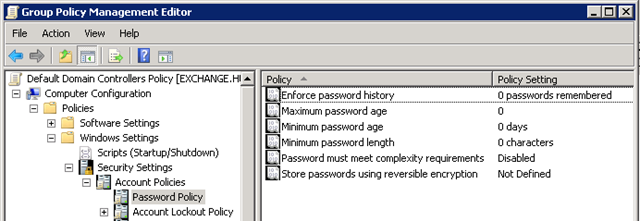
Computer Configuration > Policies > Windows Settings > Security Settings > Account Policies
Warning: The security policy outlined above is pretty much suicidal if you don’t enforce password policies through a different tool. Here is a brief description of the Microsoft password policy requirements.
So why did we disable it? Because we wrote our own software to manage the policies, which has the same complexity as Microsoft’s recommendations, but we found that Microsoft will at times even deem it’s own default password policy not to be strong enough, introducing inconsistencies that we were not willing to risk support expenses to narrow down.
Another bad security lesson brought to you by Vladville.
 For the less coherent, more grammatically correct realtime insight, follow me on Twitter at
Pingback: topwebbusinesses » Blog Archive » Windows Server 2008 & Domain Security Policy