ExchangeDefender Updates: So this is what its like to work on Microsoft Vista?

IT Business
6 Comments

Yesterday I had a pleasure of hanging out with half a dozen of our customers and at some point I got the Vista treatment:

We really love your product, but the file rules blow.

This is Vlad’s version of UAC. ExchangeDefender filters based on content type (tnef expanded Outlook attachments widely used in the exploit land), content name (things ending up in .bmp) and a few hundred other manual checks. Here is the problem. Microsoft’s .bmp, .pif, .scr and so on are widely used to propagate trojans, worms, etc. Users are stupid. So although Bob the sysadmin wants to get a zip file that has codebase or executable content inside of it, we cannot allow that to go through because then the user gets the message such as:

Dear Quickbooks User,

Attached is an archive with the software upgrade for Quickbooks. Double click on the zip file and launch the setup.exe program.

Sincerely,

Intuit Security

And, well… poof. They are 0wn3d. So one of the really useful features ExchangeDefender allows for is managed security – we sit on top of major infosec lists and watch for exploited extensions / filetypes. We look at our internal reporting and constantly program in attack patterns, etc. But every now and then we get this:

My user didn’t get my email because I inserted my .bmp signature. I don’t care its dangerous, works everywhere else, I demand you drop down the entire site security.

I need to get these files. I don’t care about security.

I am sick and tired of you blocking all the useful stuff. Open it up.

But after sitting around yesterday and listening to the feedback, I understand that ExchangeDefender may at times be more of a nuisance than a beneficial security layer. If it causes you more overhead and you’re willing to compromise your security (and set your own tradeoff level) I am willing to make that compromise.

And since I don’t work for the blue badge of inefficiency, I would like to let you know that we have worked overnight and that this feature is available in ExchangeDefender right now. How’s that for a major feature deployment in under 20 hours?  And no, this is not something we have been working on for years, this is something I started cranking on at 4AM and it’s functional against my domains now.

    • Provide your own extension blocklist
    • Provide your own filetype blocklist
    • Provide your own malware preferences (block, reject, bounce, forward, redirect, disarm, convert-to-text)

No pretty GUI right now, but if you’re banging your head and the users are screaming because they cannot get mail from point A to point B I can get this going for you today. The infrastructure is very granular, it can be implemented against a domain, email address and supports full RegExp (though if you don’t know how to write regexp this will absolutely break your mail delivery) and is implemented as an eval against an evenlope recipient (rcpt to) first and then inline second (“To: “). Want it today, drop me an email. GUI will follow by the end of Q3, we’re redesigning the way GUI works to begin with.

How to learn Exchange?

Exchange
2 Comments

Every now and then we get an onslaught of newbies coming into the SBS world and trying to learn about Exchange. Unfortunately, they try to learn in the exact opposite way than the way Exchange is supposed to be deployed. Notice the word deployed, not installed. You install Office, you tweak around ribbons, clippies, chm files and you eventually figure it out. If you don’t, you clear the profile and try again.

Servers are different folks. There is a lot of planning involved. You need to learn. You need to consider the things below the surface before you start your building. That means understanding infrastructure. Understanding topology. Understanding permissions. Understanding protocols.

Understanding is not something we are born with. It takes education, layer upon layer of core competencies, experience good and bad. No matter how much Microsoft lies to you, these are not attainable in a day. No, you can’t get them from a two week boot camp and four letter acronyms do not equate to a competency. So where does one even start?

First, read about Exchange deployment, configuration, troubleshooting, etc. There are many great books, most of which you could read online in the comfort of your laptop from safari.com for $15 a month.
http://safari.oreilly.com/

Get familiar with Exchange team and ongoing developments:
http://blogs.technet.com/exchange

Find out how the SBS team is integrating it:
http://blogs.technet.com/sbs
and troubleshooting it:
http://blogs.technet.com/petergal

Look at a number of great SBS books.

Finally, go to TechNet virtual labs to get hands-on experience with Exchange:
http://www.microsoft.com/technet/traincert/virtuallab/exchange.mspx

For the most part, Exchange is a solid product that breaks very quickly with a hacked-up network (dynamic DNS, port blocking, high latency) so trying to learn against those odds will be very frustrating. I have customers that spend their entire days banging their head against the wall with Exchange problems that have nothing to do with Exchange and everything to do with the connection and topology. You will save yourself a lot of time and your clients a lot of productivity if you went through the resources above instead of tzo/dyndns/etc.

Microsoft Re-releases MS06-025 Patch

Security
1 Comment

Microsoft is releasing an update to the patch it provided earlier this month, vulnerability in Routing and Remote Access blah blah (911280) where blah blah means remotely exploitable, patch now. 

http://www.microsoft.com/technet/security/bulletin/MS06-025.mspx

Busy News Monday: To Q or Not to Q, Dude, you’re getting an AMD

Vladville
9 Comments

I’m wondering if it would be better to stick this into the upcoming Vladville Vlog or keep it in the blog for my partners but every week I find a lot of info that I don’t have any particular opinion on (though I do find it somewhat interesting). I tried doing this with Quick Vlad blog but I really don’t have the time/energy to run another blog. Anyhow, Monday was a big news day so here is what may have slipped through the cracks.

Dude, You’re so Qucked

So you’ve never heard of Motorola’s track record in making bad SmartPhones based on Windows OS? Whatever prompted you to make the stupid decision (shiny advertising, needed a new phone, but dude my m0to r0x!!!) get ready to join an army of unsatisfied Motorola Q owners.

AMD does Texas

Supposedly AMD <> Dell partnership is getting hotter and hotter. Makes you wonder if this is just a part of Dell realizing that AMD technology is better in certain circumstances or if they just figured they can make more money offering a wider range of products. Given that their moto was JIT for so many years and that the company is maturing.. who knows. One thing is for sure, this looks more and more like a guy bitter that his ex-girlfriend is dating again (Intel – Apple relationship)

Heading to WWPC?

Nobody has taken the $5 bet that SBS R2 launches at WWPC which probably means SBS MVPs know something we all don’t. So if you’re around on Monday at WWPC (the day before) check out the small biz event. If you’re getting to Boston late on Monday, Eric has a list of top 15 small business sessions at WWPC, along with an invitation to the yellow lounge. If you’re curious what a “chat” is think of a guy in front of a whiteboard with about a dozen people chatting.

New Digg

Digg is now v3. In summary, Digg == Slashdot++. New Digg == Old Digg + More Categories. It’s my homepage, there is no better place on the net to get a quicker grasp on whats going on in IT.

Get a free copy of SBA

Get a free copy of SBA 2006. I’ve got to hand it to them, they are working on SBA really hard. It must be a frustrating effort, working so hard on a product nobody uses or respects. I guess they are motivated at taking Quickbooks down from its pedestil but so far not a single person I’ve met has anything good to say about SBA 2006. It is interesting that the ones who half-like it complained about the lack of literature for the product — well, I was at B&N over the weekend and actually saw a book on Small Business Accounting! Microsoft Press, one of the entry titles, but its a start!

Publishing SharePoint to External SBS users

Tavis found a link to a whitepaper on Microsoft’s site covering the publishing of SharePoint on SBS to external users. While I would love to praise them for doing this… just whats the point? The appeal of SBS to the small business owner is the ability to configure the server without understanding the details – this document would scare them. Targeting an IT consultant? Ouch. Dear Business Owner, if your IT consultant is reading this printout to configure your server you need a more competent consultant.

Microsoft Shows off Unified Messaging

Microsoft, Mobility
Comments Off on Microsoft Shows off Unified Messaging

Untitled document

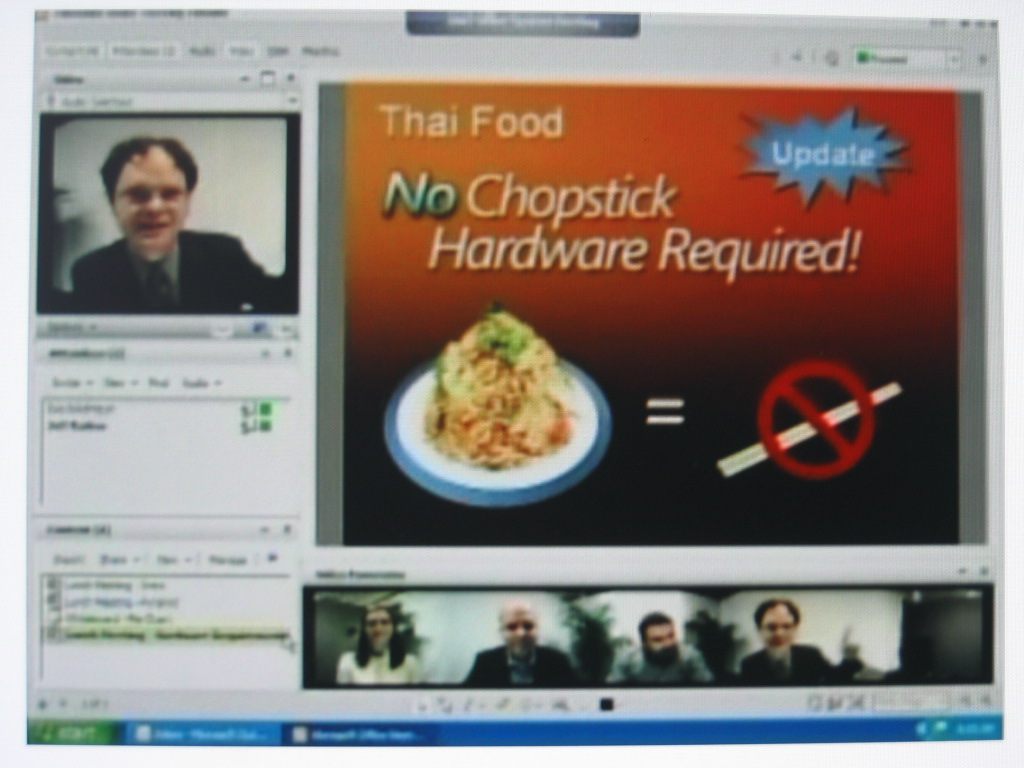
So I got the usual slew of “you’re selling out, man” from my Linux friends by saying my company is pushing Microsoft software. I’m sorry guys, but the world demands more – more than IRC and GAIM. No, those are not the same as what Microsoft is building, not by a long shot. Take a look at this video to see what Microsoft is doing for communications.

IMG_1853

Above is a demonstration of the new integration of LCS, Office and Unified Messaging. They are showing an integrated system of multiple presentations, multiple presenters and the camera that swings to the person that is actually talking or whose presentation is currently on the screen. Yes, they are working on something really important

But this kind of underscores just what Microsoft is working on and what is coming out. Yes the basics could be pulled off on Jabber, and Skype and eventually thrown together – but virtually anyone involved in software development will tell you that its cheaper to just buy than to sit around and reinvent the wheel over and over again. These will be expensive, thats for sure, but I for one don’t want to spend more time listening to screaming todlers on airplanes.

Has the Small Business Specialist Certification Failed?

Microsoft
17 Comments

There has been quite a bit in the community about the revised Microsoft Small Business Specialist certification exam 70–282. Why? The idiots are complaining that Microsoft made it too hard. As a Microsoft Certified Systems Engineer I can tell you that if you have even the slightest problem passing 70–282 you outright have no right to consult small business on their IT decisions. Plain and simple.

Today a friend of mine called with a question and, in finest Monthy Python tradition, reached abuse:

Ryan: Hey Vlad, can I pick your brain for a moment?

Vlad: Real quick, whats up?

Ryan: What would you suggest in terms of RAM for SBS running Virtual Server running Terminal Services? I just realized Virtual Server 2005 is free.

Vlad: 4 GB.

Ryan: Oh, ok.

Vlad: Yeah, might as well go all the way.

Ryan: I was thinking about perhaps using another board, so I can add more RAM later – 6 or 8GB?

Vlad: Ryan, How did you pass 70–282?

Now it is true that there are many people out there that passed 70–282 but have no reason, ever, to be near a server. You see examples of such in newsgroups every day. But does that invalidate the entire certification, Microsoft’s effort to build a recognizable branding for legitimate small business consultants, official training materials (books, webcasts, coursework, etc) and further promotion of those that pass? Absolutely not.

I get blamed for being hard on Microsoft but at the end of the day our business is promoting and selling Microsoft solutions – I try to beat them up when I see them making decisions that will negatively impact our customers. But you cannot blame the company or the program just because people are dishonest and cheat their way to certification. You cannot blame or look down on a certification just because some who choose to participate are dishonest. That only reflects poorly on those that cheat, not the program itself. Let’s not focus on the crimes of the few and instead look at the triumph of those who succeed with Small Business Specialist badge. Many, present company included, have been more successful with it than the Microsoft Certified Partner badge.

Getting around Verizon restrictions for OWA

Exchange
Comments Off on Getting around Verizon restrictions for OWA

Something interesting came over the newsgroups today, Verizon has started restricting inbound traffic to ports 80/443 to their customers on dynamic IP addresses. Now lets for a moment ignore the fact that running a server on a consumer level DSL / Cable connection is usually against the AUP/TOS (and will get your account closed) and focus on how to get around it for a really small business.

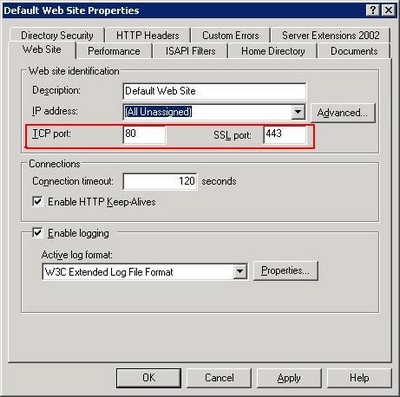
Let’s say you’re running SBS and are getting your mail using a POP3 connector. Let’s also say through some miracle all of that is working, how do you get around Verizon’s port restrictions? The quickest way is to simply change the port bindings for the Default Web Site by going to Start > Administrative Tools > Internet Information Server (IIS) Manager.

Open the Web Sites container, right click on Default Web Site and select properties. This is where Exchange’s Outlook Web Access files sit so if you change the ports it is accessible on you will be able to access your server remotely.

Exchangeports

For example, change the SSL port to 8433. Your OWA will now reside at https://server.domain.tld:8433/exchange – that 8433 is important, it tells the browser which port to access the server on. Of course, this is still a violation of your providers terms of service so it hopefully gets you by for a day or two while you transition to a full static IP address on business class DSL or Cable service. Good luck.

Eight Simple Rules To Avoiding Flamewars

IT Culture
Comments Off on Eight Simple Rules To Avoiding Flamewars

Untitled document

One of my friends posted this on a mailing list we frequent, reflecting the feeling that many people have towards mailing lists and the few that ruin the experience for everyone:


I am sick of this group turning into nothing more than debates about licensing and every Tom, Dick and Harry's interpretation of the EULA. A short period of time ago, people complained they didn't understand Microsoft licensing, now the room seems to be filled with experts.


But how do you have a good experience in an online community if there are just few people that often ruin the experience for everyone. Certainly, you can always order the group by thread and follow the topics you are really interested in but the people you cannot stand tend to be present on every thread, seemingly contributing nothing. This discourages others from participating, once they see the virtual beating the other sensible person took by bringing another angle to the conversation.


Here are eight simple rules to avoiding mailing list flamewars: 


1. Identify the idiots


This rule in particular applies to people that are lost on professional lists. They seek free help yet at every step reinforce their lack of understanding for the product or technology, yet still hope that the kindness of strangers pulls them through to the other side: "Oh, dear overlord of technical expertise, please carry this newb to the greatness and understanding, ever thankful, yours – The Dumbass"


Do not get into extended discussions with these. There are plenty of books, videos, classes, magazines, web sites and not to mention Google that could train them. What is worse is that 99.999% (scientific) of the time they have likely destroyed their computer to the point that even a forensic team could not put it together again.


Idiots should be ignored.


Cruel, yes, but lets consider the two alternatives that come from trying to help them. First, by attempting to help them you will receive an endless amount of guilt thrown your way and will be expected to help them bring their computer back to the defaults, along with all the personalized training they will ever need. There is nothing worse than trying to answer a question from someone who doesn't know what they are asking. Truth is, it is obvious they have no troubleshooting skills to begin with. Their initial troubleshooting, before they asked for help, could have broken 30 different things each of which could have caused it to "stop working" and you have an astronomic chance of helping them.


The second, and more dangerous result, is that the idiot problem brings down the conversation level of the entire group. This is why Orlando IT Pro has basic membership requirements, so that the conversations remain among professionals and not on the material that New Horizons could knock out in a week.


It is hard for the kind people to ignore idiots, so they try to help. Results are often far worse than the good they tried to provide. Look at rule #8.


2. Identify the worthless


As the age old saying goes "Opinions are like as**oles, everyone has one."


Same goes for ITPRO lists. Every list has their resident unemployed consultant who feels a need to tag on every thread and provide his computer science criticism based on his GED. There are exactly two criteria to determine whether someone's opinion requires a response: their knowledge and experience.


This tends to be a cornerstone of Linux user groups but is also growing on the Windows groups as well. You have a guy who in his entire live has not written a single line of code, yet jumps on every thread to criticize decisions of software developers. Same unincorporated hobbyist billing 3 hours a week also has the might to debate business decisions of a multi-billion dollar conglomerate.


The problem with arguing with the worthless? You will never be able to reason with them. That’s the beauty of having infinite spare time, they can write pages and pages of arguments without a bit of common sense. A long time ago one of my friends gave me an easy way to identify the worthless: "Organize by the posters name and look at who posts the most. If they have the time to do that chances are they do nothing else"


Look at rule #8.


3. Identify "passionate beyond reason"


Passionate beyond reason are easy to spot. They will jump into a discussion thread and throw a tantrum or an overly dramatic argument which to a casual observer has nothing to do with the topic at all.


There is no reason to ever respond to anything these individuals make. First of all, their responses will never challenge the discussion, facts or circumstances – they will challenge you. They are not looking for a differing point of view (similar to rule #4) they are simply retaliating against what differs from whatever causes their insanity.


It's like seeing crazy people on the street – just keep on walking and don't look make eye contact.


4. Identify "religiously devout"


"Religiously devout" (nothing to do with religion) are a special breed of "passionate beyond reason" that do not have the ability to convey their message with much dramatic effect. They have the core of opinions which they consider to be "the word of God" and nothing can ever disagree with that. Even if one word is in direct conflict with another, they have a way of reasoning around it, without common sense of course. Common examples:


Mac users.

Mutt/vi users.

Windows95 evangelists.


You cannot have a conversation with them. You cannot disagree with them. You cannot point out that they are wrong, no matter how much factual evidence you have against their argument. They are always right. They have the understanding of the world that you simply do not.


Take a look at rule #8.


Now that you know the four typical difficult personalities on mailing lists, here is how to avoid getting in trouble.


5. Steer clear of opinionated threads


One easy way is to make your contribution to the community on the facts alone. Facts that are documented, published and otherwise available for everyone to take a look at. Yes, #1-4 will certainly have their inner angle on all the facts but you can let them argue with the facts and not with you. Saves you time, wears out their keyboard.


Stay away from opinionated threads. It is easy to get dragged into a virtual conversation about the pointless, but you would never start one in real life. One way to bring life to a boring list is to constantly prod for an opinion on something that nobody has a strong enough of a feeling to carry on a discussion… except the individuals in #1-4. You can always get a crazy person to rant. Need the input of the uneducated, just ask – how can they be wrong with their guesses. Lonely and bored ALWAYS want to talk.


Stop. Stay away. Leave it.


6. Steer clear of undocumented "facts"


Great way to get in trouble on a mailing list is to start extended conversations over rumors, unsubstantiated quotes, grapevine and worthless opinions of people who obviously don't get out enough.


Do not go down to the level of #1-4.

"I think… I believe… I wish… I'm not sure, but…" are clear indications that the opinion does not warrant a reply, even further, does not deserve to be read completely to begin with.


This is a flame war bait by the devout, worthless and passionate. They are just looking for someone that’s dumb enough to disagree with them so they can pummel them with their righteous arguments. 


Great way to avoid being sucked into an argument is to never reply to a reply. Never engage in a conversation with the #1-4, no matter how much you disagree with them. You will not win, regardless how factually correct you are and how ridiculous they seem.


7. Forgive before you kill


Now that you know the personalities and their common traps, there are two ways to avoid them.


The simplest one is to consider what your response would be had you met this person face to face. If you started a passionate argument in the middle of the street and the other person obviously appeared crazy and clueless, you would walk away, wouldn't you? (if not, you're likely one of #1-4)


"Forgive before you kill" is simply an admission that you have nothing to gain from a fight that you do not need to fight. Let the insane person carry on and make an ass out of themselves in front of everyone, they do not need your help or fuel. Let them talk. Given enough mic time we can all say enough stupid things to lose everyone's respect. Let them do it, step back.


While it is always tempting to put the clueless into their place, remember that there is much more at play, far more than you can fix with a few quick facts to settle an argument. It is not your problem.


8. Use the blacklist, Luke.


Do you go into bars looking for a fight?

Do you go into a church with a burning cross?

Do you go through a rough neighborhood yelling racial slurs?

Do you stand around in traffic with a huge sign inciting others to be violent?


Then why in the world would you want to allow others to do that to you on your computer?


There is a wonderful feature in your mail client that allows you to keep #1-4 at bay:


Blacklist.

Ignore list.

Delete rules.


Most mailing list become very pleasurable when they are pruned of the few that are only present to cause trouble. Remember why you joined the list in the first place. To help. To get help. To discuss things with people going through the same things you are going through. To talk to your peers.


Always remember that there are real people behind these postings. They are not automated or randomly generated. There is a human being behind every word. Human beings have problems, sometimes serious ones. Humans tend to be shaped by their circumstances. Humans tend to have absolute feelings, cultural traits, strong biases. In real life, you can read whether those are a joke, sarcasm, or pure and utter insanity. Online you cannot. So stick to the safe side and keep your cool, avoid the fights you do not need to fight.


Vista Beta 5456 Hits Connect

Beta
Comments Off on Vista Beta 5456 Hits Connect

Beta software, suicidal only, yada yada yada.

Latest version of Vista beta (build 5456) is up on Connect. If you have no life and are reading my blog on Saturday ~9 PM EST you’ll be happy to know that. Also, in case you can’t do the math, it also helps to remember that most of Europe is asleep right now. So instead of hitting the USA mirror that most  will attack, aim for the European mirror to get the really beefy transfer rate. USA ~60 KB/sec with Europe kicking butt at 522 KB/sec  I installed the first really useful build of Vista at TechEd and promptly turned off UAP – according to the few that have been working on this latest build the UAP has really undergone a severe amount of changes to make it more appealing to the end user and still adequately protect them.

iPod Dominance is Over: Enter Sansa

Gadgets
Comments Off on iPod Dominance is Over: Enter Sansa

Untitled document

SansaI often get blamed for iPod purchases by people who listen to my podcast. After a while you just can’t remember to pack stuff into your PocketPC and as the more interesting stuff comes online in the audio form the more reasonable the investment in a portable music device becomes. I must admit that I’ve cringed at the number of iPods I’ve sold not simply because I hate the arrogant Mac users who think they are englightened but also because I have first hand experience with the awful quality of the iPod Mini that my fiance has. She is on replacement #2 or #3, stuck with iTunes and quite unhappy with it. The problem is that even given those downsides there was no comparably useful device that supported WMA and Plays for Sure and still appealed to the sight and to the touch. I’ve held back on this post for quite some time because I wanted to make sure that this doesn’t become yet another gadget in the drawer or a Best Buy return.

Sandisk Sansa E260 is the winner.

I’ve played with everything on the Microsoft side and until now everything has sucked. Either from the lack of features, poor design, poor sound quality or just poor all over. Who wants to carry around a brick that plays video (Creative Zen Vision M) – that 20 year old technology of portable television is available at your local flea market for $50.

This is different. Sansa costs around $180 for the 4GB version (cheaper than Mac Nano) and quite comparable in size. It has a rather intuitive interface and is far less prone to scratches than Mac Nano. Unlike Nano, you are not restricted to a single proprietary software or music store – you have a choice of going with Yahoo, Napster, Rhapsody, allofmp3.com  and more. This is important because you are not stuck paying $0.99 for one song after another, you just pay ~$15 a month and download as much as you want and the content is yours to use for as long as you keep your subscription. Sansa has a built in microphone so it can easilly function as a voice recorder, something Nano does not because Jobs is in bed with the recording industry and doesn’t want to allow people to record live concerts. Sansa also has a built-in FM radio tuner when you get bored of your mp3’s and want to listen to talk radio or get traffic updates. Sansa also works as a USB drive which means you can drag and drop files, pictures, music and anything else you want onto it. The USB interface is also the charger so you don’t need to keep a stack of batteries or carry around a cradle when you’re traveling. The battery is solid, 12–20 hours of playtime on a single charge.

And the killer feature – Video. Yes, this tiny device can play video. Even though it is as small and as light as Nano it does have a significatly bigger screen which allows you to play rocketboom on the device. The sound is spectacular. The video, likewise, is bareable but lets face it, you’re using this device to be entertained while doing other things, not to enjoy theatre-like movie performance. I’m starting video blogging later this month so this is what sold me on it, David Ciccione did an awesome video blog episode on this device and I got it just a few minutes later.

As for how I use it – first of all, all my music is directly ripped from CD’s so I simply moved my desktop library to the device and that was it. For podcasts and vlogs I use Yahoo Music Engine which keeps stuff up to date and syncs my Sansa with the desktop when its plugged in. Thats all there is to it.

So if you’ve got an iPod, throw it away and go get Sansa. You will not regret it.