SBS Podcasts To Listen To This Weekend

Uncategorized
3 Comments

Two big podcast shows on SBS are happening this week. First the folks from the Microsoft SBS Support Team are doing another podcast tomorrow, BUT at a new time: 1 PM Central – You can call in, ask a question, comment, etc. Its pretty cool, they even have new audio equipment so if they all learn to lean forward towards the mic it will be another great show. If you have never heard of it, their show is quite technical and they cover SBS news in depth, product support issues (they all work as top SBS support) so they know about stuff before it hits these Yahoo groups. Its a good training opportunity and its entertaining so if you’re driving around tomorrow at 1PM CST call (866) 500-6738 and enter participant code 5362361. If thats not a good time for you, these are podcasts (or icecasts) that can be downloaded to your MP3 player or your desktop – so you can listen to them at any time. SBS Support Podcast runs for about an hour:
Blog: http://blogs.technet.com/sbs/
Podcast RSS: http://sbspod.libsyn.com/rss

On the other end of the spectrum you’ve got our SBS Show podcast which is very elementary and targeted at small business owners, small business specialists / consultants and the SBSer crowd in general. We’re not as technical but we guilt community and successful business leaders into coming on the show and talking about what they do. Last week we talked to Susanne Dansey and Amy Luby about community initiatives and JJ Antequino about TS2 events. This weekend we’re doing something more serious — we’re talking with Karl Palachuk about disaster recovery and dialing down my partners in South Florida that got beaten up by Hurricane Wilma. Sort of the real world thing. We record on the weekends (when I can get everyone on the phone at the same time) but take phone calls all week long at (407) 965-2945. We have over 4,000 downloads so far with just two shows so there is something to it despite the no really high tech talk.
Blog: http://www.sbsshow.com
Podcast RSS: http://www.vladville.com/sbsshow/podcast.xml

These two podcasts are really a good use of your time, I promise. I may be biased, but the feedback on these podcasts has been awesome so far, so if you haven’t listened to one yet you really should.

Download SBS Show #2:
http://www.vladville.com/sbsshow/sbsshow-episode2.mp3

Download Official SBS Support Podcast (Inside SBS) #6:
http://libsyn.com/media/sbspod/10282005insidesbs.mp3

Exchange Team got a new Intern: New Exchange Tools

Uncategorized
1 Comment

Either they got a new intern or someone had a very productive month. There are new (or updated) tools for Exchange available and there goes my weekend. I think of particular interest to a lot of you would be the performance troubleshooting tool as I can’t count the number of times I’ve had to walk people through setting up counters by hand to find bottlenecks. The second one on the list would be the Jet Stress tool, especially for you folks looking to bump up your SBS/Exchange Standard stores to 75GB (please, for the love of god, don’t go all the way up to 75GB..30, 40, 50 – its configurable you know.) More on all this when I get a chance to play with them, in the meantime get your download on!

Exchange Server Management Pack for MOM 2005
The Exchange Server Management Pack includes rules and scripts to track performance, availability, and reliability of Exchange components, such as Internet-related services, Extensible Storage Engine, System Attendant, Microsoft Exchange Information Store service, and SMTP.
This management pack not only validates the availability of communication services but also sends test e-mail to verify operations and measures actual delivery times.
The Exchange Management Pack Configuration Wizard provides a graphical user interface to configure Exchange 2000 and Exchange 2003 Management Packs, including test mailboxes, message tracking, and monitoring services.
The Exchange Server Management Pack Guide for MOM 2005 explains how to use the Exchange Management Pack to monitor and maintain messaging resources. You can download the management pack guide from the Microsoft Web site

Exchange Server Public Folder DAV-based Administration Tool
Use the Exchange Server Public Folder Distributed Authoring and Versioning (DAV)-based Administration tool (PFDAVAdmin) to perform various management tasks related to public folders and mailboxes. The tool checks the permissions status of each public and mailbox folder and corrects any problems found. The ability to bulk export/import the permissions and replica lists make this tool invaluable in achieving greater productivity in managing public folders. The program can also reports content information of each public folder and mailbox folder such as the number of items in each folder, size of folder and most recent modification date of any item in the folder.

Exchange Server Management Pack Configuration Wizard
Provides a graphical user interface to configure Exchange 2000 and Exchange 2003 Management Pack, including test mailboxes, message tracking, and monitoring services.

Exchange Server Jetstress Tool
Use Jetstress to verify the performance and stability of a disk subsystem prior to putting an Exchange server into production. Jetstress helps verify disk performance by simulating Exchange disk Input/Output (I/O) load. Specifically, Jetstress simulates the Exchange database and log file loads produced by a specific number of users. You use Performance Monitor, Event Viewer, and ESEUTIL in conjunction with Jetstress to verify that your disk subsystem meets or exceeds the performance criteria you establish. After a successful completion of the Jetstress Disk Performance and Stress Tests in a non-production environment, you will have ensured that your Exchange 2003 disk subsystem is adequately sized (in terms of performance criteria you establish) for the user count and user profiles you have established. It is highly recommended that the Jetstress user read through the tool documentation before using the tool.

Exchange Server Performance Troubleshooting Analyzer Tool v1.0
The Exchange Server Performance Troubleshooting Analyzer programmatically collects configuration data, performance counters and live tracing information from an Exchange server. The tool analyzes each subsystem to determine individual bottlenecks, then aggregates the information to provide root cause analysis.

Exchange Server Disaster Recovery Analyzer Tool v1.0
The Exchange Server Disaster Recovery Analyzer programmatically collects configuration data and header information from databases and transaction log files. The tool analyzes all headers and creates a detailed list of instructions explaining what the problem is, and how to resolve it.

Exchange Server Best Practices Analyzer Tool v2.5
The Exchange Server Best Practices Analyzer programmatically collects settings and values from data repositories such as Active Directory, registry, metabase and performance monitor. Once collected, a set of comprehensive ‘best practice’ rules are applied to the topology.
Administrators running this tool will get a detailed report listing the recommendations that can be made to the environment to achieve greater performance, scalability and uptime.

Live.com and Office Live: By George, I think she’s got it

Uncategorized
12 Comments

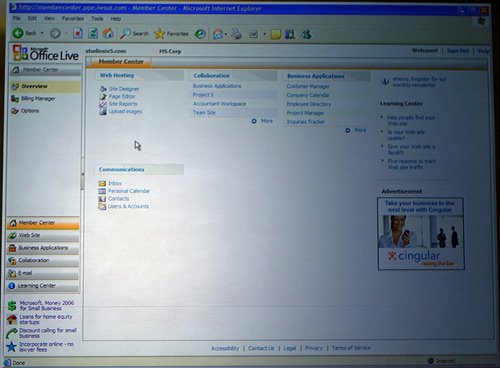
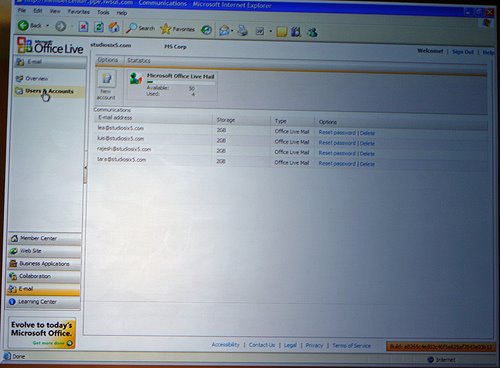
So I closed last nights editorial post asking “Are we really looking at the first signs that MSN is starting to get it? and looking at the broadcast and the screenshots I have to say that I think they have. What you’re about to see is a series of screenshots of Office and Live.com which Microsoft considers their new “application hosting” approach. It is basically bCentral and start.com meshed together with AJAX with the familiar look and feel of the Microsoft Office tools. Except, it is light, fast and web based and they even mention that they are working on Firefox (for those of you not reading between the lines, its not about Firefox support, it is about multi-platform support – they can sell this thing to a Mac user, Linux guru even cell phones — no sync, no software to install – anywhere!) Take a look (click to enlarge) at the screenshots to your right, they are courtesy of neowin.net.

Main Screen

It looks like a pretty complete dashboard starting with the Web Site (site designer, page editor, site statistics even file management), Collaboration (smells like SharePoint to me – business applications, accountant workspace, team website), Business Applications (Customer manager, company calendar, employee directory, project manager, inquiries tracker) and Communications (inbox, calendar, contacts). The most important part of the screSo lets take a look at it (screenshot on the right) — It appears everything a small business needs is at hand here: Web hosting (with built in site designer, page editor, site statistics and fileen is that they also figured out how to (tastefully) include advertising relevant to small business. So not only will they be drawing subscription revenues from this, they will be bringing in the advertising and having yet another way to hit the small business owner with their software – “Web page too restrictive, save a few $$ on Microsoft Money 2006 for Small Business.” This is exactly the kind of a thing that phpGroupWare has been working on for years but never quite hit home with the interface.

Buddy List
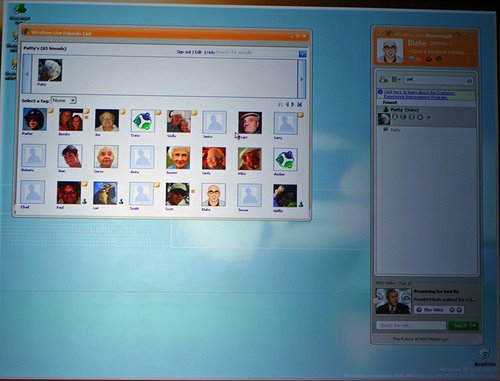
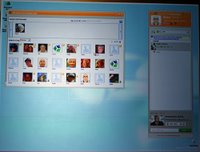
They embedded MSN messenger in this, something that has been in beta for quite some time. Again, the appeal here is that you can open this from anywhere and be instantly present for anybody on your buddy list. Would you rather get 10 IM’s all at once or 10 phone calls all at once, with 10 people asking you how you’re doing, whats new and then after wasting a minute or two of your life on politeness they actually get to the beef of what they need? Well, this is designed for a small business, for busy people and reduces the management problem of having to install, manage and upgrade software. Upgrade being the big word here, small business is generally not savvy at managing their software – this is a web page. A rapidly deployable (and infinitely customizeable and changeable) web page that MSN can tweak at any time and not worry about extensive platform testing, distributing the patch, waiting for people to upgrade, handling technical issues. It’s all AJAX, it all runs off their IIS.
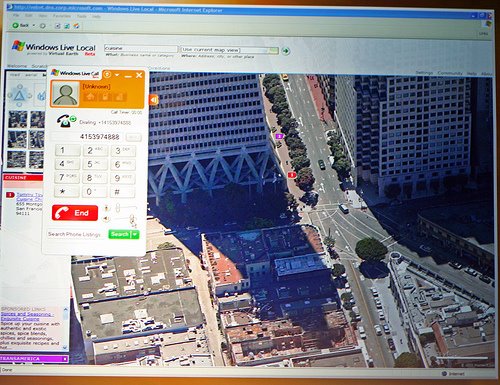
So its just a web page? What about a map and a phone?The web page is the interface, but it is not just flat boring HTML. Check out the screenshot to the right, this is the Windows Live Local view, where the person tried to find a restaurant — they got a satellite map of where the restaurant is and and at a click of a mouse they were put into a VoIP session dialing that business. This (although far more elementary) exists in Windows Mobile 5, where you can click on a phone number in a web search and it will automatically dial it. But getting a map, VoIP session and everything at your hands is a big sell.

What else is there?
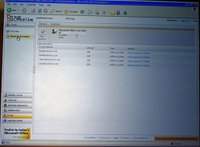
Well, it looks like its a pretty dynamic on-the-go Office for small business. Saves your RSS feeds, saves your Internet Explorer favourites, integrates a virus scan and computer optimization tools and if it integrated your desktop screen saver it could make for a really portable desktop. I have to admit, I hate hotmail very passionately. But I like this, I want this. It is so simple, so elegant, so.. mobile. I run a hosting business and I don’t see this as a big threat at all, this is a great thing to give to a small business owner who just wants to run his or her business without any complexity. There is such a thing as good enough in small business and I think this gets it.
Now, how does this go up against Google?
Well, it would have to be free. Tough chance of that one happening, especially with accounting and web site hosting — how do you offer free web site hosting with relevant advertising keywords sending that businesses customers to someone else? But a basic subset of this could be free, plastered with advertising ala-Yahoo on every screen, email and IM you write. But to steal a line from my comments section – “They seem to have taken a page out of Google’s book” and in my humble opinion, they made it prettier. It’s simple, its pretty and it makes money. Should Microsoft make it free? Don’t make me quote 2 Live Crew here. This will be the new small business desktop. If it is, why would anybody go to Google to search? Its right there, on every page. Google search is better than MSN Search, but if they come for the applications they won’t go to Google for anything else because you can’t underestimate the convenience.

This looks pretty good, I must say. No wonder Lewis Lin left SBS for this. 😉

So what is Microsoft Live?

Uncategorized
3 Comments

I’m not the only one scratching my head over this one regarding the news that Microsoft is entering the software as a service paradigm. You can see what they are planning over at Micorosft live.com and Office Live.

There has been a lot of speculation lately over what the Microsoft’s “hosting” approach would be and it looks a lot different than what a lot of us imagined. It appears to be a complete change of direction from Microsoft’s traditional focus on cash cows and instead embraces AJAX. Among the cool things are the web based virus scanner, ability to store IE favourites online so they can be accessed anywhere, and all-around Microsoft portal. To be honest, it looks a lot more like Apple’s .mac idea of storing some functionality online (webmail, file sharing, etc) – its very interesting. Either Microsoft is brilliant and they figured out that simplicity and utility are the key to their online success without bloated overfeatured applications… or they are commiting virtual suicide by ignoring the very core of what makes them a dominant vendor. Only time will tell, in the meantime, here is the marketing take:

There are multiple Office Live offerings. Office Live Basics helps a small business establish an online Internet presence including a domain name, a Web site with 30 MB of storage and five Web e-mail accounts at no charge through an advertising-supported model. Office Live also provides a set of subscription-based services with more than 20 business applications to help automate daily business tasks such as project management, sales and collateral management, customer management, expense reports, time and billing management, and secure internal and external collaboration. Built on Windows SharePoint® Services, these applications can be customized and extended to specific customer needs by an extensive Microsoft partner ecosystem.

Obviously everyone expected a hosted Microsoft Exchange, Microsoft Live Communication Server and a tie-in with presence. Instead, it is Microsoft’s online properties tied into a cohesive, accessible light-weight platform that is, pardon me while I sip some koolade, on par or better than what Google has to offer. In particular, try adding an RSS feed to your live.com page – you’ll see something that looks like text advertising. Are we really looking at the first signs that MSN is starting to get it?

Exchange 2003 SP2 and ContentFilter container and UCEArchive folder

Uncategorized
4 Comments

One of the most frequent questions I have received over the past two weeks of Exchange 2003 SP2’s existance on this planet has been regarding IMF and a brief note in the Exchange 2003 SP2 release notes: “Do I have to create the ContentFilter container?” Just to be clear, here is the part from the release notes that everyone is referencing:

Because Intelligent Message Filter is included in Exchange Server 2003 SP2, it is no longer an add-on and, therefore, a container must be created within Active Directory® directory service as follows:

Cn=UCE Content Filter,cn=Message Delivery,cn=Global Settings,cn=cn=Microsoft Exchange,cn=Services,cn=configuration,dc=

So do you need it? Well, here is the skinny: Most likely not. I have put this procedure through all of my test platforms, all of my SBS boxes and I went from a virgin to SP2 and from SBS 2003 SP1 with Exchange 2003 SP1 to Exchange 2003 SP2 and the answer still seems to be no. I cannot, in all my tests, get IMF of Exchange to mulfunction without this container. As a matter of fact, the Exchange 2003 SP2 setup does not create this container if IMF does not exist. Furthermore, on Exchange 2003 SP1 with IMF that has been upgraded to SP2 (IMF uninstalled of course) there are no modifications made to the ContentFilter folder or any of its settings.

Remember that you need to uninstall IMF before you proceed with Exchange 2003 SP2 installation. But if you did not have IMF installed in the first place, you will get it with Exchange 2003 SP2. You do have to enable IMF by hand (by default it is disabled) but it will work fine without it at least on SBS 2003.

Should I create the UceArchive folder?

The answer to this one is no as well. If you have enabled IMF on Exchange 2003 SP2 and set the spam to be Archived this folder will be created when the first piece of SPAM is received by Exchange. This UceArchive folder is created in (assuming you are using the C: for Exchange):

C:\Program Files\Exchsrvr\Mailroot\vsi 1\UceArchive

Hope that answers some of the questions that have come up. As per our podcast on Exchange 2003 SP2 you need to evaluate SP2 carefully and roll it out once you are happy with what it has to offer. Remember that this patch is irreversible, so there is no “uninstall” short of full restore.

SBS Show Podcast #2 – Its a small IT World

Uncategorized
15 Comments


This show is all about the small business technology communities that can help you get better as an SBSer, it pro, technician, salesman or that guy stuck with running a server in the small business. Travel the world of information from the comfort of your chair, we talk about SBS groups, sites, blogs and mailing lists for every interest.

In addition to Chris Rue, today I’m joined by Amy Luby (Mobitech) and Susanne Dansey (Readycrest) who add a touch of class to the show. Collectively, we manage to offend everyone from Estonia to Australia, hope you enjoy it. We also had the first phone call-in from JJ Antequino (MS-TS2) who talked about Microsoft TS2 and presenter involvement in the community. Topics discussed:

– SBS / SMB partner groups (sbsgroups.com)
SBSBPI in United Kingdom with Susanne Dansey (readycrest.co.uk)
– Managed Services Group with Amy Luby (mobitechonline.com)
– Microsoft Small Business Channel (mssmallbiz.com)
TS2community.com by JJ Antequino
– SBS Pope (Susan Bradley, msmvps.com) and other Blogs
– Various communities on Yahoo, MSN, Microsoft.Public and PSS
– Funny find of the week: The Nascar Laptop

Download SBS Show #2

BlackBerry 8700c: Yes, its your fault.

Uncategorized
9 Comments


The first glimpse of the next BlackBerry 8700c device is out and there are some big news behind it, namely: “Look for RIM to become the next company to blame its demise on the success of Microsoft.”

No, this is not Deja vu, this is another example of a company with an excellent product not recognizing its competition and sticking firmly on its ground without a bit of innovation. Yes, that may work great if you’re making staplers, but if you’re in the business of making gadgets for the corporate America you better add some of the features they are asking. Yes, mobile email is great, RIM, koodos on that. But guess what, a $10 cell phone can now get mobile email and instant messaging and pictures and sms and ringtones and… well, you’ve got the same brick with poor voice from 2000 except you added a color screen. Congratulations, the museum of obsolescene is on the right.

Perhaps thats a harsh evaluation of the situation with BlackBerry, but not everyone can be Apple. You cannot sit still while your competitors are blowing you out of the water and ride out your virtual monopoly on name alone. It is no secret that virtually everyone you see out there with a Blackberry also has another cell phone on them to make phone calls. They walk around with their mobile email gadget and their cell phone – so when they go back to the phone store and ask to see whats new — will they get another brick or will they get a PocketPC or SmartPhone that can do what BlackBerry does (and better) and only have to carry a single device? I guess time will tell, but I’m taking out my BlackBerry showel.

AOL IM’s sdbot worm downloads worms

Uncategorized
2 Comments

According to a post from Neowin there is a new ring at AOL: “Ding – you’ve got rootkits!”; Just a reminder that EVERYTHING connected to the Internet needs to have anti-virus, anti-spam protection. Just because “that computer over there, oh it never gets used, lets not worry about security there” doesn’t get used until your daughter visits the office (famous Cisco commercial where his daughter nukes the network by installing a game) doesn’t mean you can let it just slide.

So if you did get hit by the AIM worm, its time to download some free AV software and free antispyware package or more for that system.

SMB2: ln -s /Unix1980s /Vista

Uncategorized
1 Comment

I hope you got the dig from the subject line, Microsoft is innovating symbolic linking into Windows Vista. This means you can link different objects without the presence of .lnk files – which helps on file shares when you want to quickly bounce people to the other directory instead of a readme pointer. Despite being very overdue, I’m glad to see this innovated into Vista. Now get to work on MSH!

In Vista/Longhorn server, the file system (NTFS) will start supporting a new filesystem object (examples of existing filesystem objects are files, folders etc.). This new object is a symbolic link. Think of a symbolic link as a pointer to another file system object (it can be a file, folder, shortcut or another symbolic link). So then you ask how is that different from a short-cut (the .lnk file)? Well, a shortcut will only work when used from within the Windows shell, it is a construct of the shell, and other apps don’t understand short-cuts. To other apps, short-cuts look just like a file. With symbolic links, this concept is taken and is implemented within the file system. Apps when they open a symbolic link will now open the target by default (i.e. what the link points to), unless they explicitly ask for the symbolic link itself to be opened. Note symbolic links are an NTFS feature.

Now why is this relevant to the SMB2 protocol? This is because, for symbolic links to behave correctly, they should be interpreted on the client side of a file sharing protocol (otherwise this can lead to security holes). SMB2 understands the concept of symbolic links and evaluates the links on the client. This is the support that is added in SMB2.

Inside SBS Podcast #6

Uncategorized
1 Comment

Its out, get it while its hot! Here is what they talked about:

  • Damian joins the podcast (that’s Spanish for “yes”)
  • CRM 3.0 Beta is out (link)
  • MOM on SBS?
  • Audiovox SMT5600 with Activesync, mobility, certs, and everything
  • Weekly cricketcast
  • Susan Bradley asks about repartitioning domain controllers
  • ISA 14709’s due to disk performance issues
  • SharePoint alerts not working
  • When you’re done here, check out the podcast at http://www.vladville.com
  • Exchange SP2 new Public Folder Permissions Wizard

They even gave me a plug so you know its worth the download. As a matter of fact, the new audio hardware they got is awesome and it sounds great, beats our $20 setup. Check it out.