AntiMacFanboism as a Religion

Apple
7 Comments

Dave asks in my WHS Unplugfest post if hating Mac’s is a religious bigotry:

Why are you turning your nose at something that a) works and b) does what you want. That’s religious bias…

He is right. AntiMacFanboism is a religious decision but I think it has more merit than the MacFanBoism where hordes of people line up for no reason at all to buy a device just because of its design. When confronted, they always compare their current Apple Experience with the crashing and blue screens of Windows 98. Yes, “It Just Works” because you have no choice but to run anything but the Apple software and when you try the other options they crash just as ugly as they do on Windows.

My AntiMacFanboism stems from tying software to their overpriced hardware and trying to lock content down to their software. No ability to legally use Mac OS X on a system that can hold 4-6 hard drives in a single chasis with my choice of RAID controller makes MacOS X absolutely useless to me. I don’t buy music on iTunes because I cannot move those songs to other devices. That, IMHO, is moving backwards, not forwards. It doesn’t matter how pretty your device is if you can’t swap the extra battery on your own on a long trip.

I’m not saying that Apple hasn’t done a great job of creating the baseline applications that most people use and dumbed them down to the core so that anyone can be immediately productive without problems — what I am saying is that everyone I know that exists even an inch off that computer newbie level is virtualizing Windows on top of their Mac anyhow. So what’s the logic there, pay for an overpriced Apple device and virtualize Vista/XP just because Vista/XP didn’t perform marvelously on your underpriced/underpowered Dell?

It’s not like I’m a naive Mac basher, I have two Mac’s in my office and use it every day, so far, nobody has been able to clearly and eloquently demonstrate to me that Mac is better on equivalent hardware.

It’s all the huge gaping unreasonable holes in what Apple delivers that really hold me back from taking them seriously as a platform. At the end of the day, they are both trash. For example, “just works” doesn’t apply to our Apple G4 iMac in the front office. It came without a wireless card so we bought a third party one from Dlink. It blows. It’s unstable. The iMac is visually stunning, but it’s CD no longer works. It has spots on the screen.

See, it goes both ways. Both are broken. AntiMacFanboism side is just more affordable, more versatile and on the OS merits alone more relevant since most of the other religion virtualizes out religion to begin with.

What are you using for your home media storage?

Windows Home Server
15 Comments

Long weekend is upon us, it’s computer project time.

With Windows Home Server out of picture and unplugged I’m left to search for something more reliable. What is popular out there? I’d prefer it have some sort of an Xbox connectivity to it but am not that picky if it doesn’t.

So far I have checked out LinuxMCE, XBMC for Linux and a few others but so far XBMC seems to be the boss. Just gorgeous. There is of course just installing a copy of Vista Ultimate but that seems too ungeeky.

My requirements – ability to store system backups, pictures / slideshows, remote access to pictures and video and the ability to be easily backed up for offsite/secure storage. Oh, and not corrupting files on a file server, that would be just fantastic.

(if you say Mac Mini, so help me god, I will hunt you down and kill you)

Is the addiction to pornography a genetically dominant trait?

Misc
1 Comment

So the other night Tim and I were hanging out watching the NBA playoffs and bringing Lucy Exchange online and my wife walked in on the following scene:

IMG_3312

So, is the addiction to pornography a genetically dominant trait? It would appear so.

I’ve got 29 years on the kid and I’ve only progressed as far as getting rid of the diaper. It’s not as if that is some huge plus to begin with.

The look on my wifes face when she realized we’ve made another copy of me…. priceless.

Demotivators

Awesome
Comments Off on Demotivators

  Had a hard day… hard day that got fixed by a Hurricane. Phew. Here is something to brighten up your day in return:

Handler_045

For my buddy Dave:

Handler_012

And of course, who can miss out on the pride of the Blue & Orange:

Handler_077

Ta na na na na…. Go Gators.. Bzzt.

Make something idiot-proof…

Security
5 Comments

… and they will build a better idiot.

Honestly, there are days when I feel like people do things with my software just to dick with me. For years we didn’t enforce password complexity on ExchangeDefender, ergo 99.999% of the passwords at ExchangeDefender are “password”, “Password”, “Password1”, “P@55w0rd“, “P@ssw0rd“, “password123”, “1qa2ws” or “2ws3ed” and can be cracked by a three year old.

So I set out to write a password complexity procedure the other day, enforcing the standard MCSE complexity: at least 7 in length with the mix of three of the four options: lowercase char, uppercase char, integer, special character. So today I power on my laptop to see just how complex the passwords being generated are, thinking that people are starting to use passphrases, etc.

What I found made me scream out “Fuuuuuuuuuuuuuuuccckkk me, WHY!?$!@#” out loud. The password?

Abcd1234

Why, for the love of god, would anyone do that? Did they just look at the new password complexity alert and thought…

“Screw Vlad. What is the LEAST complex password I can come up with given the current restraints. Let’s see… how do I make this work… something everyone uses…. something sequential… start it at the beginning of that sequence. Oh, and I’ll capitalize the A for take that complexity Vlad, you Asshole.”

Thanks… whoever that was (anonymously logged)… I think my next method will check for password complexity and instead of throwing an alert or UAC or any of that annoying stuff that they can live with I will shoot back a 4096/1024bit key as their new password. “Dear Customer, The password you requested did not meet our password complexity requirements. Here is a 4096 char password to use from now on.”

Or sell them AuthAnvil….

I just don’t get it. Why spend all this money on perimeter security and protect it with a sequential password that can be guessed by a 3 year old?

The importance of corporate culture

IT Business
4 Comments

Read this article earlier today and it just blew my mind. It talks about the importance of corporate culture, values and giving your customers a reliable feeling when they work with your company:

So when Zappos hires new employees, it provides a four-week training period that immerses them in the company’s strategy, culture, and obsession with customers. People get paid their full salary during this period.

After a week or so in this immersive experience, though, it’s time for what Zappos calls “The Offer.” The fast-growing company, which works hard to recruit people to join, says to its newest employees: “If you quit today, we will pay you for the amount of time you’ve worked, plus we will offer you a $1,000 bonus.” Zappos actually bribes its new employees to quit!

Why? Because if you’re willing to take the company up on the offer, you obviously don’t have the sense of commitment they are looking for. It’s hard to describe the level of energy in the Zappos culture—which means, by definition, it’s not for everybody. Zappos wants to learn if there’s a bad fit between what makes the organization tick and what makes individual employees tick—and it’s willing to pay to learn sooner rather than later. (About ten percent of new call-center employees take the money and run.)

We work in the exact opposite way – raise or fire – within 90 days, and I have to admit that the above does look better. My primary Office Space problem in growing OWN is that the experience is definitely not consistent because there is a personality tradeoff in hiring – I can hire someone social or someone technically savvy, but we generally don’t find both, so we have hordes of people that likely go home and work on their roadkill taxidermy projects for all I know. IT customer is not exactly the “people person” nurturing system, 99% of the time you’re dealing with some asshole who also gets kept in a dark, moist basement rarely exposed to sunlight much less people.

Wonder what it takes to raise socially presentable IT employees?

So much for mobile broadband

Mobility
1 Comment

Seems like Nextel-Sprint just keeps on finding ways to tie more stones around its ankles as it sinks further and further into the ocean of companies not to work with. Betanews is talking about Sprint’s upcoming implementation of a 5GB cap, effectively killing any sort of mobile multimedia experience you may have dreamed of in the future. This is not particularly bothersome today because the state of 3G networks in USA can at times rival the speeds of modems in the late 90’s… You have to try damn hard to get 5GB of data transferred over a 3G card.

So, why is Sprint going to do this? Why are they implementing a software cap that 99% of the customer base cannot hit today? Because WiMAX 4G networks that are getting built right now make all sorts of media things possible, and when WiFi can replace your broadband cable/DSL connection Sprint does not want to have to deal with the issues of network caps, bandwidth throttling, crippling applications and then some.

Establish the precedent early is the name of the game.

Ironic, this being announced on a day that Roku announces the Netflix device, allowing you to get this $100 box and play 100,000 movies from your Netflix subscription for $9 a month.

What we are seeing here is a ton of people all of which want a cut not off the services they deliver, but from the companies actually making money. It’s like me going out to my ExchangeDefender customer, all pissed off that they are making more money than me, and asking them for some extra money! Except the people asking are government organizations (State tax revenues from Internet sales), phone and television companies (free phone calls, free TV) and the list goes on.

What I hope someone points out is that the growth everyone is seeing is due to the things being open and as more interesting things show up online more people part with their hard earned money for the service – a scenario in which everyone makes more money. But as the greater fool theory crashes with the first participant trying to change the rules of the game to capture higher percentage of the transactions, their growth goes away. In this case, Sprint wants to make its network more profitable, but in doing so it will sacrifice any opportunity to grow. 3G is still a premium service, and premium services don’t succeed if you’re indistinguishable from the alternatives yet crippled….

Exchange 2007 & Outlook 2007 OST Corruptions

Exchange
9 Comments

Exchange 2007 and Outlook 2007 using cached-mode is one of the most powerful marriages in the business software space. But like most marriages, it can be tough when the partners aren’t working together, or when one of them is having a secret affair with a particular spindle in your RAID set. As the Outlook gains weight and starts cheating with the RAID set more and more, things tend to break. Then you find out. Every time you try to see your kids, the Outlook 2007 tells you that she can’t let you see them because you were a bastard that didn’t take care of her (OST size) or the house (computer) and she will not let you see your kids until you start showing some responsibility, fix the house (defrag) and spend some more time with her (scanpst/scanost).

In all honesty, finding your Outlook OST, corruption the first thing in the morning can be very frustrating. Depending on the size of your OST, you might be waiting for hours for the scan to complete and your mailbox to be restored to its working state.

But what do the users generally get upset the most at? It’s that they feel helpless and can’t figure out how to fix their OST/PST. If it’s a frequently experienced problem, why is it not automatic? Vlad to the rescue.

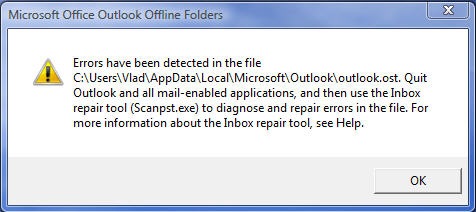
First, you will now you’re in for a scanost journey when you get the following screen:

Microsoft Office Outlook Offline Folders

Errors have been detected in the file … Quit Outlook and all mail-enabled applications, and then use the Inbox repair tool (Scanost.exe) to diagnose and repair errors in the file. For more information about the Inbox repair tool, see Help.

ost2 

The complaint is that there is no link to Scanpst.exe. Doing a file search on Vista also turns nothing up. Psst, here is a little secret:

On Vista x64:

C:\Program Files (x86)\Microsoft Office\Office12\SCANpst.exe

On Vista x32:

C:\Program Files\Microsoft Office\Office12\SCANpst.exe

Here is the thing. Before you close out Outlook it will prompt you to locate your set of folders. You can either write down the file location in the error notification above, or you can just go to the next screen “Offline Folder File Settings” and copy the contents of the File section.

On a default Vista system, my OST is:

C:\Users\Vlad\AppData\Local\Microsoft\Outlook\outlook.ost

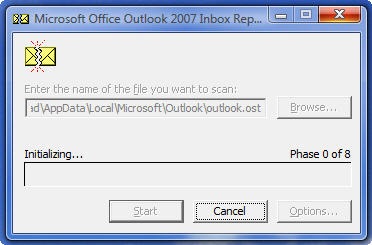
Obviously replace Vlad with whatever your username is. Now, start Scanpst.exe, select your mailbox and let it work.

Youtube….

ost1


This may be a great time to catch up on that Star Wars trilogy you’ve been meaning to watch off Youtube because this process will take forever. Or, if you’re lucky enough to have Exchange 2007 it’s time to fall in love with Outlook Web Access 2007.

Monkey Superpowers

Shockey Monkey
7 Comments

This one is going to be filthy… You’ve been warned.

The blog post I wrote earlier today really made me think.. What “ability to work on multitask” really means. Apparently it means I suck at multitasking, at least judging by ability to write a blog title and proofread it at the same time. I originally titled it “What ability to work on multiple tasks really means” but that spanned two lines so I decided to change it to “What ability to multitask really means” or so I thought. Two college degrees folks, if that doesn’t prove the value of higher education I don’t know what will.

But it does bring me to an interesting point. We work on a lot of things throughout the day. All of them urgent… to someone. Service delivery is a double-edged sword. You have to work towards the resolution as fast as possible while still keeping the client informed about what’s going on. Those are not complimentary tasks, I can either fix the problem or write to you about it. Which would you rather? I can write a blog post, I can put an announcement in Shockey Monkey, and if messed up bad enough we’re  sure to see support requests from the people that read as well as I write blog posts.

So earlier tonight I took the laptop to the bathroom and decided to make some magic.

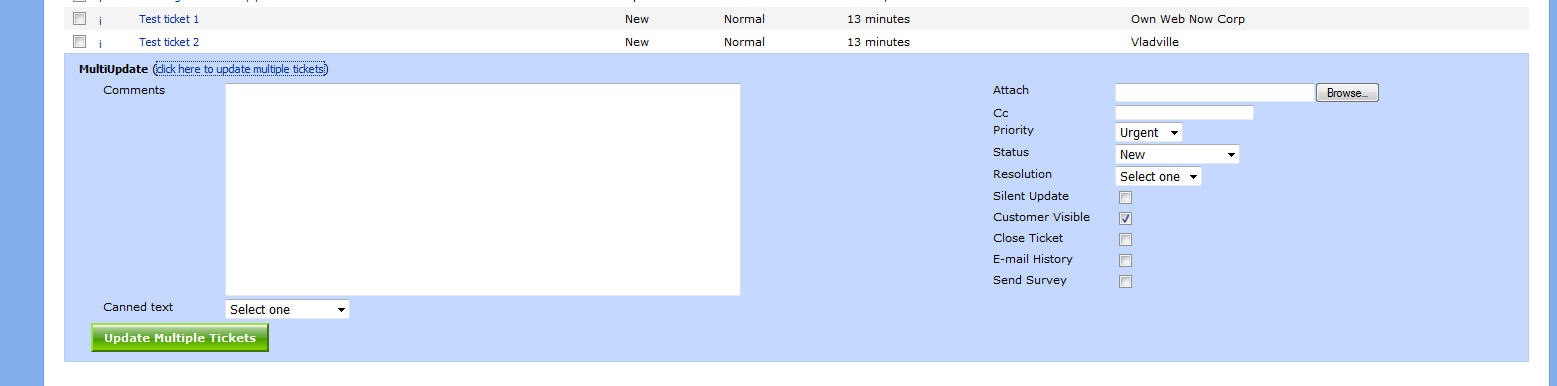
I also wrote some code. Below is the result (of both actions) the first Shockey Monkey Slimy Vendor SuperPower (SMSVSP): MultiUpdate.

multiupdate

Above is the Shockey Monkey portal for Own Web Now. We’ll just assume that OWN rocks and has only two open support requests. 🙂

Show of hands – how many times have you come out of a meeting, or woke up from an afternoon nap just to see a bunch of support requests waiting for you? Wouldn’t it be nice to be slimy and just update  all those tickets  and say something like “I’m on it, I’ll have it fixed in a jiffy” even if you were just about to go back to your nap or another meeting? Effortless deception, baby.

Maybe you’re not a scumbag.. Maybe something just blew up and you’re working on it but as you’re rolling along you get 50 tickets opened up in the space of 10 minutes that it took you to gain control of the server. Wouldn’t it be nice to be able to update all those  tickets that just piled on without opening a single one? That’s what MultiUpdate enables you to do! Usage is dead simple too.

Click on “click here to update multiple tickets” text at the bottom of the ticket listing section. A new container will slide into the view allowing you to type in your update, including all your canned responses. You can also use the full power of SM ticket update functions – change status/priority/resolution, include attachments, cc the update to someone else, send a survey, you name it!

multiupdate1

Click the nasty green button at the bottom and watch in awe as you deliver exceptional service and status update to your client base in a prompt, detailed manner with a personal touch… as far as they know 🙂

It will be our little secret.

Psst, this ships in 1.99.04 this weekend. If this doesn’t shave some serious time off your day-to-day ops I don’t know what will.

Exchange 2007 & POP3 Access

Exchange
1 Comment

Exchange 2007 features a built in POP3 server but by default it is off and will not accept plain text connections. Good luck telling that to a difficult customer who wants to send his password in clear text over the Internet just because the Apple store told him so.

By default, going to port 110 and trying pain text user/pass dialog will yield the following error:

“-ERR Command is not valid in this state”

To enable plain text login drop down to PowerShell and issue the following command:

Set-PopSettings -LoginType PlainTextLogin

Then make sure to restart Microsoft Exchange POP3 service:

Restart-Service -service msExchangePOP3

As far as how to enable POP3 service on Exchange 2007, here is some more PowerShell magic:

Set-service msExchangePOP3 -startuptype automatic

Start-service -service msExchangePOP3